

Want Push Email On Your iPhone? No Problem

Well, kind of. How 'bout your email application checking every 5 minutes instead of the minimum 15 minutes? Want it faster? How about 2 minutes? That's what we've been able to figure out with the help of Arminius2. In this simple step-by-step guide you'll be on your way to fake push email heaven! That BlackBerry is looking worse and worse... Full instructions with pictures after the jump!
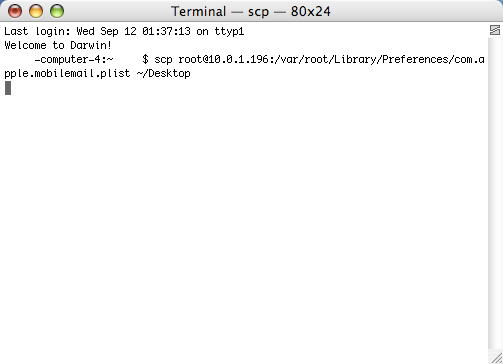
First, you'll need ssh installed on your iPhone. We use Terminal, but this method will work for anyone using a SFTP client. You want to copy the com.apple.mobilemail.plist to your computer. Be aware that in order for this to work, you will have to have auto-fetch on already and not set on manual. The .plist is located in /var/root/Library/Preferences/
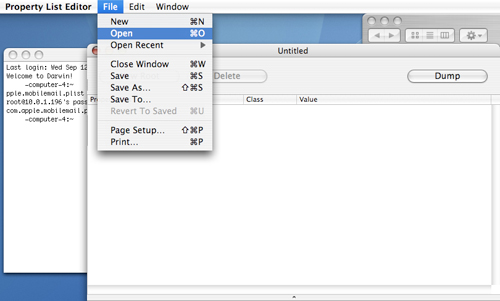
Once the .plist is copied to your computer, you'll need to use a Property List Editor (.plist) to edit the file.

In the .plist you will see the "AutoFetchInterval" at the top. Simply double-click this value.

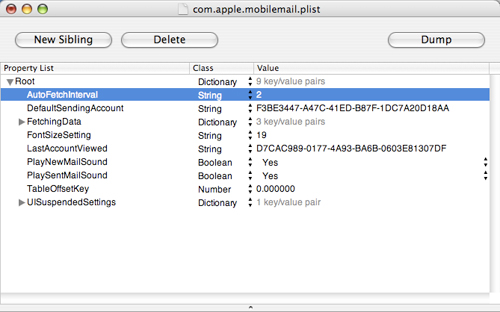
Then, just change the value to anything you want. It could be 10 minutes, 8 minutes, 1 minute — you get the idea!

Then all you have to do is replace the existing file on the iPhone with your edited .plist. That's it! You're so hip you can feel it!
Quick note: this will remain active on your iPhone and you should experience no issues but, there is a but. If you go into Settings/Mail on the iPhone, it will reset the .plist and your changes will be lost. You can feel free to go into Settings and change anything else, just don't go into the Mail section or this will be undone. That's it! Let us know how it works for you. We got ours set to 2 minutes and don't notice a big drop in battery life, if any!