

5 Essential Mac Apps You Should Always Install First

You've just unboxed your new Mac and find that Apple has included a handful of first-party apps to get you started. That includes its in-house browser Safari, Preview for viewing PDF files and images, Notes for note-taking, iMovie for editing videos, Pages and Numbers for office work, and more. But while Apple's apps are handy in different scenarios, they aren't enough to meet all your needs. Besides, you might also want certain apps that may do the same things as some of the pre-installed apps, but better.
So you'll naturally have to visit the App Store or search the web for different types of apps for various use cases. Whether you're new to the macOS ecosystem or not, you should always install these essential apps on your Mac first. This list includes handy utility apps that will make your life easier, along with full-on power tools that will supercharge your productivity on macOS.
Raycast
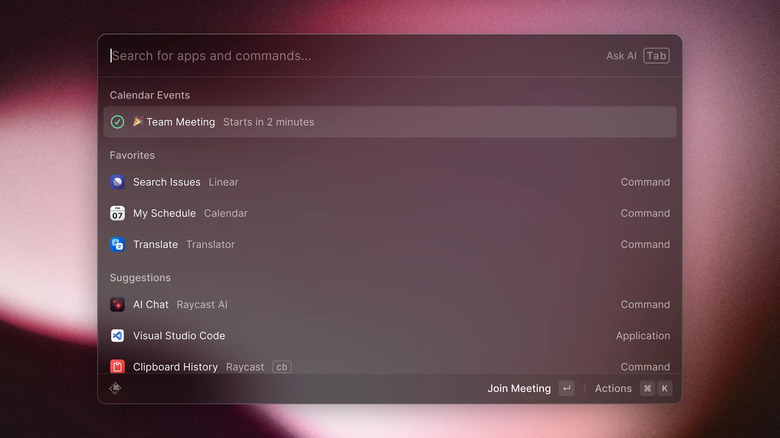
Raycast is a powerful app that everyone needs on a Mac, both for productivity and ease of navigation. The app is natively built for Mac, and it packs a ton of functionality out of the box. Aside from its features, what makes it stand out is that you can use all of the app's functionality with just your keyboard. First, it includes a clipboard history, which comes in handy if you need to copy and reuse certain text. Second, there's a window management tool that you can use to easily manage multiple windows on your Mac. The app has built-in commands to help you organize your windows and even resize them without touching your touchpad. It also has search functionality that acts as a replacement for Spotlight, which can sometimes be unreliable.
Other handy features include Snippets to store your frequently used text, Focus for blocking distractions, Notes for jotting down information, and Quicklinks for accessing frequently visited web pages. Raycast also includes a store that you can use to download different extensions that work with apps like Asana and Jira. With the Jira extension, for example, you can create an issue and even change its status from Raycast's interface. You can download Raycast for free, but you'll have to pay if you need its full capabilities.
Notion

Notion is a note-taking app that uses a block-based editor for writing and editing. The app makes taking notes easy with its commands that can be accessed by typing a forward slash (/). If you prefer Markdown, the editor has built-in support as well. Notion makes information organization easy with pages and blocks, and thus can be used as an all-in-one place for all your notes, regardless of whether you work or study. Additionally, it includes databases that build on top of pages, which can be helpful if you need a way to view related information in one place, such as tasks for a given project. The app also has other features, like formulas, and can be integrated with other tools, such as Google Drive.
Notion supports offline editing, so you don't need an internet connection to take notes. When you want to get started on any page, you can use one of the many templates provided by Notion and its community of users instead of fiddling with the interface to create your own. Notion has a free plan for basic use that should be enough for most. However, you can get the individual Plus plan for $12/month ($120/year), which includes features like unlimited file uploads.
DaisyDisk
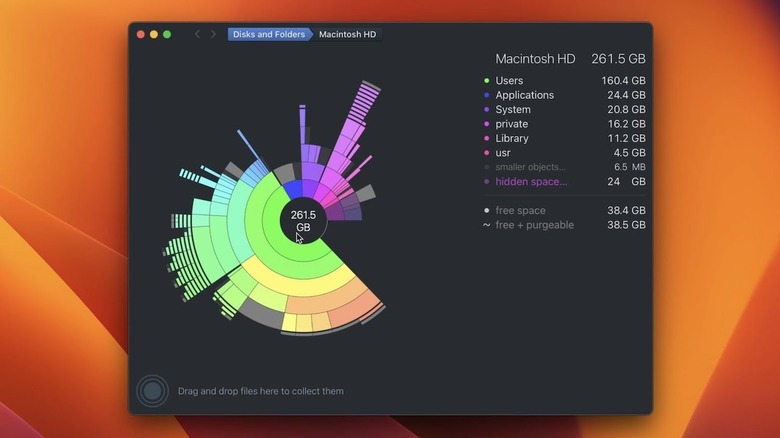
Regardless of the internal storage capacity of your Mac, you may run out of storage after months or years of use. And if you got the 256 GB variant, it might happen sooner than you think. While using external drives can get you extra space to store your files, insufficient storage in the internal drive can lead to issues such as being unable to install the latest macOS version. DaisyDisk is a handy disk space analyzer that scans your Mac's drive and gives you an overview of its usage. Using the app, you can see a breakdown of what's taking up the most space on your precious internal drive. The app also goes the extra mile by allowing you to easily delete files you don't need to free up space.
You simply drag the file or app to the bottom left in DaisyDisk and click the Delete button to remove the files from your disk. The app is free to download and provides a free trial if you need to give the Pro version a shot. When you're ready to pay, it has a one-time fee of $9.99 for a lifetime license with support for updates and a device limit of five Macs.
Latest
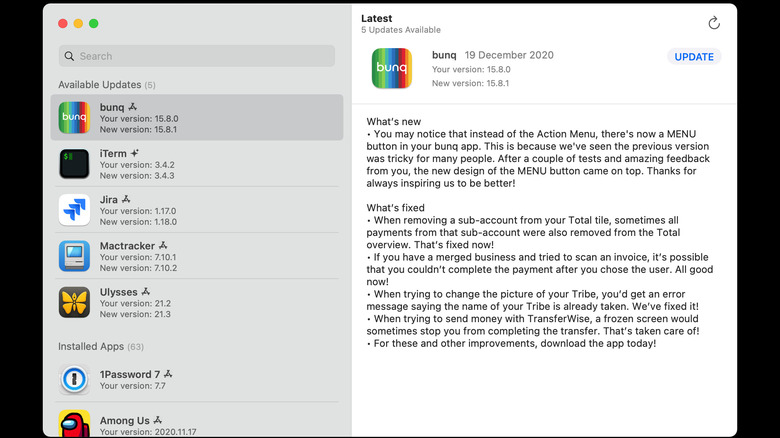
Unlike on your iPhone, you can install apps from multiple sources on a Mac. While this freedom of installation is a plus, it makes it tedious to keep all the apps updated. No wonder developers take it upon themselves to add notifications inside apps to let users know there's a new version for download. That's where Latest comes in handy. As the name suggests, Latest makes it easier to keep all your apps updated. What's impressive about the app is that it doesn't matter where you downloaded the app from.
As long as you have an app installed and there's a new version available, Latest will tell you when there's an update. When you open the app, it displays a section of Available Updates at the top, followed by the list of all your installed apps. When an app has an update, it will tell you when the new version was released, and display release notes in the right sidebar. You simply click Update, and Latest will download and install the latest version of the app. Latest is a free and open source app, so you can download and use it without paying a dime.
Substage
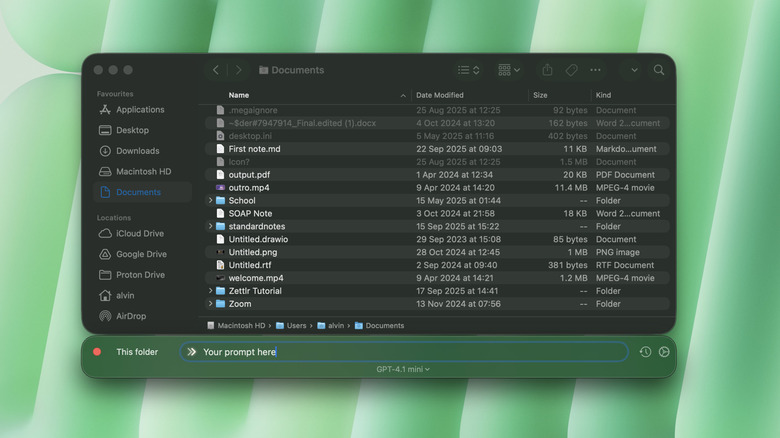
Substage is a handy utility app for Mac that helps you manage and work with files easily using Artificial Intelligence (AI). When installed, the app adds a small window below your Finder window, enabling you to prompt it for actions. For instance, when viewing the Downloads folder on your Mac, you can ask the app to highlight all PNG images and zip them. It uses LLM models from companies like OpenAI, Google, Mistral, and Anthropic, so you can use plain English to give commands, and Substage will execute them on your behalf. You can prompt the AI models to delete certain types of files, convert a selected video from MOV to MP4, convert JPGs to PNGs, and whatnot without a hassle.
Simply write what needs to be done in the app's prompt window, and AI will do it for you. The app is free to download, but you'll need to pay to use it. It costs $3.99/month or $29.99/year, but you can also buy it outright at a one-time fee of $29.99. However, if you choose the one-time purchase option, you'll have to use your own API keys or run local models using apps like Ollama and LM Studio. There's a two-week free trial that you can take advantage of to check if the app suits your needs.