

4 Ways You're Sitting At Your Desk Wrong

If you suffer from back, neck, arm, and/or hand pain after a long day at the office, it might have something to do with too much sedentary time. As the saying goes, sitting is the new smoking. But it could also be because you're sitting at your desk wrong. Along with getting up to stretch or walk around at least once per hour, you can alleviate some of the discomfort by ensuring that when you are sitting, you're doing so properly. Yes, there is a right and a wrong way to sit at your desk.
It starts with having the right equipment, including an ergonomic and adjustable chair, and maybe even an adjustable height desk, to facilitate proper body positioning while you work. Make use of all the adjustment options, like lumbar support and arm rest height. There are plenty of accessories for ergonomic support, like wrist rests. But not all of them should be used in the way you think. Finally, the worst way you can sit at your desk incorrectly is to sit for too long. Get up, walk around, and adjust your position so you feel better at the end of the day.
Wrong positioning
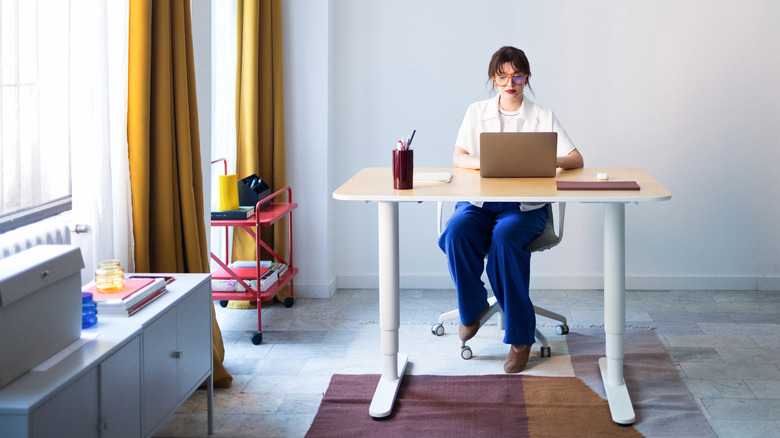
We've all heard it from our parents for decades: Sit up straight! While this is good advice, trying to sit up straight for the entire time you're working can put unnecessary strain on your spine. Ideally, you would sit in a way that can be comfortably sustained for long periods of time without much effort. For instance, lock your chair in a slight recline to support your body weight. Another option is to move your feet behind your hips, supported by the chair legs, which will help limit your body leaning forward or backward while you sit.
Adjust the seat height in accordance with the screen and keyboard to prevent putting strain on your wrists, or your arms rubbing against the edge of the desk. Your elbows should be at your sides so your hands are lined up with the keyboard and mouse. Shorter individuals might need a footrest to ensure your feet are still planted firmly on the floor at a 90° angle or opt to move them behind your hips as noted above. The top of the computer screen should be in line with your eyes. Any other position and you'll be bending your neck, which can lead to both strain and pain.
Not making adjustments

The best ergonomic office chairs often come with the option to make adjustments to seat and armrest height. One of the best gadgets for working from home is an adjustable desk. Adjust the height of the chair to fall in line with the proper seating position relative to the desk. This is especially important in an office chair if you don't have an adjustable height desk.
The armrests, meanwhile, should be at a 90° angle. For chairs with a headrest, it should be adjusted to fit the curve of your neck and not force your head upwards or downwards. Consider that the standard desk height is 28 to 30 inches high, which is too tall for the average person, a 5'4" female or 5'9" male. An adjustable height desk can make a huge improvement. But if you can't invest in one right now, at least use a chair with adjustability to compensate.
Incorrectly used accessories

While wrist rests are promoted for ergonomic typing, you should try to avoid them if you're working for long periods of time. They can end up compressing the median nerve, which can lead to issues like carpal tunnel syndrome. Leave your hands floating over the keyboard as you type or invest in a low-profile keyboard like the Satechi SM3 Slim mechanical keyboard.
Take rests and rotate your wrists from time to time to ensure there isn't any cramping. If you do use a wrist rest, use it to support your palms, not your wrists. Desks with drawers at the front are convenient, but they can make sitting in the proper position difficult because they get in the way of your knees. Avoid those and instead consider a separate cabinet for essentials, or choose a desk with top storage.
Seat pads are a simple solution to raise the height of a chair if it doesn't adjust, but they can also impede the ergonomic design of the chair itself. If you find you need a seat pad to get the right height, you may be better off investing in a new chair with adjustable features that fit your body.
Sitting still for too long

The best way to sit is, ironically, to keep moving and adjusting your posture. This doesn't just mean getting up every hour to stretch, but to also move around on the chair so you aren't static in the same position for hours. This might involve engaging in some of the bad sitting habits from time to time, like sitting forward, craning your neck, slouching, or even crossing one leg over another. This is all okay in moderation, as long as you don't slip back into sitting that way for long periods of time.
Most importantly, get up, stretch, take a bathroom break, grab a coffee refill, or do a short walk around your office or home to remain active. Having the knowledge of how you should sit at a desk, along with using the proper desk, chair, and accessories can go a long way in making your daily experience in the office more comfortable. Sitting properly can help reduce issues like repetitive strain or back pain, and it takes just a few conscious decisions to make it happen.