

5 Free Apps That Can Replace Your Microsoft Office Subscription
Microsoft Office has long been the king of the office suite. Commonly used in the business and educational space, Microsoft Office is so ubiquitous that even non-tech people know what it is. Over the years Microsoft has evolved its office suite to include more programs and tools but also changing the way we use it.
The latest version of Microsoft Office, now known as Microsoft 365, has become a subscription service that you can pay for monthly or yearly. The cheapest Microsoft 365 Personal subscription will cost you $9.99 a month for access to Word, PowerPoint, Excel, Outlook, and the rest of the Microsoft suite of software. This is actually a 45% price hike for Microsoft 365, as Microsoft states that new AI integration into all Office apps through Copilot is the reasoning for the increase. This includes what Microsoft calls vibe working, an AI-driven way to help create documents for you.
If you want the classic Office experience, you can still purchase Microsoft Office 2024 and have lifetime offline access to the full office suite, but this version lacks regular feature updates. It also requires a hefty $149.99 fee, and while it's usually on sale, that's a lot to ask for tools that you can easily get for free. The following are some well-loved replacements for what Microsoft 365 charges an arm and a leg for, all of them completely free of charge.
LibreOffice -- The complete all-in-one solution
If you are looking for a complete replacement for the classic Microsoft Office suite experience, you don't have to look much farther than LibreOffice. This free and private office suite has become incredibly popular over the years in part by eschewing the paid and subscription model of popular office suites such as Microsoft Office.
LibreOffice, being open source, also means that anyone can share and modify the program. This allows the LibreOffice community to develop extensions to add new features for even the most niche of needs. The LibreOffice suite can handle all of the most popular file formats including those from Microsoft, making the program incredibly flexible.
The suite offers replacements for the most used elements that are common with Microsoft Office. This includes alternatives for Word (Writer), Excel (Calc), PowerPoint (Impress), and others that are unique to LibreOffice. If you are coming from the Microsoft Office world but don't want to add yet another subscription to your credit card bill, switching over to LibreOffice might be the best and easiest transition you'll make this year.
AbleWord - The Word alternative
One thing I've found over the years of using Microsoft Office is just how little I use all the offerings that Microsoft Office offers me. In school I would use the entire office suite, while in the office I relied on Word and Outlook a great deal, but I'd wager most people simply need a basic word processor so they can write and edit basic text documents.
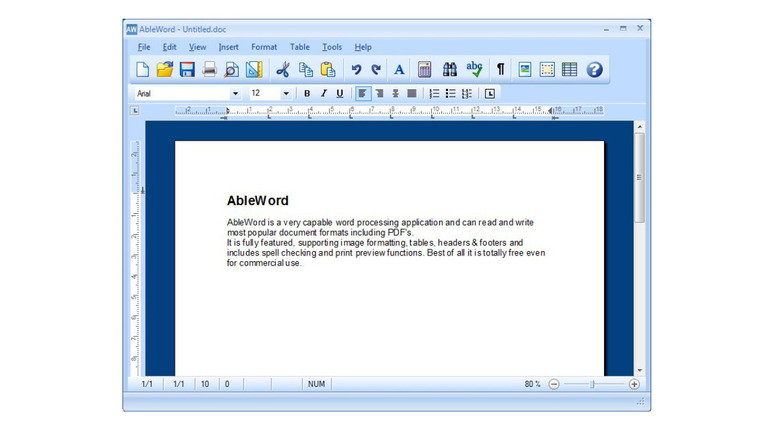
AbleWord is the perfect choice for those users looking for a simple, accessible, and offline Word alternative. The program has a classic Word look and feels, most likely due to getting its last major upgrade in 2015. That said, AbleWord is easy to use and offers all the basics a casual Word user would ever need. The software features support for DOC and DOCX formats while also serving as a PDF-converter.
If you are looking for a simple-to-use and uncluttered Word alternative with PDF editing functions, it's hard to find any fault with AbleWord. It's totally free to use and comes with more features than you get with the built-in tools offered by Windows. If you can get past the slightly outdated bubble UI theme from the mid 2010s, AbleWord is one to check out.
CryptPad Sheets - The Excel alternative
Excel is a great program for creating and editing spreadsheets and is used and loved by many. People even use Excel competitively, with an entire Excel World Championships dedicated to users showing off their insane skills using the software. While Excel reigns supreme, Google Sheets is a pretty great online alternative. But what if you are more privacy-minded and concerned with the Google ecosystem?
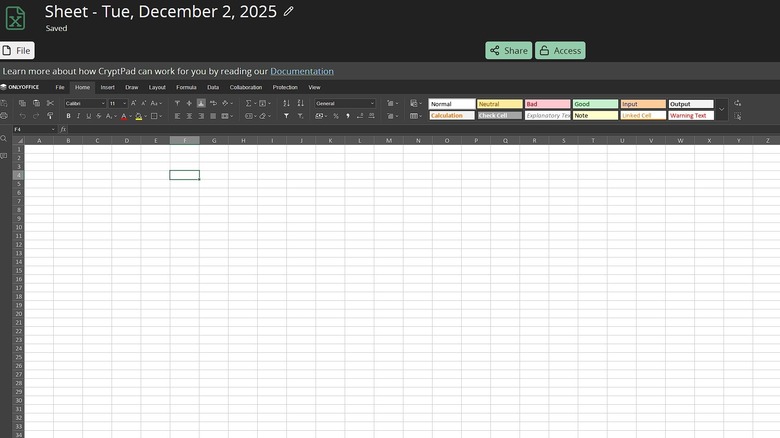
With recent leaks being found in Google Sheets that could potentially expose sensitive data, finding a secure alternative might be important for many home and small business users. CryptPad looks to solve this issue by being online for easy access but providing end-to-end encryption while offering collaboration tools for teams. This open-source suite offers Sheet, CryptPad's Excel alternative.
It features an interface similar to Excel, supports popular file formats, and features no ads. Sheet is a great replacement for Excel, and being free while knowing that it's secure adds to its overall value. And if you are looking for the ease of Google's online office suite but don't want Google to have access to all your information, CryptPad might be the office suite replacement that you've been looking for.
Canva - The PowerPoint alternative

A staple of many school and business presentations has been the PowerPoint. This tool allows users to create slides of information and has been a great way to create quick and simple presentations. No doubt many of us have nodded off to a PowerPoint presentation or two in our lifetimes. But what if you are looking to create a presentation but don't want to invest a monthly fee if you only plan on creating a couple a year.
This is where Canva comes into the picture. Canva allows users to easily create slide-based presentations. With a variety of included tools and options, Canva's presentation maker makes the process of creating a PowerPoint-like project much simpler. From its easy-to-use interface, multiple contemporary templates to choose from, and the ability to save to PowerPoint format, Canva can do it all.
Using Canva is free but some templates and features require a paid subscription. You can access their presentation tools right from your browser, making it great if you are traveling. The platform also allows for editing and creation right from your phone, meaning all the tools you'll need to create a presentation are accessible from all your devices. While Canva is primarily web-based, you can download the software onto your PC and use it completely offline.
Mailspring - The Outlook alternative
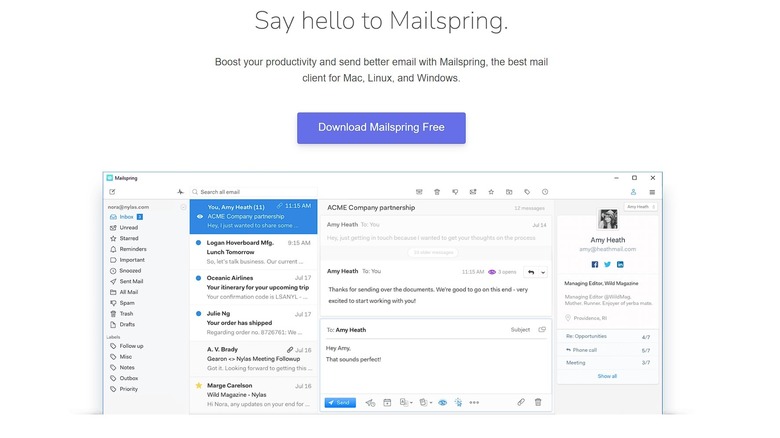
Mailspring is an Outlook alternative that comes highly recommended by users. This open-source mail service software has a modern design that features a unified inbox making it easy to manage all your email accounts in one place. One of the nicest things about Mailspring is its sleek-looking UI.
It doesn't look like a busy and cluttered piece of business software, instead featuring a more minimal style. And you can also adjust the software to look how you want through the use of themes, both bundled with the software and those created by the community. Mailspring offers all the tools that you would want from an Outlook alternative. This includes easily consolidating all your email accounts into one place, read receipts, send later functionality, and regular updates.
Mailspring also provides offline support, allowing you to read and write emails even when not connected to the internet. And thanks to local storage options, your content is much more secure than it would be residing in the cloud. Mailspring is a great alternative with its basic free tier offering more than enough for most users.