

Your Roku City Hides Lots Of Easter Eggs - Here's What To Look Out For
We may receive a commission on purchases made from links.
Roku isn't perfect, but no streaming platform is. It gets a few things wrong, like blasting your screen with ads you can't disable, potentially violating children's privacy laws, and the fact that it collects data by default and may be spying on you. But there is one thing it does right, and that's offer some pretty cool screen savers. One of those screen savers is a neon-dripped cityscape featuring lots of Roku brand colors and designs. But hidden in that scenery are some funky little pop culture- and movie-related Easter eggs, if you know where to look.
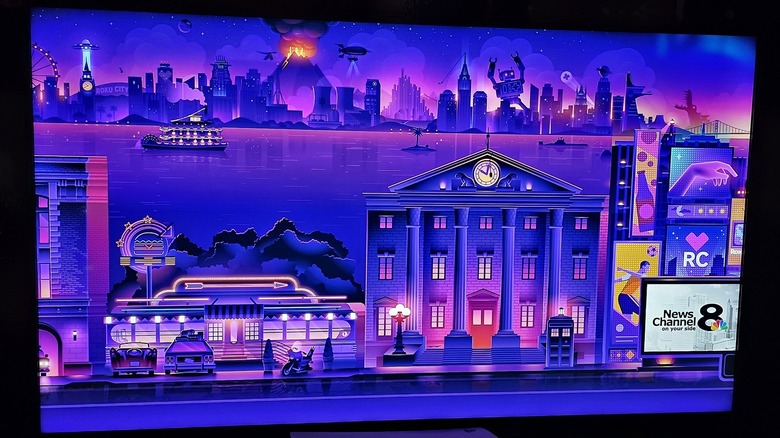
That screen saver has a name (though perhaps a bit plain), Roku City. There are so many Easter eggs packed into the artwork that people have started Reddit threads calling out everything they discover. From "King Kong" to "Ghostbusters," and "Poltergeist" to "E.T.," you'll find the whimsical references are a lot of fun to pick out. But if you'd like to do that now, and don't want to wait for the screen saver to begin automatically, here's a quick way to get it started: Head to Settings, then Themes, then Screensavers and select Roku City, then Preview from the list. That should work on both Roku devices and Roku TVs from brands like Hisense.
Even in the image above you can spot some big ones. The clock tower building from "Back to the Future," the TARDIS from "Doctor Who," a velociraptor's eye from "Jurassic Park," the Death Star from "Star Wars" in the skyline background, Stark Tower or the Avengers Tower from the MCU — are all there. Honestly, the list could go on and on.
Looking for hidden gems is most of the fun
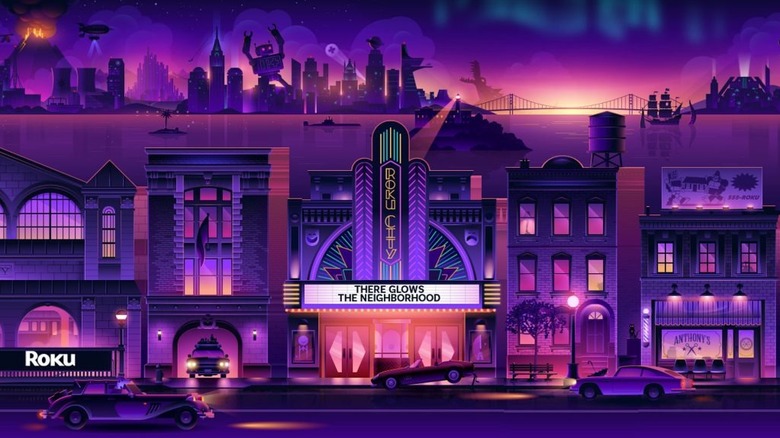
Roku City has actually been updated over the years. More recent versions incorporate advertising, and in the original screensaver artwork the Easter eggs were more subtle. For example, in the background of the initial slide, you can see a clock tower with an alien ship hovering above, beam pointing down. That was a big reference to "Independence Day," where the aliens destroy major landmarks during a pivotal part of the movie. But if you remember, the iconic shot is of the Empire State Building. Roku City changes it to a clock tower, and the alien ship looks a little different. That very graphic shows up in the new screensaver design, albeit relegated to the background. By contrast, some of the new references are more in-your-face, yet still fun to investigate.
Looking for all of the references is the amusing part, whether you sit down to watch the scrolling animation for a little while or you're simply passing by your TV on your way elsewhere. Some other well-known features include "The Wizard of Oz," the station wagon from "National Lampoon's Vacation" (and series), the Daily Planet building from the Superman mythos, a neon billboard from "Blade Runner," the luggage cart from "Harry Potter" — and more. What kind of Easter eggs have you found?
Speaking of, while you're on the hunt for Easter eggs, there are some hidden features every Roku user should know about, like unlocking hidden menus, or creating a custom slideshow.