

What Is The SC Port On Your Laptop For?
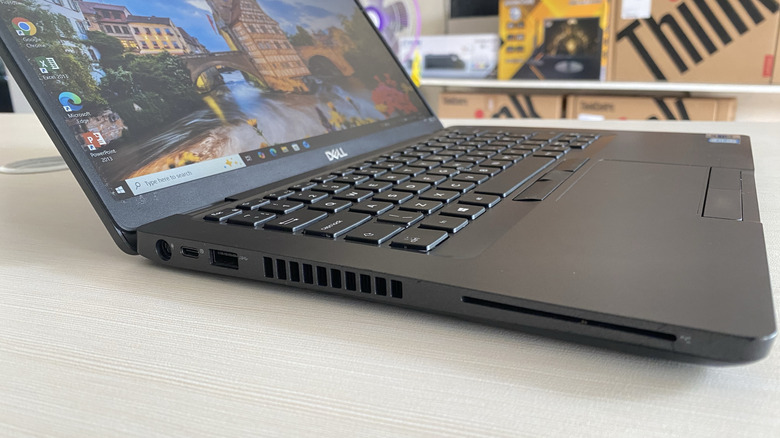
If you've ever considered buying a refurbished laptop, or if your company's IT department ever sent you one, you may have noticed a strange, wide slot on the side. Well, that mystery slot, often labeled SC and resembling a stretched-out SD slot, is a Smart Card reader — a piece of hardware that's pretty common in enterprise computers. But instead of reading memory cards full of vacation photos from your camera, it's for a corporate security badge.
A smart card looks similar to a credit card, complete with that little metallic contact chip on the front. It might double as an employee security badge, too. When you slide a smart card into the SC port, the laptop reads the chip on the card to verify the credentials and permissions of the person holding the card to use that computer. Since passwords can be guessed or lost, having a physical method to log in and access files can be both handy and secure. It's easier for employees, but it's also often a far more secure way to protect an institution's highly sensitive data.
But you don't usually find this intense focus on physical security with everyday laptops you see in stores like Best Buy. Instead, SC ports are more commonly used by government institutions and those working in finance or healthcare. Major hardware makers usually only put these readers on heavy-duty laptops, like Lenovo ThinkPads or Dell Latitudes designed specifically for enterprise use. And, while that may be overkill for the average user, shoving a security badge into a laptop is just part of the morning routine for many office workers.
The real reason those institutions love SC ports

While there are plenty of gadgets that make remote work easier, keeping data safe on a remote worker's laptop is a total headache for IT departments. Once a laptop leaves the safety of a heavily monitored office, those network protections largely disappear. If a hacker guesses the password, they often have a pretty easy time gaining access. An SC port at least partially solves this headache, however, by forcing a physical check-in with a company-issued card or badge. Now, if a hacker manages to steal login credentials, they still can't reach the corporate system without also holding that smart card in their hands. That's much tougher to accomplish than simply brute-forcing a password.
The biggest use case for these ports revolves around VPNs, or Virtual Private Networks. Basically, a VPN allows a worker to connect to internal company servers or access any restricted files or software from outside the building. It's for more than just getting logged in, as it also creates an encrypted digital tunnel that lets employees securely access sensitive company data from their home office or even a local coffee shop, all while keeping that sensitive data better protected from bad actors. But access to a VPN itself can also be hacked, so requiring a physical card to be inserted into the SC slot to make that connection can help protect vital company resources.
Beyond remote network access, that security can also be extended to protecting local files stored right on the laptop's hard drive. This way, if the device ever gets lost or stolen, that data stays inaccessible without the use of the smart card. The thief just gets a laptop, and that institution's data stays mostly hidden and safe.
Do everyday consumers actually need an SC port?

Despite how impressive that enterprise-level security sounds, the average person really has no need to bother with smart card readers. For normal daily activities like checking your email, watching Netflix's best feel-good movies, writing a document for school or work, or just enjoying some good old-fashioned online shopping, passwords and biometrics are usually secure enough. Plus, newer operating systems are packed with security features designed to keep data safe without forcing you to also tote around a plastic security card.
If you happen to buy a used business laptop with an SC slot at some point, that port will likely sit empty forever. That said, there are a handful of niche scenarios where a regular person might actually use one. Some universities hand out student ID cards with embedded chips, and students can then use these IDs to access specific campus networks or digital library archives for a class. Certain countries also make use of similar cards that can show personal ID information to border patrol or pull up healthcare records. But unless you fall into one of those very niche categories, that weird slot on the side of your laptop is just a harmless corporate leftover you can likely ignore.