

5 Essential Open-Source Apps Every Android User Should Try
The Android operating system is a staple in the mobile smartphone space. Android 16 recently received a huge redesign, and the OS as a whole has a higher market share than Apple's iOS.
One of the best Android features is that it lets users customize their experience. You can always stick to Google Play Store apps, but you can also download software from across the internet. This opens up a world of options, many of which are better than or serve a specific purpose more efficiently than those on a curated app store. We've found five impressive open-source applications that every Android user should check out. Because their source code is public for any programmer to help analyze, build, and optimize the software, these programs tend to be more stable and reliable than other apps. All the apps we recommend can be easily found on the Google Play Store or on trusted sites.
While you're responsible for the safety of your device when downloading apps outside of the Google Play Store, as some risks may be involved because the apps are not inspected beforehand, we've tested and used several of the apps listed. We have also relied on the recommendations of common users, experts, and reviewers from across the web, including those on YouTube, GitHub, and the Google Play Store, to make sure these apps with high positive ratings are also safe.
PixelPlayer
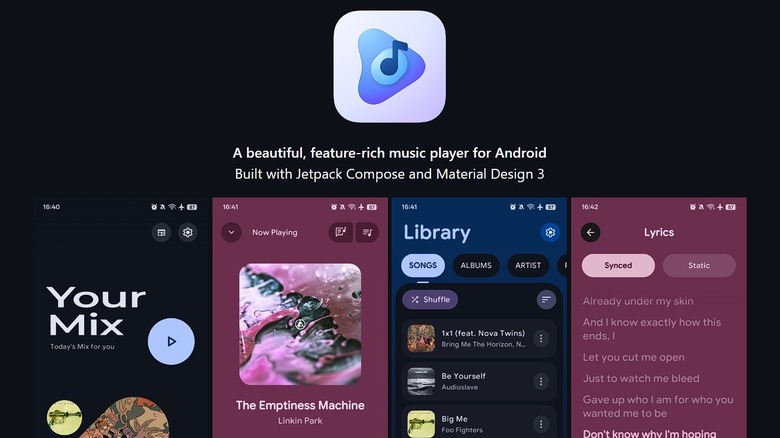
Many people use their phones as their primary device to listen to music. It's just incredibly convenient to be able to stream music from your phone, whether that be from services like Apple Music or Spotify. You might even be a person like me who still likes to own their music and download it onto their device. For that, I use PixelPlayer, an offline open-source application that has replaced the music-playing apps on my smartphone.
It has an incredibly sleek and modern design that puts a lot of major music players to shame. The application is filled with all sorts of small details that help set it above others. The play bar flows well, the app can sync lyrics, and you can choose between several theme options. PixelPlayer even comes with a nice sleep timer for those who head to bed listening to music.
The application is open source and still being worked on, so there are some quirks with the software, such as issues with the sleep timer sometimes failing and music continuing to play after disconnecting headphones. Thankfully, the developer is very active on GitHub and constantly working on bug fixes and app improvements.
Audire
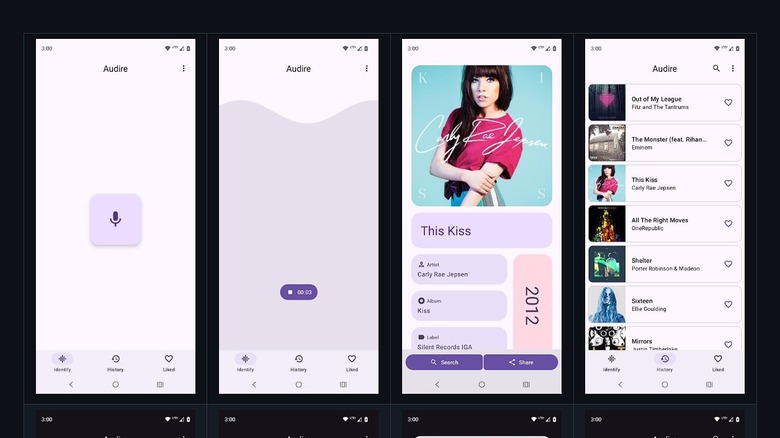
Shazam might be the standard when it comes to applications that identify music playing around you, but some people aren't fans of applications that run exclusively on ads as it does. For those who want an ad-free experience while still having the ability to identify music, Audire might be the open-source application you've been looking for.
Audire features a clean and minimalist design that works well. It can identify a music track playing nearby and give you additional options, such as searching for the track online through your system's default search engine to get more information. The application will also provide you with a history of audio it has identified, so you can always go back and enjoy it later. One feature that many users appreciate is that if you are not actively connected to the internet, Audire will save a short recording of a song playing and start searching once an internet connection has been established.
Audire is also available on the Google Play Store.
Private Lock
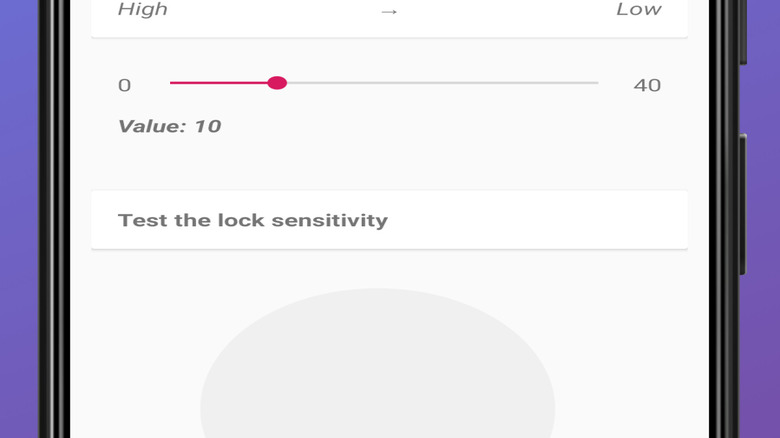
Security has always been important, and Private Lock takes a novel approach to help you improve yours. The app acts as a theft deterrent tied to the accelerometer inside your smartphone. When the accelerometer triggers from a sudden motion, like that of a person swiping your phone quickly from your hands or off a table, Private Lock will immediately lock the device.
This is also helpful if your device ever gets tossed or falls from a certain height. Private Lock will block your screen and avoid accidental activation of other applications or features in the process.
You can jump into the settings and adjust how sensitive the accelerometer trigger is, so the app won't lock your phone when you casually set down your device. It even features a simple animation to help you test and visualize the sensitivity right from the settings. Private Lock is a simple application, but it hasn't been updated since 2019. This means modern Android releases may have issues running it properly, and getting support for issues will be a challenge.
Canta
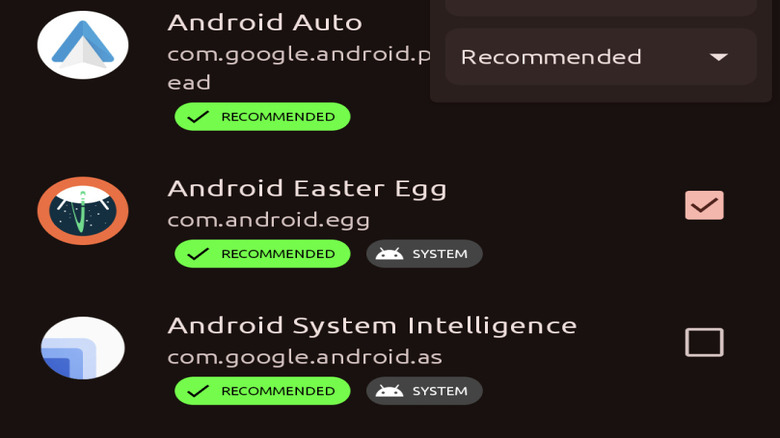
Canta is an application that helps debloat your Android device by uninstalling any app you want. While some Android smartphones come with pretty basic apps, other devices come loaded with unnecessary bloatware, including some we featured in our ranking of every major Android phone brand. This is often how smaller device manufacturers can help keep consumer costs lower and compete with big brands.
If you purchase a cheaper Android smartphone from a brand you might never have heard of, all the preloaded bloatware can have a big impact on the overall performance. This can be a real problem for what might already be an underpowered device. Canta allows you to delete almost anything installed on your phone by you or the manufacturer. Canta even includes system-level apps for you to uninstall. Be aware that deleting applications can cause serious system issues with your smartphone, so only delete the ones you are sure won't affect your device. Canta provides an undo function that allows you to quickly reinstall an application that you removed, if doing so causes any issues.
LocalSend
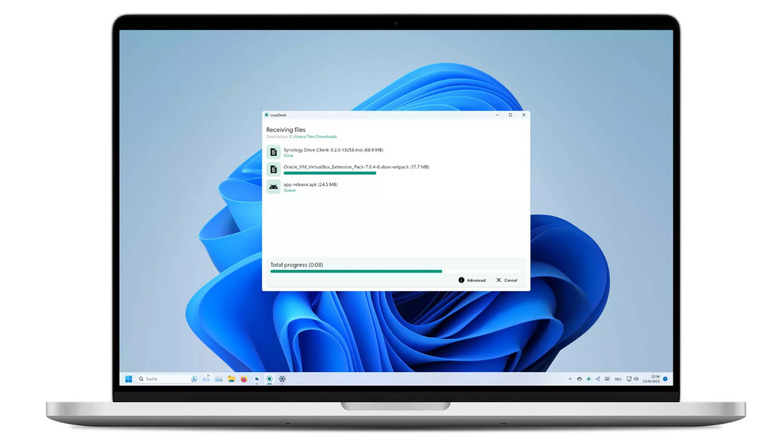
Nothing is more frustrating than trying to transfer a file from my phone to my computer, or the other way around, easily. Since LocalSend is a solution for this problem, it has quickly become one of my favorite and most used open-source Android applications over the past several months. You can get it directly from the Google Play Store.
LocalSend allows the user to easily share files with any nearby device across your local network that also has LocalSend installed. If you don't have a cable and instead email files to yourself — like I used to — or use an online file-sharing platform, which I avoid for data protection reasons, LocalSend is a useful alternative. While Android Quick Share works similarly, with some newer Android phones sharing data with Apple AirDrop, many users find the tool to be inconsistent and overly complicated.
LocalSend is cross‑platform. It doesn't require an internet connection and doesn't rely on third‑party servers. As someone who works from home and does a lot of research on my tablet and phone, LocalSend has been a real game-changer. But some issues arise due to cross-platform support, as some users noted that it's currently not possible to send entire folders to an iOS device.
How we selected these open-source Android apps
The Google Play Store is filled with a ton of fantastic applications that serve all sorts of purposes for the massive Android user base. But while Google Play is a great choice, there's a treasure trove of open-source Android applications that can be found and downloaded outside of Google's dedicated store. With so many options, we searched some of the best open-source applications available not only on the Google Play Store, but from other reputable sources.
Many of these applications I have tested and actively used. I have also focused on applications that have been vetted by the GitHub community, come highly rated online on places like the F-Droid and Google Play stores, and have been featured by respected tech creators across YouTube over the past several years. This means that while risks can arise with installing any unsigned application, all of the recommendations above have been vetted and are safe to try out on your Android device.