

Google Unveils Ambitious Gmail Overhaul, And It's All About AI
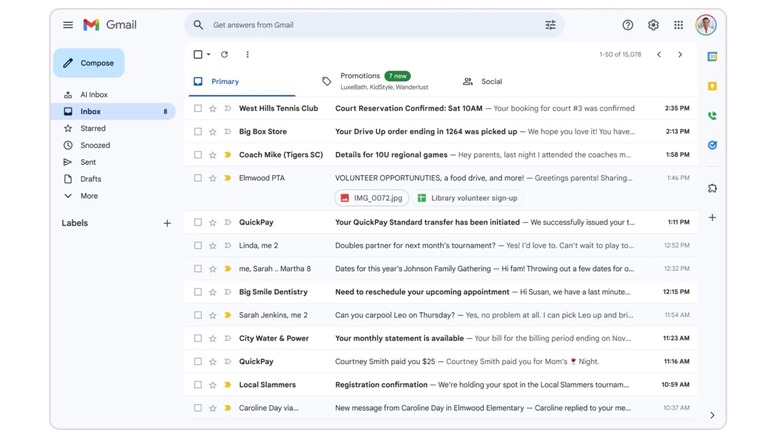
Google on Thursday announced an ambitious plan to make Gmail an even more capable tool, as long as you want to use some of the new Gemini-powered features Google has added to the app. The list includes Suggested Replies (a more personalized version of Smart Replies), AI Overviews (similar to Google Search), Help Me Write, Proofread, and AI Inbox. The latter is the most significant of them all, representing an overhaul of the Gmail experience, where the built-in AI can offer a quick at-a-glance summary at the current state of the inbox, and list the priorities.
The new AI features will be available to free Gmail consumers rather than Workspace customers initially. Google will roll them out in the U.S. with support for English. Some of the features will be available for free, including Suggested Replies, AI Overviews, and Help Me Write. AI Overviews and Proofread will require a premium Gemini subscription, including Google AI Pro and Ultra subscribers. AI Inbox availability will be more limited, as Google will roll it out to Trusted Testers while the feature is in testing. AI Inbox will roll out more broadly later this year.
Importantly, Google announced privacy protections for the new Gmail features. The AI tools are powered by Gemini 3, which will process Gmail requests in an isolated, secure privacy architecture. Google said during a briefing that BGR attended that it won't train future versions of its AI models on email content, and that the user is always in control. That said, some questions remain about the way Gmail processes and handles the new AI features.
What the new Gmail AI tools can do
Google said in a blog post that Gmail has over 3 billion users. Many of them may want a more intelligent Gmail experience, according to figures from an internal Google survey and a "Young Leaders" survey from The Harris Poll. For example, Google found that 85% of Gmail users think AI is useful when it can leverage personalized content. Also, 70% of enterprise users who use Help Me Write in Docs and Gmail end up choosing the suggestions. The Harris Poll survey revealed that 92% of knowledge workers aged 22-39 want AI personalization and 89% of them would send a longer email from their phone if AI could accurately capture their tone and style.
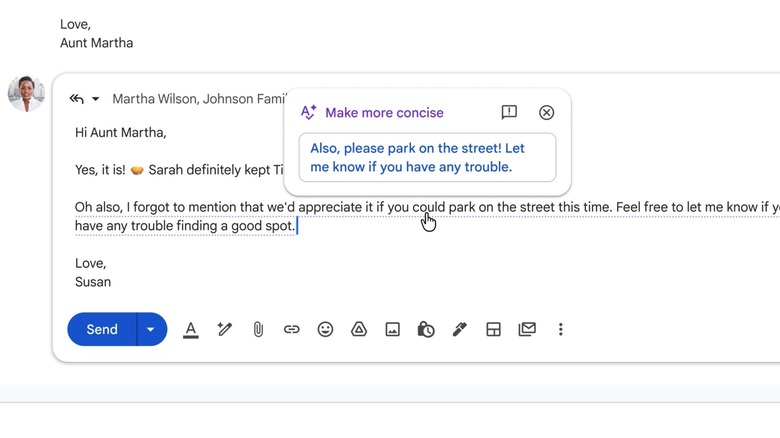
Smart Replies has become Suggested Replies, and it can suggest an email response in the user's tone and style. The new Help Me Write feature can be used to draft new emails or adjust user-written text, while keeping their tone and style in place. Next month, Help Me Write will get additional personalization options, as it'll be able to access context from other Google apps. The Proofread feature can suggest words and simplify complex sentences to make emails easier to read. The changes can be applied with a click, and the user can undo the alterations.
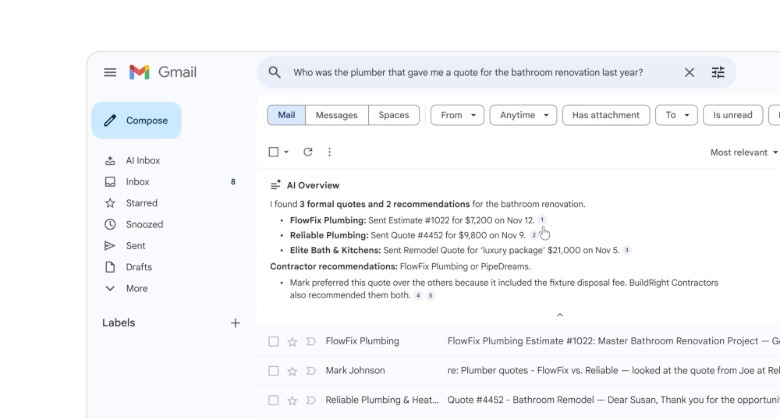
AI Overviews is a more controversial Google AI feature, considering its rocky start in Google Search, where it made a few errors in its early days. In Gmail, AI Overviews will draw information from your Gmail inbox to answer email searches performed in conversational language. Demos during the briefing showed that the AI can answer questions about the user's shoe size for specific brands, utility bills, and previous vacation purchases, like a Legoland pass.
AI Inbox and new privacy concerns
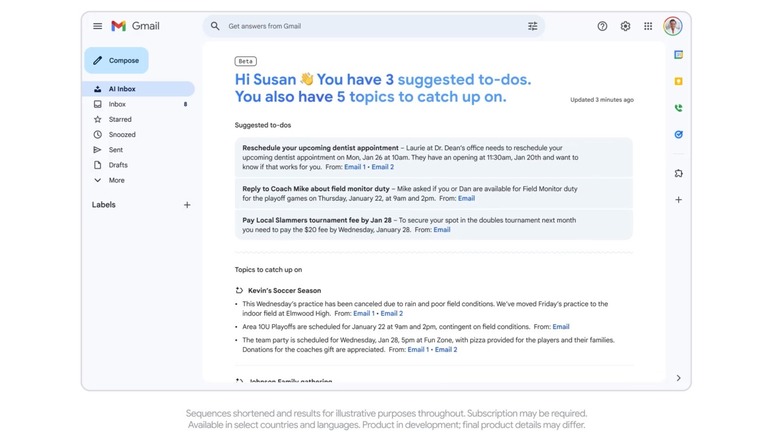
AI Inbox is the only new Gmail feature that changes the app's design. Click the AI Inbox button, and you'll discover an AI-generated list. First, you'll see a list of suggested to-dos based on urgency. Gemini will determine which emails require immediate attention. For example, the AI will see the user has to purchase plane tickets to take advantage of FareLock pricing. The second category in the AI Inbox is a "catch-me-up" list that groups topics into relevant themes for the day or week. Google demoed three topics on the list, including one featuring important content tied to an upcoming trip to Japan. The AI Inbox will provide links to the emails it surfaces, so the user can address the emails immediately from this view.
While showing off the new AI Inbox feature, Google's Blake Barnes switched from a personal Gmail account to a demo version, telling the media he wasn't quite ready to share his personalized AI Inbox with the world. Most Gmail users might not be comfortable sharing their personal emails with anyone, including the AI, unless they know that strong privacy features protect that data exchange.
Google emphasized during the call the privacy-first approach for Gmail AI features. Also, the new features are optional. But while personal data will not be used for training AI models, and Gmail processing will happen in a secure environment, it's still not clear what happens to the user data Gemini collects from emails. Also, it's unclear how long that data is kept, and whether human intervention occurs. BGR has asked Google for more details on the new privacy protections in Gmail and will update this post with new information. Separately, Google confirmed to BGR that the email data will not be used for ads.