

You Should Change This Camera Setting If You Value Your Privacy

If you capture and share a lot of photos, you should know there's a setting that stores your location, along with other details like date, time, camera model, focal length, shutter speed, or ISO values. By default, photos captured on Android and iOS smartphones include this information, called the EXIF (Exchangeable Image File Format) data or metadata. And it's the location part of this metadata that you should be concerned about.
Keep in mind that this information is often helpful. It can be used for categorizing photos based on date or location, or even detecting duplicate photos. But the information can also be misused to track your activity or collect information about you. For instance, photos shared from your home will give anyone a rough idea of your home address. If someone is really dedicated, they could easily keep tabs on your daily activity simply by analyzing the photos you share at different times of the day. Since the metadata includes both GPS coordinates and time, they could get an idea of what time you leave for the office, the route you take, your work address, and the places you frequently visit.
Although many social media platforms, like Facebook and Instagram, remove location-related metadata from photos you post, you can't entirely rely on their built-in mechanisms. Even with WhatsApp, the GPS coordinates are sometimes retained. So, it's vital to either remove location-related data from photos before you share them or turn off geotagging entirely.
Deleting or disabling location metadata
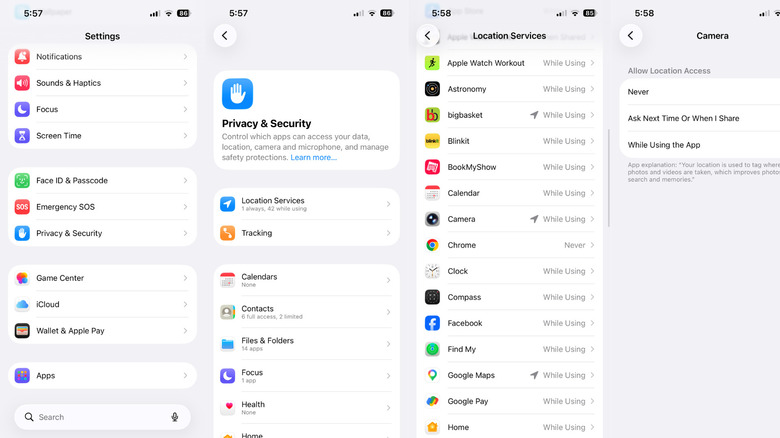
If you're concerned about location metadata, you have two options: Either disable geotagging so that captured photos don't include location-related metadata, or delete this information later on. On Windows, macOS, iOS, and many Android phones, you can quickly remove the GPS coordinates from photos. However, some Android phones don't let you do this with their built-in photos app, so you might need to install the free Google Photos app or a third-party option like Photo Exif Editor.
To delete location metadata on iPhones, open the image in the Photos app, tap the ellipsis (three dots) near the top-right corner, select Adjust Location, then tap on No Location to remove the location details from the image. In here, you can also add fake geotags if you'd like. To prevent your iPhone from saving these details in the first place, go to Settings > Privacy and Security > Location Services > Camera, then set Allow Location Access to Never.
On Android smartphones with the Google Photos app installed, open the image and swipe up to reveal the location data, then tap the pencil icon next to it and choose Remove location — but note that this doesn't work with location data added by your camera app. To prevent that from being added in the first place, go to Settings > Apps > Camera > Permissions > Location and disable the toggle.
You can also remove location data from photos stored on your computer. On Windows, right-click the photo, select Properties, go to the "Details" tab, click on Remove Properties and Personal Information, then on Create a copy with all possible properties removed and choose OK. On macOS, open the image in the Photos app, go to Image > Location in the menu bar, then select Hide Location.
Which is better, disabling geotagging or removing metadata?
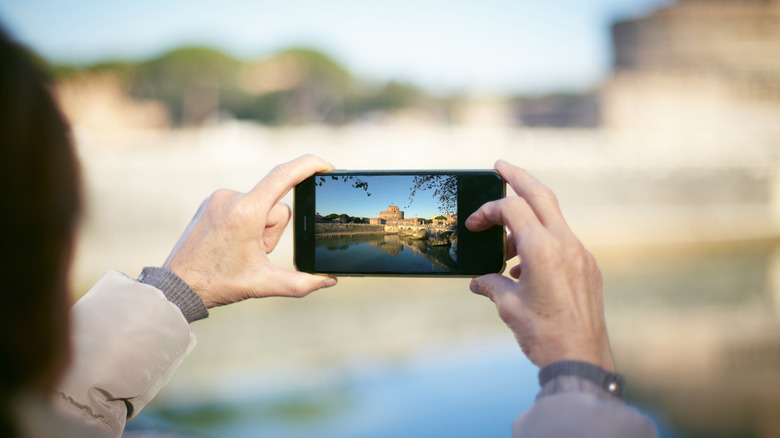
If you are privacy-conscious and don't want to accidentally share GPS coordinates alongside photos, disabling geotagging altogether is the better approach. You can't solely rely on social media services or messaging platforms to do that. Theoretically, they should automatically remove such information, but that's not always the case. Sometimes photos slip through unedited. So, for maximum privacy, disabling geotagging on the source device is the smarter choice.
But not everyone needs that, and there's a downside to it, too. If photos are not geotagged, your photos app won't be able to group them by place or city. This can be a major inconvenience to people who search for memories by location. If that's you, it's probably better to remove location-related metadata from photos you are about to share. Photos that never leave your device can safely retain those details.
In the end, it's a balancing act between convenience and privacy. The same setting that helps better organize your photos can also be a major privacy risk. Disabling it takes less than a minute, and for some, it might be worth the inconvenience.