

Spotify Is Getting A Major Revamp For Tablets - Here's What's New

As one of the major music streaming platforms on the market, Spotify has its app on a variety of platforms. You can download the Spotify app on macOS, Windows, Android, and iOS, and even on consoles, smart TVs, tablets, and car infotainment systems. If you use Spotify as your go-to platform for listening to music, it's fair to expect a unified experience regardless of the device that you're using. That may not have been the case for tablet users recently, but the company has just announced a new layout that will soon be available for download to address that issue.
In a press release posted on its website, Spotify says that it has revamped the tablet layout on both Android and iOS in an attempt "to make listening, watching, and discovery feel more natural on larger screens." According to the company, the new layout is meant to offer a seamless experience that's on par with its app on other platforms, though it comes a few years after Spotify overhauled the user interface (UI) of its smartphone app. The revamped layout has been designed with the large screens that tablets offer in mind, and it takes full advantage of that, unlike the old interface, which offers scaled-up versions of UI elements used in Spotify's smartphone apps.
Spotify's tablet UI revamp introduces notable changes
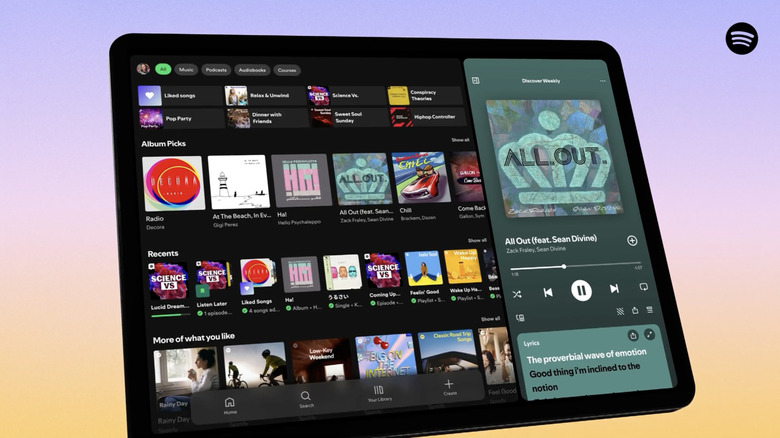
Despite maintaining the same navigation as before and the usual unmistakable Spotify look, the new interface introduces a handful of noticeable changes to the app. The first key feature that Spotify's new UI offers is Parallel browsing. This feature enables you to browse Spotify's catalog and explore other items in the app while the player view is displayed on the right side of the screen. With this feature, you'll also be able to view videos or the lyrics of a song on the side while browsing the app. And if you'd like the player view (or something else that you're viewing, like an album or artist page) to occupy the entire screen of the app, the new interface has a collapsible sidebar that can hide to do so.
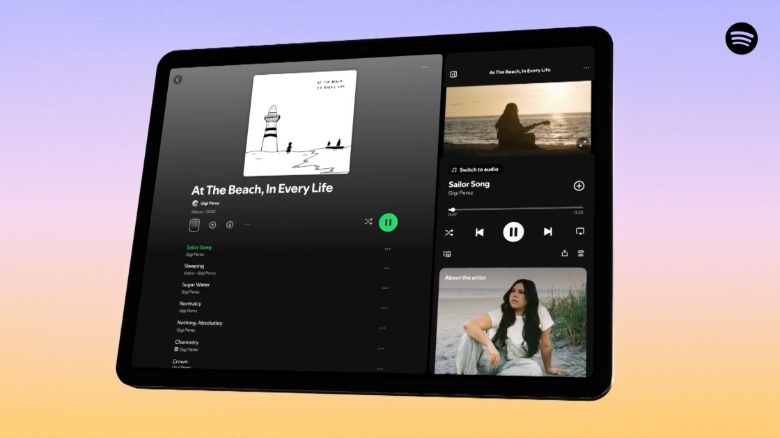
The company has also made the app's interface adapt to the orientation of the screen when switching between portrait and landscape, thanks to a new feature that's been aptly named Adaptive orientation. With Adaptive orientation, the UI won't simply resize the components like the old one when you switch orientations, thus making the interface feel more or less the same in both scenarios. Another tiny change that the company has made is to make the Switch to Video toggle stand out in the player view for easy access.