

Your Apple Watch Is Tracking A Health Metric You Didn't Even Know Existed

Your Apple Watch may be small, but it actually packs a whole lot of sensors inside. Probably the most popular one is the heart rate sensor, used to power the Apple Watch's heart care features. Then, there's the depth gauge and water temperature sensors, both of which come in handy when you're out swimming or diving. But beyond these Apple Watch features you're using every day, there's one other valuable sensor you might have missed: the ambient light sensor.
For other Apple devices, this is designed to automatically adjust the screen brightness depending on how dark or bright your surroundings are. On an Apple Watch, though, it's also meant to help with your health. Instead of only controlling the brightness level of your device, the ambient light sensor also tracks how much daylight you get.
As you might already know, sunlight is the cheapest and simplest way to get your health in better shape. It provides vitamin D, supports good eye health, regulates your circadian rhythm for a healthier sleep, and even helps with some psychological disorders. That's why it's important to know whether you're getting enough of it on the daily — and your Apple Watch can help with exactly that thanks to its Time in Daylight feature.
How to check the time you've spent in daylight on your Apple Watch
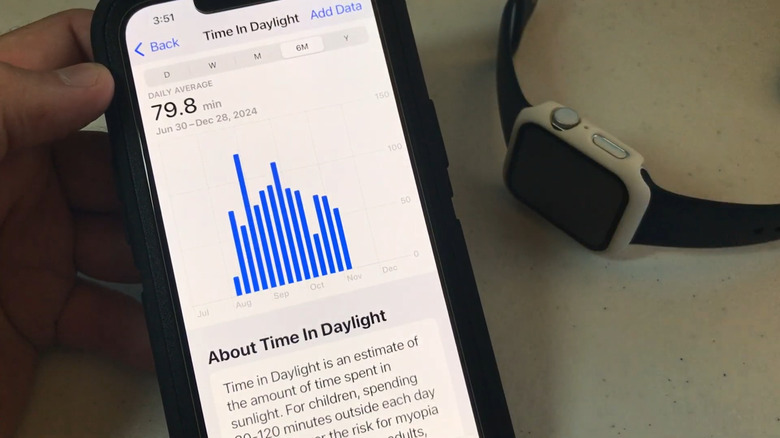
The total time you spend in daylight is automatically synced from your Apple Watch to the Health app on your iPhone. Here's how to view this data:
- Launch the Health app on your mobile device.
- Press the search icon in the bottom-right corner.
- Under "Health Categories," go to Other Data.
- Choose Time in Daylight.
If you're managing an Apple Watch for a family member like your kid, you can also check their hours of daylight exposure from your Health app. Just go to Sharing instead of the search icon. From here, you'll then see how many minutes they've spent in daylight in total. Tap on the timeline at the top to check the total time for the day, week, month, past six months, or past year. Studies suggest that at least 10 minutes of sunlight a day can boost your health, so see whether you're getting as much.
If you're not a fan of this underrated Apple Watch feature, though, you can disable Time in Daylight from the Settings app on your Apple Watch. From the Apple Watch's main Settings menu, navigate to Privacy & Security and choose Health. Then, select Time in Daylight and toggle off the feature.