

5 New Features That Make macOS 27 Golden Gate A Worthwhile Update
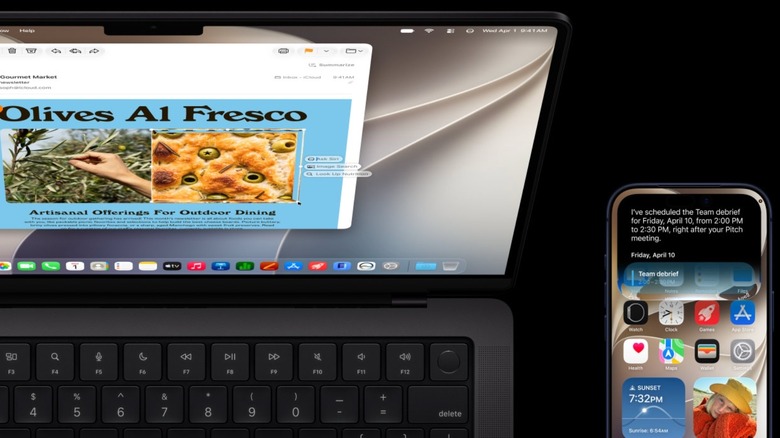
The future of Mac software is upon us following today's reveal of macOS 27 Golden Gate. More than just improving Apple Intelligence, this upcoming software update improves Liquid Glass and officially ends support for Intel Macs. Apple is also starting to limit what older Apple Silicon devices can do, as the ability to customize how Siri sounds is limited to M3 Mac devices or newer with at least 12GB of RAM, meaning that even the all-new MacBook Neo will lack this functionality.
Unlike previous WWDC keynotes, instead of jumping between software updates, Apple spent much of the stream focusing on Apple Intelligence, finally delivering on the promises it made a couple of years ago. Apple spoke at length about Siri and Apple Intelligence, but leaving many of the specifics to be discovered by developers and, eventually, public beta testers.
At WWDC 2026, three core pillars were Siri's AI makeover, Apple Intelligence coming to more apps, and performance improvements. Another big focus for Apple was Child Safety, as Screen Time has been redesigned and improved to protect children.
Liquid Glass design improvements

macOS 27 Golden Gate is all about making Apple Silicon Macs run more smoothly. After complaints about readability and the general accessibility experience delivered by macOS 26 Tahoe and the all-new Liquid Glass design, Apple started the keynote addressing this issue with an all-new slider setting that lets users adjust how translucent or tinted Liquid Glass appears.
Beyond that, app icons are sharper and some have been redesigned altogether with additional layers to improve readability. Plus, some interactions have been fixed so users can tell that Apple has been "paying attention to details."
For example, another complaint that the new Liquid Design incited was that the aspect ratio of app windows were completely different. Apple is now creating a more unified experience, and developers don't even have to change anything on their end. According to the company, window shapes, menu bar icons, and even the toolbars have been fixed, so everything will look more cohesive. While Apple still has a few more months to finalize the design, it's a step in the right direction.
Siri AI now lives in the Spotlight menu
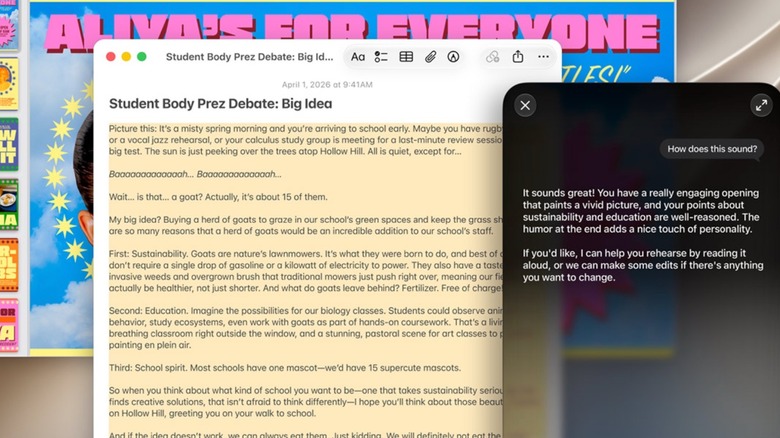
Siri is a big part of iOS 27, and that's all true for macOS 27. Apple calls the Apple Intelligence-powered Siri a "more personal assistant." Only available in English at first, and legally barred from debuting in Europe and China for now, the assistant lives in the Spotlight menu, in addition to an all-new Siri app. Users can now ask questions straight from the Spotlight menu, and the Mac will understand that it's a query to Siri. A chat box will appear where users can submit follow up questions, brainstorm with the personal assistant, and more.
The new Siri is able to understand context, so it can help you find photos from a specific weekend, remind you of a podcast a friend sent you in the Messages app a few weeks ago, and even locate a message in Mail to bring you the precise information you need. The new Siri can take control of your Mac to complete some tasks, look up information online, and generate written drafts on the fly. The improved Visual Intelligence feature also lets Siri see and discuss anything on your screen.
Apple Intelligence in more apps

Safari, Passwords, Photos, Image Playground, and Shortcuts are a few of the apps that will see expanded integration with Apple Intelligence. In Safari, users can now create their own extensions using AI. The browser can also proactively organize tabs and notify you when a sold out product is back in stock or if a ticket for a concert becomes available. Apple says Safari will send a notification as it actively monitors webpages, and you can take action from there.
For the Passwords app, Apple wants to do more to help you replace your compromised passwords. For some websites, Apple Intelligence can log in into your account, change your password, and update the password in the app on its own. Image Playground now has the ability to create photorealistic images and other new styles. Apple says there will be daily limits when it comes to image generation, but users can increase these limits with certain iCloud+ subscriptions.
Lastly, the Shortcuts app is going to be easier to use, as Mac owners will no longer need to create a shortcut step by step. Instead, they can "Describe a Shortcut" to Apple Intelligence and have AI do all the heavy lifting. One example Apple provided was telling Apple Intelligence to set a different alarm each evening depending on the first event in Calendar the following day.
Faster performance and better search
While macOS Golden Gate isn't the most feature-packed update Apple has ever released, it should improve the overall user experience significantly. This might be in part due to the fact that Apple no longer needs to support Intel Macs, but a report from Bloomberg late last year also revealed that the company always wanted to focus on fixing bugs and replacing legacy code.
Needless to say, the report was proven accurate on Monday, as Apple is promising faster performance across all of its operating system. AirDrop, searching for files, and even load times on Safari should be faster on macOS 27. Apple says the Mac feels "more responsive than ever," which means that even the six-year-old M1 MacBook Air should get a boost.
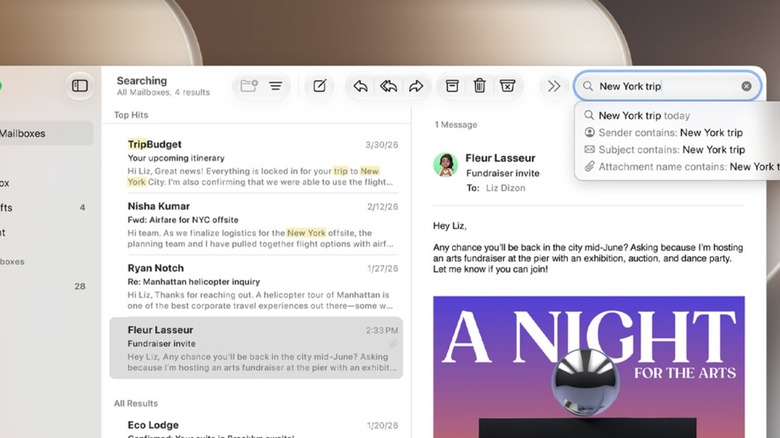
However, Apple's most important promise might be that macOS Golden Gate will fix search. This has been a big issue with macOS Tahoe as well as the past few macOS releases. Searching on the Mac has become less reliable, finding relevant results in Mail has been a struggle, and sometimes finding a file you just saved can take a while. With macOS 27, Apple says that Spotlight suggestions are improving, and that might be the most welcome change of all.
Child Safety
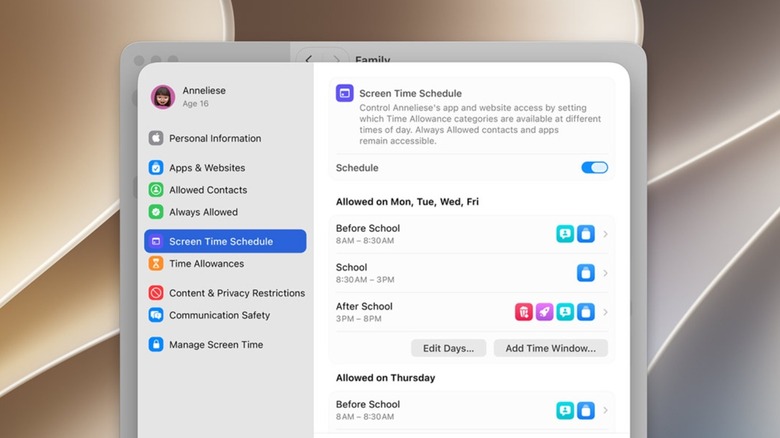
Finally, Apple spent a good amount of time during of the WWDC 2026 keynote discussing child safety features. Technology is an important and unavoidable tool for children, but Apple wants parents to be able to have a say over what their kids see. With macOS 27 Golden Gate, parents have even more control over what their kids can access online, what apps they can download, and how they can spend money. Parents can also customize schedules for when their children are at school, at home studying, or out and about over the weekend.
According to Apple, kids can send their parents new "Ask to Browse" and "Ask to Download" messages through iMessage when they want to visit certain sites or download certain apps. As kids get older, their parents can slowly dole out access to more websites, apps, and other experiences. Apple is also adding new ways to help kids communicate safely through FaceTime, iMessage, and more, protecting them from sharing or viewing nudity or violent content.
Apple says that the new interface is intuitive for parents to control, and the new Screen Time page gives them insight into how their children are using their Mac, iPhone, or other Apple device. These new features are in addition to previously announced safeguards from Apple, like age-restricted apps, content, and websites, so kids aren't exposed to inappropriate content.