

Marshall Heston 60 Review: Big Sound In A Small Package
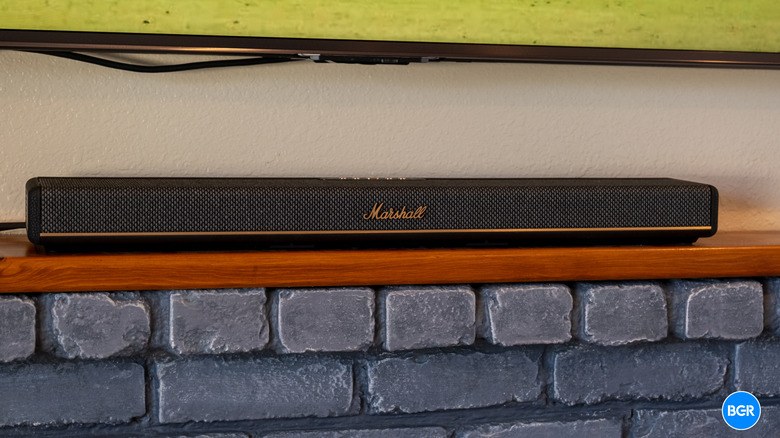
Marshall, the classic guitar amp brand, has been pushing more into the consumer electronics world. Those pushes have largely come from licensing agreements, but so far, they've retained much of the spirit of what has made Marshall so beloved in the music world. The latest Marshall consumer release comes in the form of the Marshall Heston 60, a compact soundbar that's designed for smaller rooms.
The soundbar is cheaper and much smaller than the larger Marshall Heston 120, but that doesn't mean it has to be limited on bass — it can be paired with the Heston Sub 200, which more than doubles the price of the system, but aims to dramatically improve the bass response. That can come in handy for a compact soundbar, which will naturally struggle with bass. I was sent the Sub 200 with the soundbar for testing, and I'll include my thoughts both with and without the subwoofer.
The soundbar itself costs $699 — which is a tough price point. That puts it at a higher price than the default recommendations, like the Sonos Beam (Gen 2), which comes at $499. Because of the price point, of course, the Marshall Heston 60 has to seriously justify itself. Does it? Well, in some ways. Here's what makes the Marshall Heston 60 a great soundbar — and in what case you should buy the Sonos instead.
Design
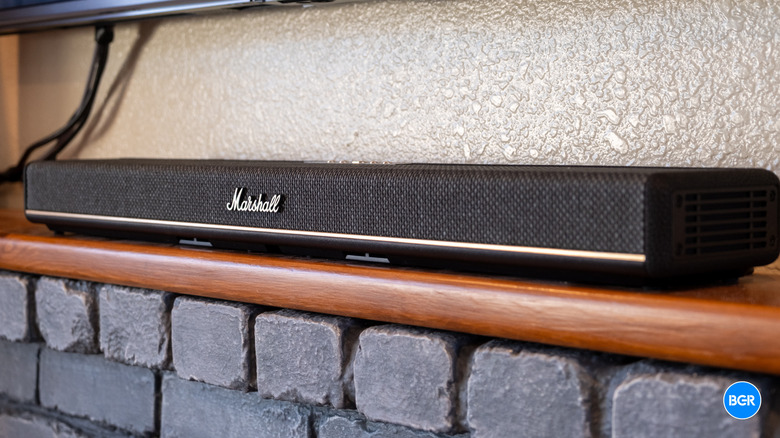
One of the things that I most loved about the Marshall Heston 120 was its design, as it largely stayed true to Marshall's design language that has been beloved for decades. Thankfully, the Marshall Heston 60 retains many of the same design elements as its larger and more expensive sibling — though there are some changes, too.
The Heston 60 measures 28.7 inches wide, 4.9 inches deep, and 2.7 inches tall, and it weighs around 6.08 lbs. That keeps it slim enough to sit cleanly in front of most TVs without blocking the bottom of the screen, and light enough to wall-mount without drama. It's only marginally larger than the Sonos Beam (Gen 2), so it fits well in the same spaces those soundbars are designed for. Not only that, but for TVs around 55 inches wide or so, it should actually fit between their feet, which helps cut down on the amount of space in front of the TV you need to dedicate to the soundbar.
The materials are very premium too, which helps for a product that's designed to be placed permanently in your living room. The bar is wrapped in a textured polyurethane "leatherette" that nods directly to the brand's classic amplifiers, with a woven "salt and pepper" fabric grille and brass-effect controls finishing the look. It comes in black and cream. This is, frankly, one of the best-looking soundbars you can buy — distinctive in a category dominated by anonymous fabric-and-mesh boxes. Compared to the deeply minimalist Beam, the Heston 60 is a design statement rather than something meant to blend in.
Build quality matches the styling. Panel gaps are tight, the grille fabric feels robust, and the whole soundbar has a sense of solidity that belies its modest weight. It feels premium in a way that justifies at least part of the price.
There are some smart design choices related to flexibility, too. The soundbar is designed to be placed on a surface in front of your TV or mounted on a wall, and when you mount it to the wall, you'll mount the bottom of it instead of the back. Marshall says that the speaker configuration means that there won't be any changes in audio, as the soundbar will automatically detect which orientation it's in. Not only that, but the Marshall logo attaches magnetically to the soundbar so it can be placed on the front in either position. Plus, the labels for the controls are magnetic, so they can be flipped around so that they're right side up.
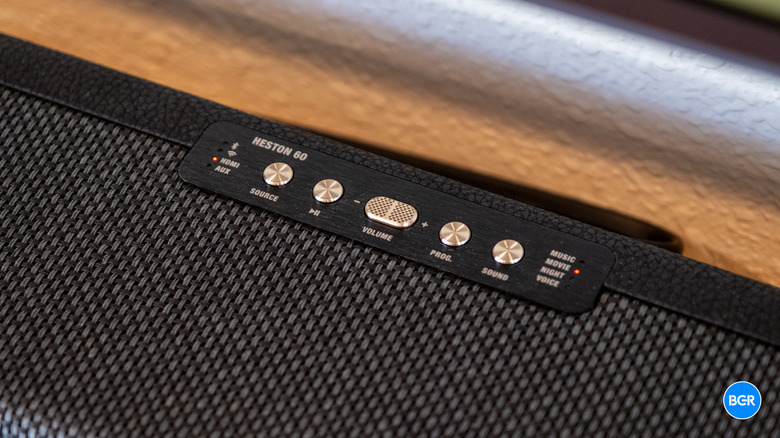
The controls themselves are located on the top of the soundbar: power, volume, input, and sound mode. The buttons are nice and tactile and easy to press, but I couldn't help but miss the excellent feeling knobs that Marshall included on the Heston 120. Unlike some other soundbars, however, there's no remote for the Heston 60. Some may dislike that decision, but it's becoming more common as more and more TVs support HDMI CEC. Frankly, even if there were a remote, I probably wouldn't use it. I use an Apple TV and its remote to control everything, including volume, through HDMI CEC. The other controls that can't be changed through HDMI CEC are accessible in the Marshall app, but these are controls you probably won't manually use all that much anyway. If you do want a separate remote, however, you'll be disappointed.
The selection of physical inputs isn't bad. There's the HDMI eARC input, plus there's an auxiliary input and an RCA output for a subwoofer — so you can connect the soundbar to a third party sub if you want to. There's also a USB-C port, but I assume this is for servicing rather than consumer use — it doesn't make much sense as anything else.
Compared to the larger Heston 120, the 60 trims chassis width and profile significantly to suit smaller screens and narrower TV stands. That's the whole point of the product, and physically, it succeeds — this is a Heston that fits a normal living room.
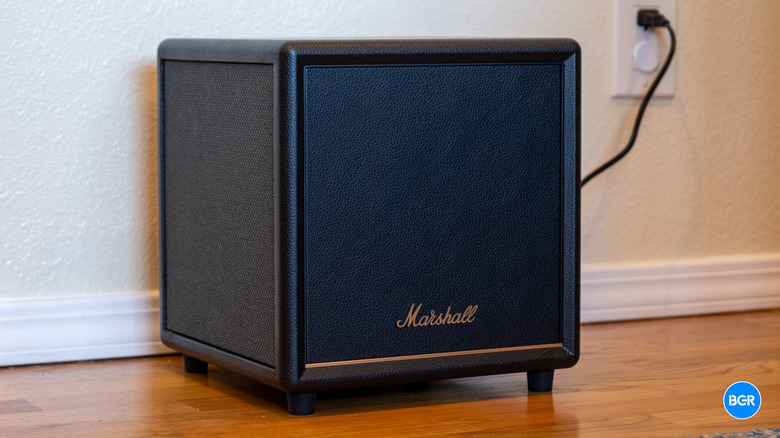
The Marshall Heston Sub 200 is also well designed, and given its shape, it looks even more like a classic Marshall amplifier. It's really just a small black cube, but it has a nice leather coating on the top and back along with a mesh grille on the front and sides. It gets the Marshall logo on the front with a control for overall volume on the back next to a wired input, in case you want to use one.
Setting both the soundbar and subwoofer up is very simple. You'll plug the soundbar into a power outlet and connect it to your TV's HDMI ARC output. From there, the soundbar should be automatically recognized and usable with your TV, but you'll probably want to add it to the Marshall app too, where you can control EQ, set up room correction, and more. The process is more or less the same for the subwoofer. Both connected to the app immediately — and even having to install firmware updates to both of them, I was up and running within five minutes or so.
Software and features
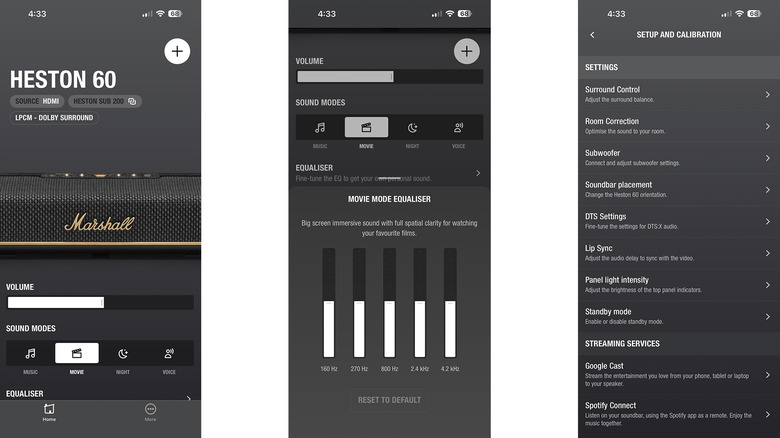
As mentioned, the Marshall Heston 60 and Sub 200 work with the Marshall app, which offers access to a number of controls to help make the experience of using them better. From the app, you can adjust the EQ, change sound modes, install firmware updates, and set up the streaming configuration. I have seen reviews that note the app as being buggy and unresponsive, but I didn't necessarily find that to be the case. Perhaps Marshall has fixed some of those bugs over the past few months. But regardless, the app generally worked as advertised, even on a beta version of iOS, which could be buggy to begin with.
From the main screen of the app, you'll be able to adjust the volume of the soundbar, change sound modes, access the equalizer, and configure some setup features. You'll be able to set the orientation of the soundbar and initiate room correction, which uses your phone's microphone to tweak the frequency response to better suit your space.
The Heston 60 supports a range of connectivity options, which helps make it more versatile. It runs dual-band Wi-Fi 6 and natively supports Apple AirPlay 2, Google Cast, Spotify Connect, and Tidal Connect, so it doesn't lock you into one ecosystem. Bluetooth 5.3 with LE Audio and Auracast is on board, too.
As mentioned, the Marshall Heston 60 can connect to the Heston Sub 200 subwoofer. But that's about where connectivity options end. Marshall doesn't sell surround speakers that can be used with the soundbar. If you're looking for a more immersive experience, you may need to look elsewhere. By contrast, Sonos obviously sells a range of speakers, and its speakers can be paired with its soundbars for immersion. You'll have to pay more for those speakers, of course, but at least it's an option — even if it's one you only take advantage of down the road.
Sound
Of course, there are plenty of soundbars that offer a similar array of features, and while they may not look as great as the Marshall Heston 60, design alone is hardly enough to justify a two hundred dollar premium. So, what about sound? That, after all, is the world that Marshall comes from. Thankfully, the Marshall Heston 60 sounds great, both for watching movies and listening to music.
Under the hood of the system can be found a 5.1 channel layout, which is built around seven drivers, including five 1.25-inch full range drivers and two 3-inch woofers. There are also four passive radiators. The soundbar can natively decode Dolby Atmos and DTS:X — which is one differentiator, as the Sonos Beam (Gen 2) can't handle DTS:X, though it does support native Dolby Atmos decoding. I suspect that for most buying a soundbar in this price range, it won't really be much of a difference maker, but at least it's there.
I found the soundbar to offer a great frequency response, and actually, its bass response is very good for something this compact. Of course, physics does limit how much bass the soundbar can realistically put out, but again, it's far better than you might expect. The bass response is better than the Sonos Beam (Gen 2), which is a 5.0 soundbar. To be clear, if you do have the cash to buy the subwoofer to use with the soundbar, you'll hear the difference. It's pretty dramatic.
The Sub 200 is a capable subwoofer, offering tons of power for the vast majority of situations. Most people won't want it anywhere near 100% volume, and even 50% was too much for already bass-heavy content. In the Marshall app, you can even set the crossover frequency for the subwoofer, which is something that most consumer subwoofers don't offer, at least in this price range. Most users will want to keep it at its default, of course.
Other aspects of the frequency range were handled excellently. The midrange was well-tuned and decently neutral, while the highs were crisp and detailed, at least for a soundbar in this price range. Dialogue is anchored firmly to the screen with excellent clarity, and voices stay intelligible even through dense action scenes. There are four sound modes — Music, Movie, Night, and Voice — and they can be useful. Movie widens the stage and lifts the bass, Night compresses dynamics for late viewing, and Voice boosts speech for low-volume or tricky rooms. For everyday TV, this bar does the core job well.
While the overall frequency response was quite good, the soundbar isn't necessarily very immersive. I found the Sonos Beam (Gen 2) to handle Dolby Atmos content much better, creating a more immersive bubble for content that supports it.
Conclusions
The Marshall Heston 60 has a lot going for it. It has a sleek and stylish design with a good audio response and an array of helpful features, especially around connectivity. The main area where it's lacking is in immersion, which Sonos is handily better at. If you're looking for something small and compact and don't mind that you're not going to get the best Dolby Atmos handling, you'll like what's on offer by the Marshall Heston 60. I'm just not quite sure that it justifies the $200 price increase over the Sonos Beam. The Beam isn't quite as capable when it comes to bass, but it still sounds great, offers more options in terms of expansion, and is better at creating an immersive feel.
The competition
The Sonos Beam (Gen 2) is the biggest competitor in this price range. As mentioned, it's not quite as good at handling bass response, but most will find it's still more than capable. And if you plan on buying a subwoofer like the Sonos Sub Mini, the gap closes even more. Not only that, but the Sonos Beam (Gen 2) is more immersive, which many will find to be important.
Other small differences include the fact that the Sonos soundbar doesn't have DTS:X support — though whether that matters for most day-to-day use is really down to what your content consumption habits look like. Finally, there's the ecosystem. If you already use a lot of Sonos products, then the Sonos soundbar is probably worth going for over the Heston 60.
Should I buy the Marshall Heston 60?
Yes, if you want a stylish soundbar with an excellent audio response, and don't mind that it's not all that immersive.