

DuckDuckGo Will Now Block YouTube Ads By Default On iOS, Windows, And macOS
Ads on YouTube have continued to get worse. Not only have we seen hour-long unskippable ads pop up on the website in the past, but the service also brought unskippable ads to YouTube on TVs, too, making it almost impossible to avoid them even in your living room. The consensus for many has become that you need to purchase YouTube Premium in order to avoid watching a ton of advertisements. However, DuckDuckGo has another solution.
Starting today, DuckDuckGo says that its browser will now block video ads such as those found on YouTube by default on iOS, Windows, and macOS. The privacy-based company says it also plans to bring the feature to Android browsers — in fact, it's already available, you just have to toggle it on yourself. The functionality builds off of community-driven filter lists sourced from uBlock Origin. Since these lists are maintained by the community, they are regularly updated to help catch onto any new schemes that Google and YouTube might be playing with.
The big caveat, of course, is that you'll need to make sure you open YouTube links within the DuckDuckGo browser on mobile to take full advantage of the functionality. It won't block ads in the YouTube app itself. Additionally, DuckDuckGo says that you can easily disable it at any point — even in the middle of a video — if you encounter any problems using the feature. To do so, simply tap the video icon next to the green shield in the address bar, or tap the menu button on mobile and select Disable YouTube Ad Blocking. If you do disable the functionality mid-video, the browser will detect this and ask you to send an error report to help with sussing out any issues.
Android users aren't left out
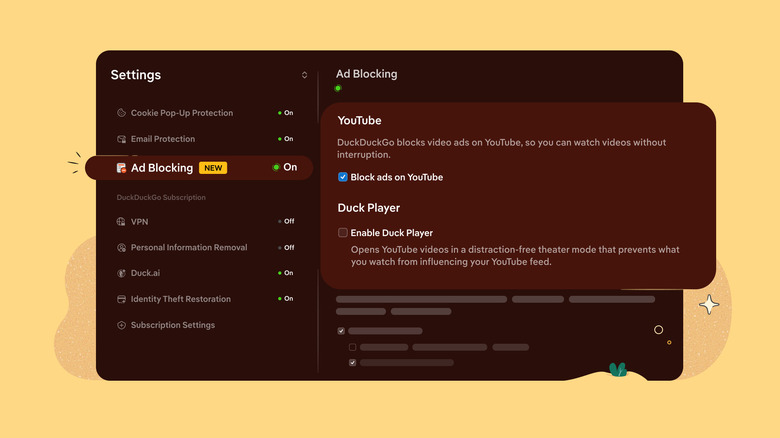
While Android users won't have the ability to block YouTube ads on videos by default, the company says that enabling the option is extremely easy. All you need to do is open the DuckDuckGo browser on Android and then navigate to Settings > Ad Blocking and enable the option for YouTube. If you don't see the feature immediately, then you should make sure your app is up-to-date through the Google Play Store. DuckDuckGo says it plans to make the feature on-by-default for Android soon, too, though no release date for that functionality has been shared just yet.
Due to YouTube's ongoing fight against ad blocking and its push to move more users to YouTube Premium with the introduction of new features and even new plan options like YouTube Premium Lite, users who don't want to pay — or who can't — may find watching YouTube with ad blocking in DuckDuckGo a solid option instead. Just be aware that YouTube could make changes at any point that make the benefits of such features completely null.