

3 Google Maps Features Every EV Owner Should Know About
Google Maps is often the first stop when planning a road trip. The maps and navigation service has so much to offer, from its seamless local search and free turn-by-turn navigation to transit directions and traffic information. The app also comes with several helpful features that can come in handy for electric vehicle (EV) owners, as their road trips often involve a little more planning, considering charging infrastructure isn't as ubiquitous as finding a gas station.
Google Maps can not only help you find EV chargers along your route but also help plan your overall trip more efficiently, taking into account your EV needs. More importantly, as it's completely free to use, there is no reason not to make the most of it for a better overall EV experience. While Google Maps is certainly indispensable, there are also two other popular apps: PlugShare and A Better Routeplanner (ABRP), which can aid in your EV journeys.
AI-powered battery predictions and trip planning
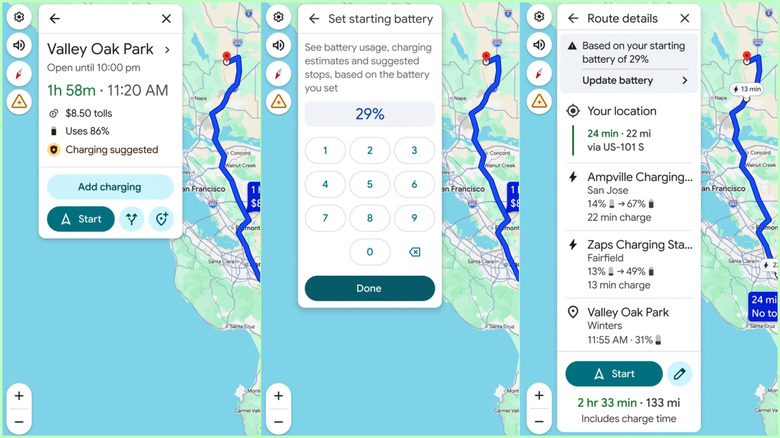
One of the latest additions to Google Maps — the AI-powered battery predictions – takes a lot of the hassle out of your trip planning. Instead of doing all the range calculations yourself and then identifying charging stops, you can simply let Google handle it for you. It'll use your EV model's details and your battery level when you start driving to automatically recommend when and where to charge. Google Maps calculates these stops based on your car's battery size, real-time traffic information, road elevation, and weather, all of which can impact your vehicle's battery consumption.
This feature is currently available on over 350 EV models with Android Auto support. You can leverage it by adding your EV's information to Google Maps and entering a destination. Maps will tell you estimated battery usage, and then you can add your current charge level to get charging stop recommendations, estimated battery level when you'll arrive at your destination, and updated estimated time of arrival after accounting for charging stops. With all this information in hand before you even start driving, you'll have less range anxiety and more confidence in taking your EV for a long road trip.
Real-time charging port availability and plug-type filters
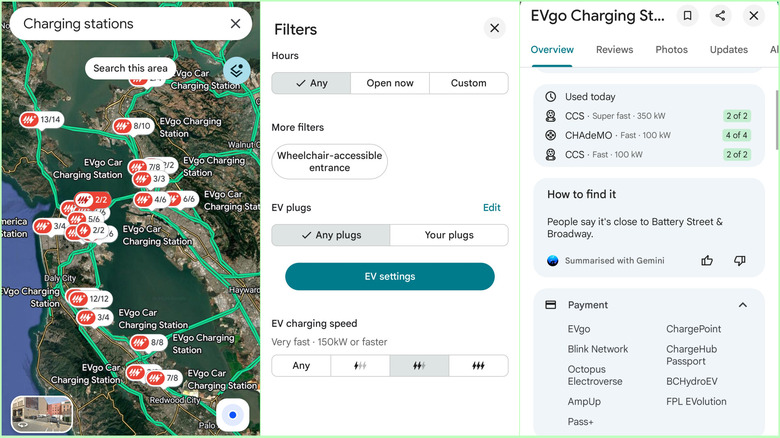
As you likely already know, Google Maps can help you find EV charging stations around you or alongside your driving route. However, it can do so much more. The Maps app can tell you how many charging ports are available at a particular station in real-time, how fast they can charge, and even whether they are currently occupied or not. While this information is increasingly available for most charging stations, you might still encounter some charging stations without all this information. If you're using the Google Maps app on your phone, you may also get information about the payment modes supported and whether the charging station was used today, which can help in identifying whether the charger is in working condition.
When you're looking for charging stations, Google Maps also enables you to filter the stations based on compatibility with the plugs you've added in your EV information and whether the charging speed is fast, very fast, or super-fast. You can also filter based on operational hours.
Battery on arrival in cars with Google built-in
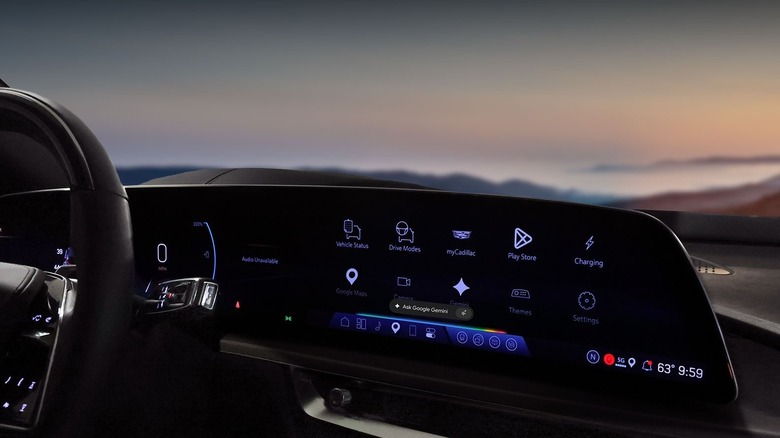
If you own a car that comes with Google apps built-in, including Google Maps, you have access to select EV-related features that can help you out in everyday travel. Some of the car makers that offer cars with Google built-in include Ford, GM, Honda, Nissan, Polestar, Renault, and Volvo. One of the most useful features that you get on an EV with Google Maps built-in is "battery on arrival." When you search for a place or your destination on Google Maps, the app will tell you the estimated battery percentage upon your arrival. Moreover, as you drive, this value will update in real time.
If your car's existing charge won't be enough to reach your destination, Google Maps will automatically add charging stops along your route and include the expected duration for your trip. Google will also highlight nearby charging stations and show available charging ports and the charging speed. Moreover, like Google Maps on other platforms, you can search for charging stations and filter them based on your needs right in your car.