

Here's How To Transfer Your Playlists To Apple Music From Other Platforms

So, you're tired of Spotify and its disadvantages and have chosen Apple Music to stream all your favorite songs. Congratulations! But it's probably not your first music streaming service, and, chances are, you've got playlists and albums you've saved up over the years. Fortunately for you, Apple Music makes it pretty easy for you to transfer your library from your ex-streamers.
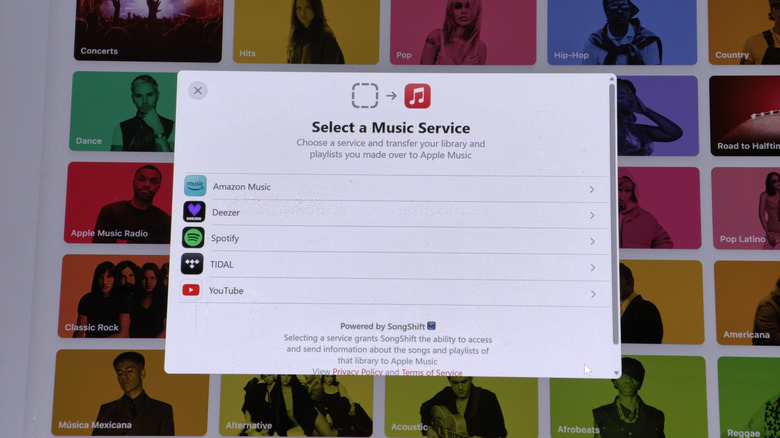
Wherever you're accessing Apple Music — be it Android, iOS, macOS, Windows, or the web — click or tap on your account profile picture and then look for an option that includes the words "Transfer Music." A prompt flow from transfer servicer SongShift initiates and you're able to import content from Amazon Music, Deezer, Spotify, Tidal, and YouTube Music. Select a service, log into your account, approve permissions for SongShift, and then select which playlists you'd like to carry over. SongShift may also allow you to import albums that have been saved to certain accounts, but on an all-or-nothing basis.
After you select "Import," you may see a message afterwards saying that some music needs to be reviewed. Hit "Review Now" to sift through the songs that Apple Music couldn't import for one reason or another. Apple Music may not have rights to some of the songs on the review list, though it may suggest alternate tracks for a few. You can accept or ignore the alternates — hit "Ignore All" if you'd like — and then click "Save" to complete the import.
Alternate ways to import your playlists into Apple Music
SongShift also offers its services independently of Apple Music through its own iOS app, supporting a greater variety of streamers including Audiomack, Deezer, Pandora, Qobuz, and several others. It's still free, but in addition to library imports, you can also share platform-agnostic playlists to your friends or even keep song additions synched up across multiple platforms if you absolutely need to be on more than one.
TuneMyMusic offers a web interface that allows you to move playlists across 19 services via logins, but you can also just manually type in the title and artists of songs you want. You can import a text file with a list you've already typed or link to a URL which has a list stored.
Maybe you have a YouTube Music account and prefer to eschew the middle man from the export process? Google Takeout will let you export your YouTube Music playlists to your device and Apple Music will be able to take in that file and do its magic importing and reconciling songs. Heck, if you're moving all your stuff from Google to Apple, you might want to look at how to use Google Takeout to get your Google Photos library over to iCloud.