

5 New Features Available On Your Xbox Series X In September 2026

Xbox Insiders are getting yet another batch of new features to try out this month. Starting in September, Microsoft says several new features will arrive for Xbox players, including new customization options, a way to get clearer voice communication in party chat, and even updated game streaming functionality. Previously, Microsoft has rolled out additional features like better controller recognition, as well as UI customization to Xbox Insiders, allowing those users to test them before they go live for everyone.
The company detailed these new changes in a blog post shared to the Xbox website, and says that these features will begin rolling out on September 9. Some will only be available to Alpha Skip-Ahead and Alpha on Xbox members of the Xbox Insiders program, though the others are expected to hit the main Insiders branch.
If you haven't already joined Xbox Insiders, but are interested in trying out these new features before they receive their official Xbox release, then you can always learn more about Xbox Insiders through Xbox support. Keep in mind that Xbox Insider sign-up is completely free.
Higher quality remote play streaming
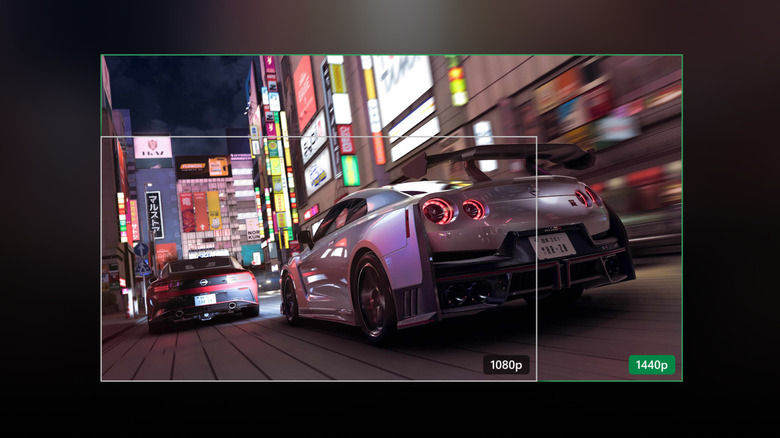
Remote Play is one of the bigger features that Xbox gamers can take advantage of, allowing users to stream their owned titles directly from their Xbox Series X or Series S onto phones, TVs, and an assortment of other devices. Starting in September, Xbox says that members of the Alpha Skip-Ahead and Alpha Insider rings will be able to preview higher-quality Xbox Remote Play streaming. The new streaming functionality will fully support up to 1440P resolution, as well as increased bitrates for video streaming to provide smoother gameplay and higher quality visuals on devices that support it.
Xbox says that during the testing period, not all devices will support the separate streaming settings, but that if you have your stream set to Auto quality it should select the highest resolution and bitrate that your device and network allows for.
To utilize up to 1440P or 4K UHD, ensure those settings are enabled in your Xbox's settings under the Display resolution section found in Settings > General > TV & display options. Both the Alpha Skip-Ahead and Alpha programs require an invite to join, so users in the traditional Xbox Insider track won't be able to utilize this new feature yet.
Improved Voice Clarity in Chat
This next update feels like a big push toward improving Xbox gaming overall, especially since Microsoft appointed a new Xbox CEO and the company has shifted its focus back to improving the brand and its dedication to the Xbox console.
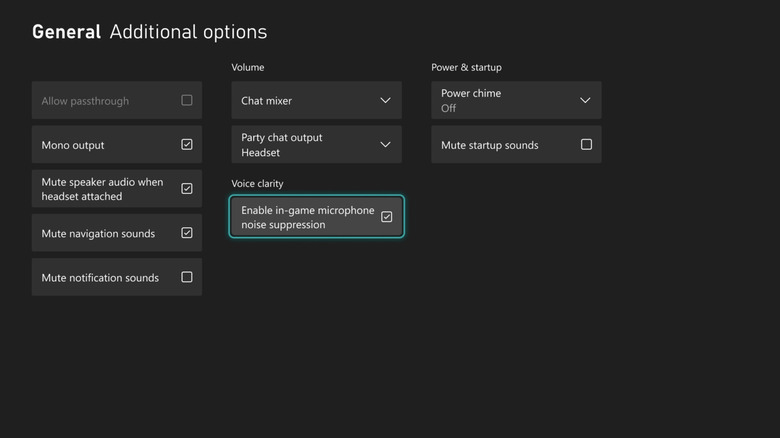
New Voice Clarity features will now be available to Xbox Insiders under Settings > General > Volume & audio output > Additional options. Here users will be able to enable Voice Clarity, a new function that provides "enhanced audio" to help reduce background noise and make it easier for you to hear your teammates.
Xbox says the new feature will be enabled by default for most games released since 2020, and that party chat will also have the feature turned on. As online games have become a bigger and bigger part of the gaming world, the need to provide high-quality voice communication has only risen, and it seems like Xbox is trying to improve its offerings drastically with this feature.
Customizable startup animations
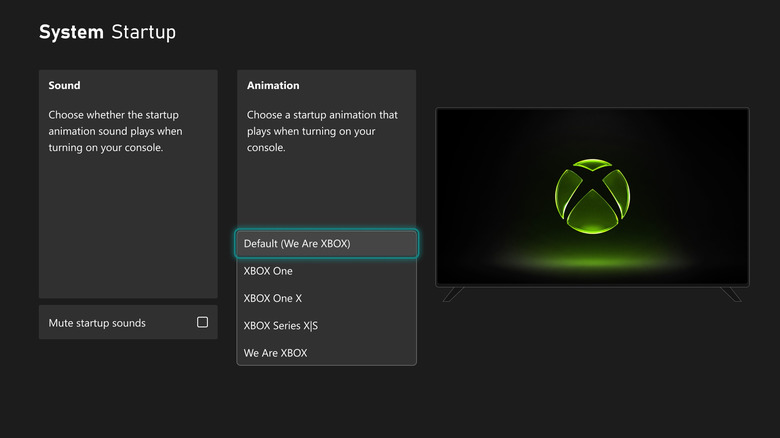
Another change coming to Xbox Insiders in September is the ability to customize your startup animation. We've already seen this feature on other consoles — like the widely acclaimed Steam Deck — and it's basically just a way to make your console a little bit more of your own machine. You'll be able to choose from several different startup animations, including the default We Are Xbox animation, the Xbox Series X/S animation, and even the older Xbox One animation.
To customize your startup animation, make sure you have the latest Xbox Insider update installed and then navigate to Settings > System > Startup. From here, you can select the startup animation that you want to see when you turn your console on.
You'll also have the option to mute startup sounds, too, which is great if you just want to enjoy the visuals without the extra noise. This and some of the other customization features that Xbox has been introducing are a good way to setup your console to fit your style more closely. On top of letting you change the startup animation, Xbox also says you'll now be able to customize the five badges showcased on your profile.
Faster local search functionality
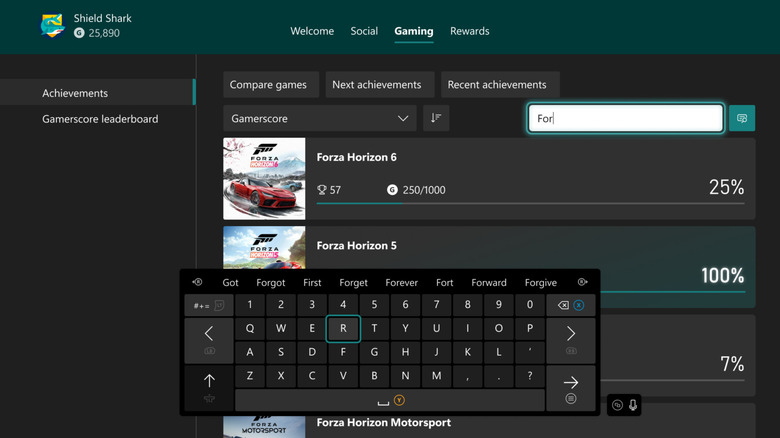
If you love achievement hunting, or just tend to move through a bunch of different games, then you might find yourself having to go back and search for the game you were playing before. Or, maybe you just want to find that hard-to-get achievement you scored during your last play session.
No matter the search, Xbox says its improved local search will now make it much easier to find the items that players are looking for. Xbox gamers will be able to search directly in the My games & apps section, as well as through official club achievement lists and even through their achievement history on their profile.
The company says that the new local search functionality will work alongside existing filters it offers, while giving players the sorting options they need to find what they want to search for. It's a small addition, but it should hopefully make it easier to find that game you meant to finish last year but never quite got around to. Of course, you'll still need to remember the name.
Keep downloading while streaming games through the cloud
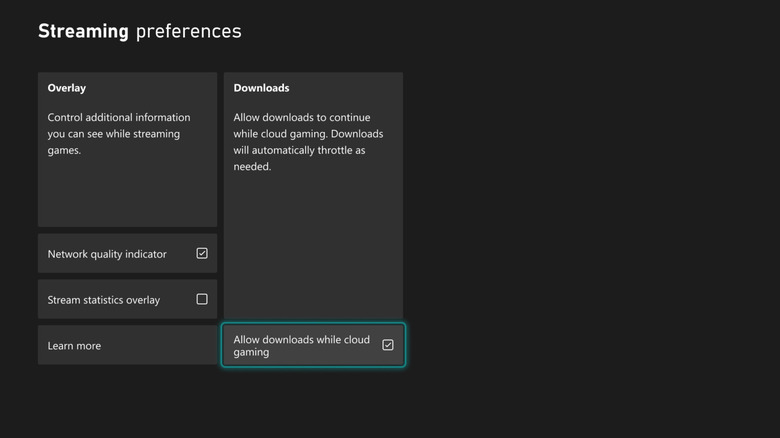
The last new feature we want to highlight is the ability to continue downloading games even when you're streaming to the cloud. This builds off a previous update that allowed Xbox Insiders to stream a game while it was installing or updating.
Now, you'll be able to continue downloading titles in the background even when streaming — if your network conditions allow for it. Xbox says this should help reduce wait times to play new games, while helping you enjoy your other titles, too. While it'll work with all Xbox consoles that support cloud gaming, Xbox says Xbox Series X/S players will see the largest improvements. That's not a huge surprise, especially since the Xbox Series X is Microsoft's most powerful console to date.
To ensure this new setting is on, head to Settings > Cloud gaming > Streaming preferences and then toggle on Allow downloads while cloud gaming. You can also customize other streaming preferences here, like enabling a network quality indicator, as well as turning on an overlay that lets you view your streaming statistics live.