

Relying Only On GTA 6's Autosave Could Cost You Hours Of Progress

"GTA 6" players may have to think twice before relying on the game's autosave feature to protect their progress. The autosave is meant to keep players from losing progress, but recent reports suggest users have been left missing hours of gameplay after unexpected interruptions. This has raised concerns about how reliably the autosave feature saves progress and what additional steps you need to take to safeguard it.
This concern becomes particularly frustrating when players have invested several hours in the game. I have lost some progress too when the power went out, but not too much. In my case, only an hour's worth of progress was lost because the game didn't autosave a mission. The reported incidents don't confirm a widespread problem with how "GTA 6" handles saves, but nothing is worse than finally getting to play a game you have been waiting for, spending hours making progress, and then losing it unexpectedly.
How autosave works in GTA 6

"GTA 6" saves your progress, but not as frequently as you may expect from a modern open-world game of this scale. Autosaves usually happen at the end of a certain mission, but different situations may trigger them. After completing a mission, the game is likely to save your progress and overwrite the autosave file.
However, "GTA 6" is an open-world game, and once free roam is unlocked, players may explore the world and discover things like shops, new areas, or points of interest. In that case, the game won't likely autosave, and if your console shuts down unexpectedly, you are likely to lose all your progress since the last autosave.
One thing worth noting is that while main story missions and larger side missions trigger autosave on completion, the same doesn't apply to smaller side activities. Another important point is that the game doesn't autosave during a mission and doesn't let you manually save either. This means you're going to be locked into finishing a mission before you can save and quit, so plan your time accordingly.
Manually saving can save your progress from being lost
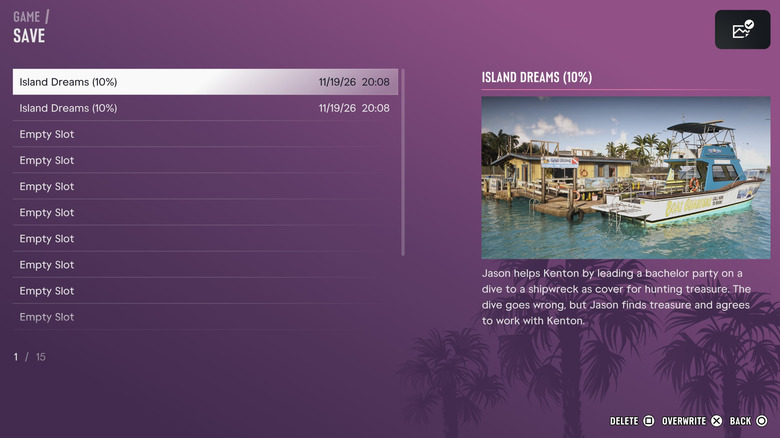
Several players have recently reported losing significant amounts of gameplay progress. Among them is JasonTheWeen, a streamer who reportedly lost about 11 hours of gameplay. His PlayStation 5 unexpectedly shut down during a live stream. After restarting the console, he found his latest progress missing and that the available save files did not include the gameplay he had completed.
Other players have also described similar experiences. Community reports include players claiming to have lost around 15 hours, seven hours, and smaller amounts of progress following unexpected power interruptions. Streamer Hachu has also reportedly lost around two hours of gameplay after a power-related incident.
To prevent that from happening to you, save the game manually. To do that, simply follow these steps:
- Press the options button on your controller.
- Select the Game option (the second one).
- Select the first option, Save Game.
- Save your progress in any slot.
You have 15 available slots to keep separate save files. Also, it is recommended to manually save regularly when you are not focusing on the main story.