

Every Amazon Fire TV Stick Should Be Using This One Audio Setting

The Amazon Fire TV Stick is a popular plug-and-play device for accessing streaming content on a TV or monitor, and it's super easy to use. But if you're listening with just the standard settings, you're missing out. There are so many other settings you can leverage to enhance your experience. One such audio feature is particularly great for offering a better balance between dialogue and background sounds.
Called Dialogue Boost, this feature is designed to enhance the sound of voices and dialogue while quieting background audio. For those who struggle to hear what people are saying, especially in shows that have a lot of loud action scenes combined with quieter dialogue-driven ones, this feature could make a massive difference in your entertainment experience. Sure, one of the cool things you can do with an Amazon Fire TV Stick is to connect Bluetooth headphones to it for private listening. But with this feature, you can hear more clearly without having to wear headphones. You can also avoid having to constantly reach for the remote to adjust the volume.
How to access and enable Dialogue Boost and how it works
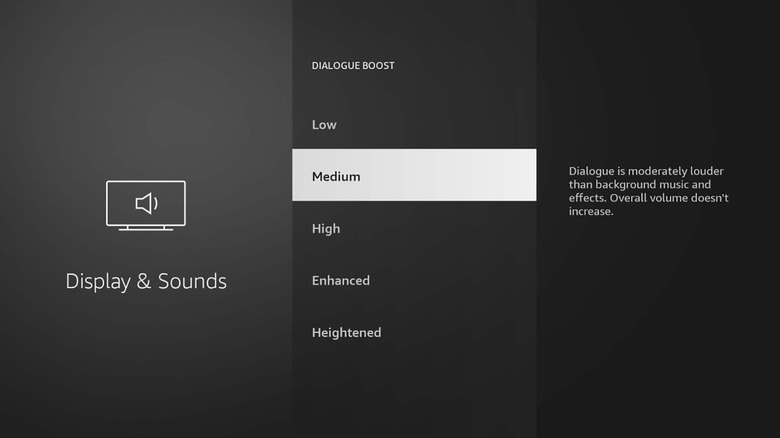
To access Dialogue Boost from your Fire TV Stick, access Settings, then Display & Audio, and scroll down to Audio or Audio Settings. Dialogue Boost is one of the options, which increases the volume of dialogue without increasing the volume of background music and effects. You can not only toggle this on and off, but you can also adjust the intensity on some newer, more premium Amazon Fire TV Stick models, including the Fire TV Stick 4K Max (2nd Gen, 2023 model) and Fire TV Stick 4K Plus. This gives you the options of Low, Medium, High, Enhanced, and Heightened, so you can play around with each and find the perfect setting for what you're watching.
Dialogue Boost works using machine learning algorithms that run in real time on the Fire Stick device itself. It can reportedly reduce background audio by up to 12dB and boost audio up to 10dB in scenes that need it most, but importantly, it doesn't increase the overall volume. Choose Enhanced or Heightened for shows like "Fallout," for example, that frequently switch between quiet scenes and loud, booming ones. While for a sitcom that has only scene-changing loud music or live audience applause, you might be fine with Low or Medium.
When to use Dialogue Boost and other considerations
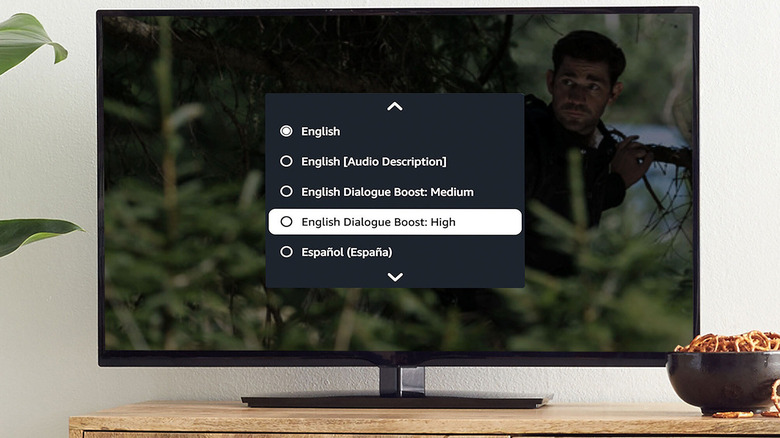
Dialogue Boost on an Amazon Fire TV Stick is great if you watch TV late at night. You can fully enjoy a show or movie without worrying that a loud jump scare, fight scene, explosion, or car chase will blast through the speakers and wake everyone. It's also ideal if you want to watch while a baby is sleeping but don't want noises that will startle them, or if you're someone who doesn't want to distract roommates with loud sounds or overall volume. Anyone with hearing impairments or sensory sensitivities might also appreciate it as a useful accessibility feature.
It's worth noting that Dialogue Boost works on select Fire TV models as well, not just the streaming sticks. It has also been available in the Amazon Prime Video menu since 2023 for Amazon Prime Video originals and many other shows and movies compatible with the feature. But if you're thinking about buying an Amazon Fire Stick, this enhanced version is a viable reason to invest in a newer model. You can enjoy the feature on virtually any app you're accessing through the streaming stick.