

3 New Tools Meta Just Added To Protect You From Scammers (After Disabling 150,000 Accounts)
As the company behind some of the biggest social media platforms in the world, Meta has to work hard to make sure its apps aren't rife with scammers. In fact, the company revealed it disabled 10.9 million Facebook and Instagram accounts in 2025 alone, all of which were associated with criminal scam centers. Meta also worked with law enforcement on a large-scale operation that resulted in the company disabling over 150,000 accounts found to have links with scam center networks, and this ultimately helped Thailand's Royal Thai Police arrest 21 individuals. But scammers are resilient, and they're constantly changing their tricks to try to evade detection.
According to Meta, criminals are using "increasingly sophisticated measures to defraud people" on its social media platforms and other services on the internet. That's why the company is launching a new suite of tools on Facebook, Messenger, and WhatsApp to aid in fighting back against different types of scams that are perpetrated by fraudsters. These days, scammers are even using AI to try to trick you, and Meta has also built artificial intelligence systems to help deal with the issue. These new tools have been added recently by Meta and are the latest ones in the company's arsenal for fighting scammers.
Alerts for suspicious friend requests on Facebook
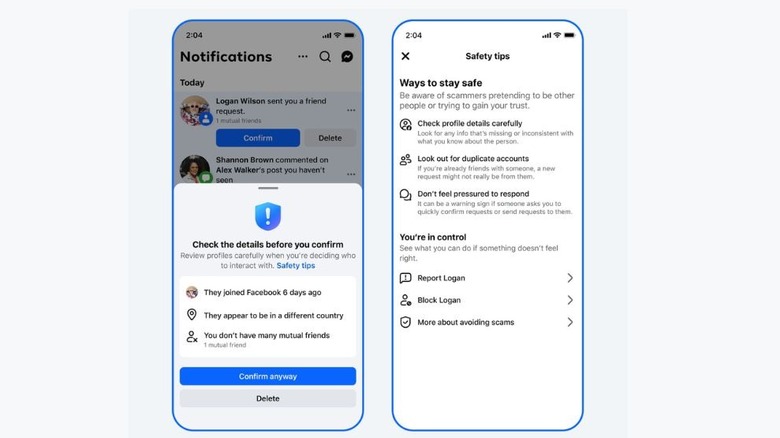
The Facebook friend request feature provides a way for you to add new people to your friends list. However, as handy as this feature is for helping you connect with new people, it appears that scammers might also utilize it as the first step in getting closer to their potential victims. Because of this, Facebook has launched a new protection feature that will alert you when you receive a friend request from any account that "shows certain signs of suspicious activity."
For instance, if you receive a friend request from someone who either created an account recently, doesn't have many mutual friends with you, or whose profile information says they're in a different country than their real location, Facebook will show you a warning. These warning alerts will trigger both ways (when sending and receiving friend requests). If you receive a suspicious friend request, the alert from Meta will give you an option to delete it.
Warnings for suspicious WhatsApp device linking
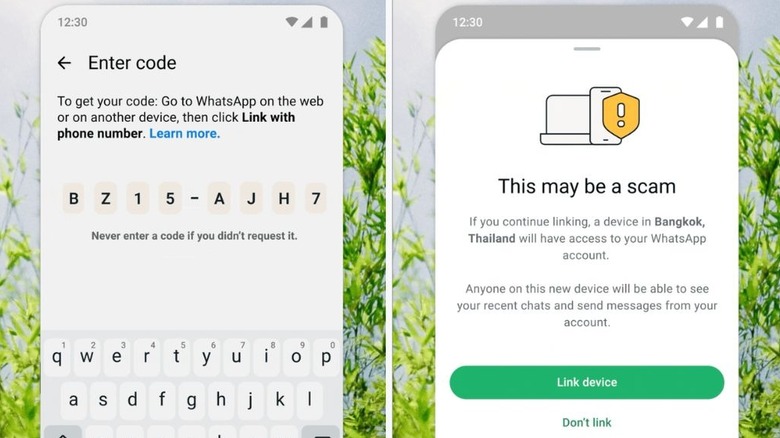
WhatsApp's device linking feature is a great way to use your account on multiple devices. When you link your WhatsApp account to a device, you can access all the recent messages that were received, and you can also send new texts. However, while this feature is useful for accessing your WhatsApp account on multiple devices, Meta says scammers can also trick you "into linking your WhatsApp account to their device." For this reason, WhatsApp will alert you when it detects that a linking request could be shady.
The warning alert will show you where the device that wants to link to your WhatsApp account is located and also highlight the repercussions of linking, which include anyone using the device being able to view all your recent chats. If you're the one who initiated the link, you can select "Link device" to finish the process. Otherwise, you can select the "Don't link" option provided on the warning screen to stop the attempt.
Expansion of advanced scam detection on Messenger
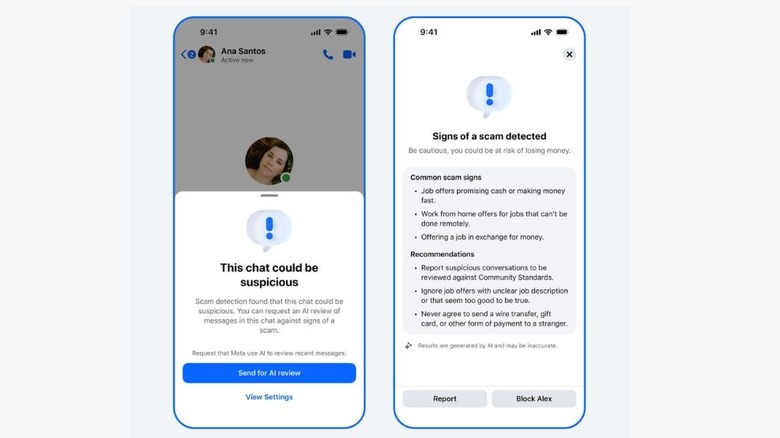
Toward the end of 2025, WhatsApp rolled out a new feature to protect users from online scams. It displays a security warning when you attempt to share your screen with an unknown contact as a way to help the platform fight against online fraud. At the same time, Meta also announced that it was testing a new scam detection feature, but that it was only available in a handful of countries. Now, the company is rolling out Messenger's advanced scam detection feature to more countries. According to a Facebook support page, this feature can be enabled or disabled depending on whether you find it useful or not, but it only works while using the Messenger apps for iOS, iPadOS, or Android.
If you choose to enable this feature, it will warn you when a chat with a new connection may contain signs of a scam. Some of the scams that will trigger a warning include job opportunities that promise quick money and work-from-home positions that can only be done on-site. When Messenger detects that a chat could be a scam, it will send you a security warning. The warning includes a button to share the chat for AI review, although that will mean the shared messages will no longer enjoy Messenger's end-to-end encryption feature.