

This New Accessory Brings Back The Slide-Out Keyboard For Any Smartphone
While early mobile phones weren't as powerful as the smartphones of today, they actually had one standout feature some miss: physical keyboards. Yes, we might have grown used to typing on a screen, but there's still a certain satisfaction and comfort in pressing physical keys as we type away. If you miss that hands-on feel but don't want to buy a completely new mobile device, a new accessory now brings the physical keyboard back to any smartphone.
The Clicks Power Keyboard swaps out the on-screen keyboard for tactile keys that slide in and out whenever needed. It makes your phone look and function like the slide-out keyboard devices from yesteryear, even if the originals are one of the old-school gadgets nobody really uses anymore. But beyond the nostalgic appeal, you might be wondering: if the on-screen keyboard works perfectly fine and has for years, why would you want a physical one?
Well, four words: maximum screen real estate. Unlike on-screen keyboards that can take up nearly half the screen, the Clicks Power Keyboard allows you to use all that precious space for something other than typing. On top of that, it can eliminate the inconvenience of using native keyboards on devices like smart TVs, gaming consoles, tablets, and AR/VR headsets. If you've tried any of these gadgets before, you know how clunky their keyboards are for typing long search queries and complex passwords. The Power Keyboard replaces that hassle with a faster, more accurate, and more tactile typing experience, all in a compact, handheld form.
A quick look at the Clicks Power Keyboard and how it works
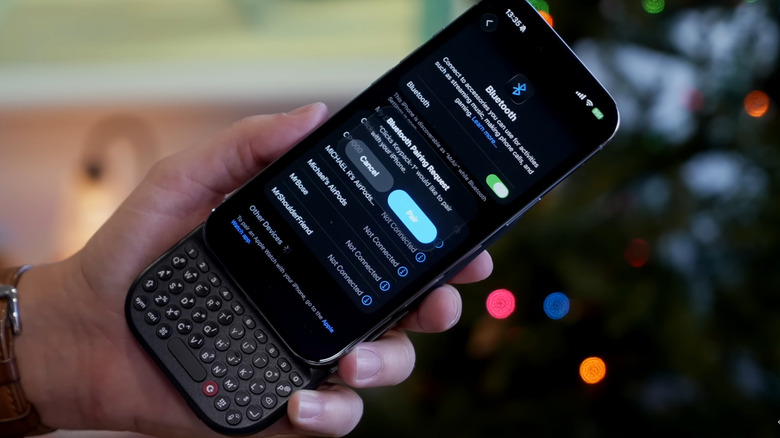
Unlike the USB-connected Clicks Keyboard Case, the Clicks Power Keyboard is a Bluetooth device — but built specifically to fit your phone. How it works is simple: it attaches to the back of your device via magnets (you can use a magnetic case or adhesive magnetic ring) and connects via Bluetooth. The keyboard itself stays hidden behind your phone. When you're ready to start typing, all you have to do is push the phone up until you hear a click. If you need to put your phone on landscape, rotate your device while holding onto the keyboard. The Clicks Power Keyboard easily fits most phone sizes, including large flagship models.
To pair the keyboard with your smartphone, press and hold the 123 key and hit the 0 key to enter pairing mode. "Clicks Power Keyboard" should then appear in your available Bluetooth devices list. Tap on it to pair. You can connect the Power Keyboard to a maximum of three devices at the same time. Simply repeat the same steps for the other two gadgets. Each one will be assigned to the 1, 2, or 3 key, based on the order in which you paired them.
When you want to switch devices, click the corresponding number key along with the power key. Since the Power Keyboard simply snaps on magnetically to your phone, you can detach it anytime. It doesn't need to be physically attached to a device to work, either.
As of this writing, the Clicks Power Keyboard is still available for pre-order, with shipping expected to start in May 2026.
Under the hood of the Clicks Power Keyboard
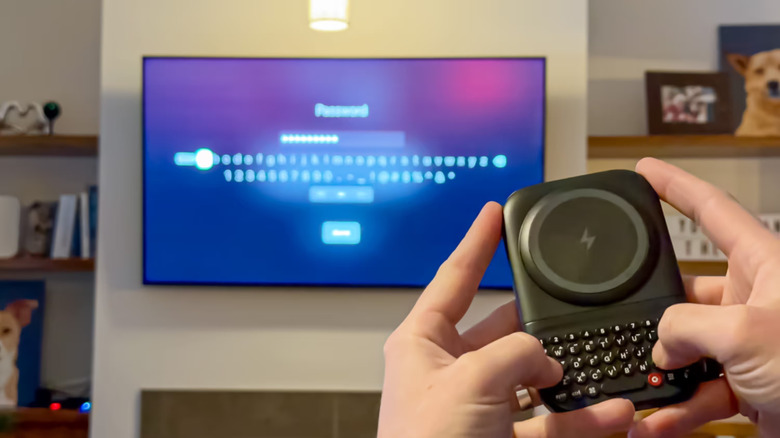
The Clicks Power Keyboard is a universal keyboard, meaning it's compatible with practically any Bluetooth-enabled device. The keyboard itself looks like your typical onscreen QWERTY keyboard; the only difference is that it comes with more features, including a dedicated number row, Ctrl key, and directional arrows for power users.
Besides offering phone users real buttons, the Clicks Power Keyboard doubles as a wireless power bank. It's rated at 2,300mAh with a 5W output, but only 1,800mAh of that can be used for actual charging by default. This should be enough to top up your phone in a pinch, though it likely won't fully charge it. It's worth noting that you can only use the keyboard as a wireless charger for Android and iOS devices that support Qi 2.0 or MagSafe charging. If you prefer to keep the keyboard as just that and not a power bank, the Clicks app allows you to disable the wireless charging functionality.
Whether or not you use the Clicks Power Keyboard for charging, its onboard battery will still work to power the keyboard itself. It uses 500mAh for the keyboard out of the box. However, this amount is fully customizable from the Clicks app. To make sure power consumption is low and battery runtime is long, the Power Keyboard runs on Bluetooth Low Energy 5.4.
For added convenience, the Clicks Power Keyboard includes an LED backlight with an adjustable brightness. The keyboard is also pretty portable. It's almost the same size as a small power bank, measuring 4.71 by 3.02 by 0.6 inches and weighing 6.35 ounces.