

This Easy Trick Shows You Which Side Of Your USB Port Faces Up
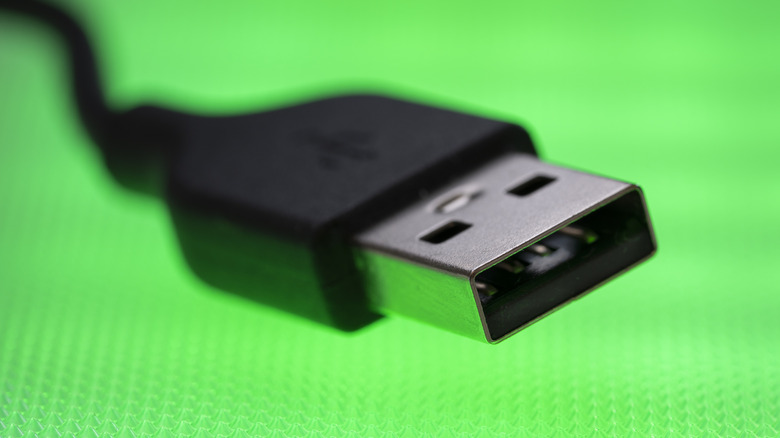
The USB-A connector is surprisingly tricky. You never know which side is up, and it almost always takes three attempts before you manage to figure that out. Plug the USB-A device once, and it doesn't connect. Flip it and try again, and you still get the same result. But the moment you switch back to the original orientation, it suddenly plugs in fine. This is often referred to as the USB paradox. With so many useful USB-A gadgets around, whether it's wired mice and keyboards, storage drives, laptop cooling pads, or webcams, this confusion can often lead to frustration. But it doesn't have to be this way. You can quickly identify which side of the USB-A connector faces up.
Although both sides of a USB-A connector appear symmetrical and identical, they aren't the same, both inside and out. If you look closely, you will notice that one side has a slight zigzag seam on the outside and a plastic plate on the inside. That's the bottom side, while the one that's perfectly smooth is the top side of the USB-A connector. This distinction alone can save you a couple of seconds every time you connect a USB-A device. When plugging in, hold the device such that the top side faces upwards. And if your PC features vertical ports, the side with the seam should face left. Some devices also have upside-down ports, but this should be evident the first time you plug in a USB-A device.
Some USB-A devices have markings for easier identification
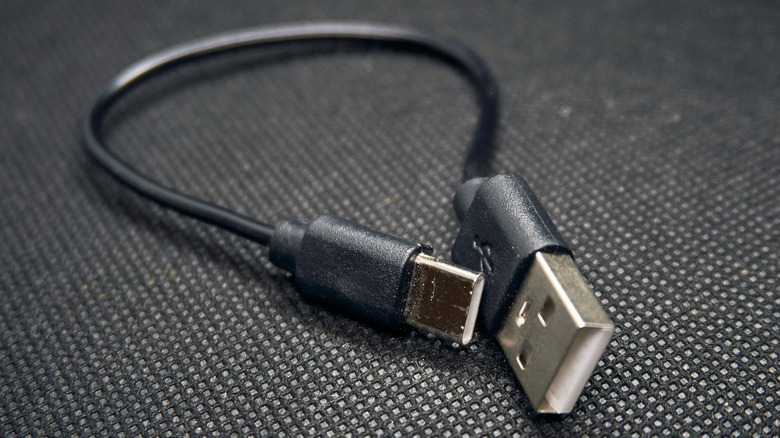
To make things easier, many manufacturers print the USB logo on the top side of the connector. Some even mold it into the plastic casing. Either way, there's generally a USB logo on the top face of the connector. The official USB specifications state that manufacturers must print the USB logo, but not everyone does it. Still, if you have devices that bear these markings, you now know which side faces up.
Keep in mind that you might not have to deal with this confusion at all in a few years. Virtually everything uses the USB-C port now due to its faster speeds, and the best part is that it is reversible. That means you can plug in the connector either way, as there's no top and bottom face. Both PC and smartphone manufacturers are now adopting the USB-C standard. Modern laptops as well as newer iPhones feature USB-C ports for charging. We now even have USB-C flash drives for storage. It will take a couple of years before USB-C largely replaces the USB-A standard, but until then, at least you won't be confused about which side faces up.