

4 Of The Best Google Calendar Alternatives
The luster of Google's free apps and services has been waning after years of lawsuits culminating in a major loss to the Department of Justice that revealed the company is indeed an illegal monopoly in several key areas, such as search and online advertising. Couple this revelation with the degradation of services like YouTube and Maps, and it's easy to see why removing Google from our lives is a pretty fashionable trend right now.
If you've been contemplating de-Googling yourself, there are a few sticking points that make the move challenging. Google Calendar, in particular, is hard to replace, especially for free. Thankfully, a few solid options do exist, if you know where to look. By drawing on our tech expertise while considering user testimonials and professional opinions, we've come away with five services that we consider to be the best Google Calendar alternatives available today. These options offer many comparable features across desktop and mobile, with a few even exceeding Google by offering native desktop apps.
Whether you're interested in a Google Calendar replacement built around privacy and security, one that is better for business-focused users, or an option that uses AI integration to help plan your day with ease, there's a calendar app for you. From Proton Calendar to Morgen Calendar, leaving Google in the dust is that much simpler with these handy replacements at your disposal.
Proton Calendar
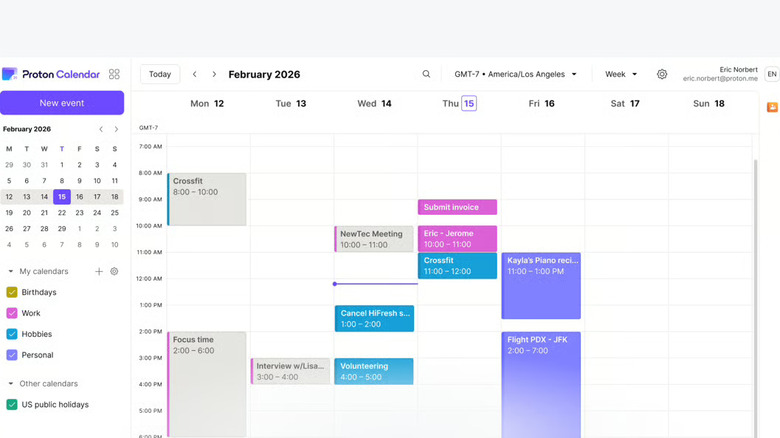
Proton caught some flak when it expanded beyond its email service. Some argued the company was spreading itself thin, creating a fleet of products users feel lack the polish of Proton Mail. But as time has gone on, it's easy to see how Proton's expansion has paid off, and we as consumers win with a handful of replacements for Google's services. Proton Calendar is one such app — a gem in the company's lineup offering end-to-end encryption, cross-platform support, and a user-friendly UI. It's all available for free in the Proton Mail app, which offers native versions across desktop and mobile.
Similar to how Google Calendar offers a handful of optional features with its Google One subscription, Proton Calendar offers a few paid tiers beyond its free access. Subscriptions start at $4 a month for features like extra storage, then jump to $10 a month for a whopping 500 GB of storage. Still, for most users, all you'll really need is the free account that comes with 1 GB access for a maximum of three calendars, which is also a great way to test the service to make sure it's something you're willing to subscribe to, say, if you require a privacy-focused calendar for your business.
At the end of the day, Proton Calendar is a privacy-focused alternative to Google Calendar, with both free and paid tiers and an easy-switch feature that eases the burden of moving from providers like Google, Yahoo, and Outlook. Not only are professional reviewers happy with the core free features you get with Proton Calendar, but you'll find users offering the same sentiment that it's a great alternative for business and personal accounts.
Outlook
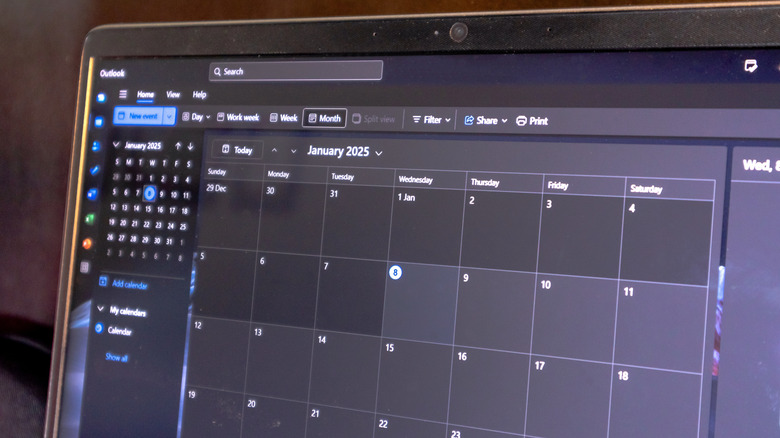
Outlook Calendar offers a tried-and-true platform, one that many businesses run on. So if you're looking for a corporate solution that exceeds anything Google Calendar is doing, Outlook is the answer for all of your complex scheduling needs. It's also a great choice if you're already using products within the Microsoft 365 ecosystem, like Word and Excel, which is a benefit of choosing such an established product. This also means you can rest easy knowing your calendar choice won't be going anywhere anytime soon — even when there's a looming update that changes the design, Outlook Calendar's enterprise-level quality as both a service and client remains a core foundation.
Outlook Calendar is free to use with a personal account, through a web browser, or its mobile app, or you can opt to use Outlook's desktop app, all of which include access to Outlook Calendar, should you require a calendar that is both native and offline. All free Outlook accounts come with 15 GB of storage, similar to Google, and you can pay for an optional Microsoft 365 subscription, starting at $10 a month for 1 TB of cloud storage while removing advertisements. So if you prefer a clean UI sans ads, Outlook shines brightest when paying for a Microsoft 365 subscription.
You don't have to look far to find professional reviews that point out Outlook Calendar's intuitive design and beneficial Windows integration, noting how great the tool is for organizing events for large groups. User testimonials across social media agree that it offers a level of control that's really hard to beat, ensuring Outlook Calendar is a top Google Calendar replacement.
Tuta Calendar
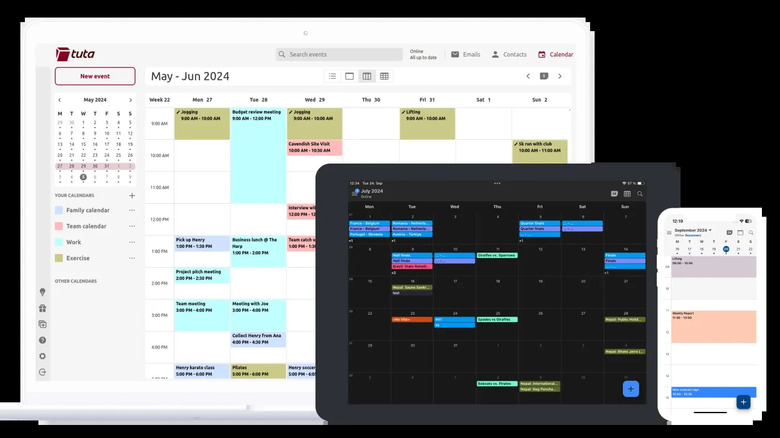
Imagine a calendar service built with the idea that Proton doesn't take security far enough, and you'll basically have Tuta Calendar. By encrypting more of your data, like your notifications, Tuta Calendar goes above and beyond, utilizing quantum-safe algorithms (Kyber-1024) to future-proof with advanced standards. So if pure security is your utmost goal when hunting for a Google Calendar replacement, look no further, as Tuta Calendar is easily the go-to for anyone who cares about keeping their data as safe as possible with full encryption.
What's especially nice is that you can get this level of security for free, and the free plan is perfectly functional for personal use at 1 GB (similar to Proton Calendar). However, if you are a power user, someone who requires the ability to sync and manage multiple schedules, starting at €3 a month (roughly $3.50 USD), you can bump your storage to 20 GB while also opening support for unlimited calendars. As far as pricing goes, it's pretty competitive for what is ultimately a smaller service that isn't backed by a major international corporation. Tuta is the better choice for users who prefer standalone software that is purpose-built, with the benefit of native apps available across mobile and desktop.
Of course, none of this matters if the UI stinks, and thankfully, Tuta Calendar offers a clean aesthetic that is ad-free. Professional software reviewers agree, noting how customizable and responsive the interface is. User testimonials across social media reveal similar sentiment, calling out how it's a great choice for anyone jumping on the de-Google train. No matter how you slice it, Tuta Calendar not only beats Proton at its own security game but also rivals Google when it comes to intuitive design that's easily navigated and customized.
Morgen Calendar
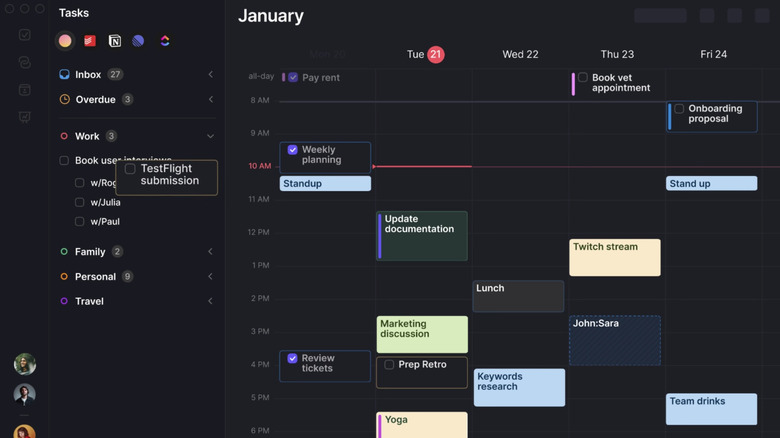
For our last contender in today's roundup, we have Morgen Calendar. Now, unlike every other option on the list, there's no free tier. However, there is a free trial that lasts 14 days, providing full access to the calendar and its many features, giving you two weeks to decide if paying $30 a month is worth it. Before you scoff at the price (which is cut in half should you pay for a full year), it's worth mentioning this is a calendar for the power users out there, offering native apps for desktop and mobile, ensuring full coverage no matter your OS of choice.
Beyond a fleet of native apps, you also get class-leading multi-calendar aggregation, ensuring Morgen Calendar is a one-stop shop for every single one of your calendars across the web, all while acting as a standalone app that's both a service and a client. If you find yourself juggling too many calendars at once and need a way to simplify your scheduling within a single app, Morgen Calendar is that app, so it is priced accordingly for this demanding use case.
Morgen Calendar also excels at task management with an included AI planner. It features a drag-and-drop interface that works with all synced calendars, easily outshining Google's efforts with Google Tasks' limited integration within Google Calendar. Looking toward professional reviews, many point out the gorgeous UI that elevates daily tasks and event planning well beyond Outlook and Google Calendar, with users on social media gushing about how well it integrates with competing calendar and to-do services. The consensus is clear: If you need more from your calendar app than the competition offers, Morgen has positioned itself to cater to hardcore users who require class-leading scheduling software.
Methodology

In order to create this roundup of the best Google Calendar alternatives currently available on the market, we have not only leaned on over a decade of expertise covering apps in all of their iterations across PC, mobile, and the web, but we've also taken into account the many opinions of experts in their field across tech websites, as well as user opinions across social media. By combining all of this information, we come away with a much clearer picture of which calendar alternatives are truly enjoyed for both business and personal use as replacements for Google Calendar.