

Active Calories Vs. Total Calories: What's The Difference On Apple Watch?
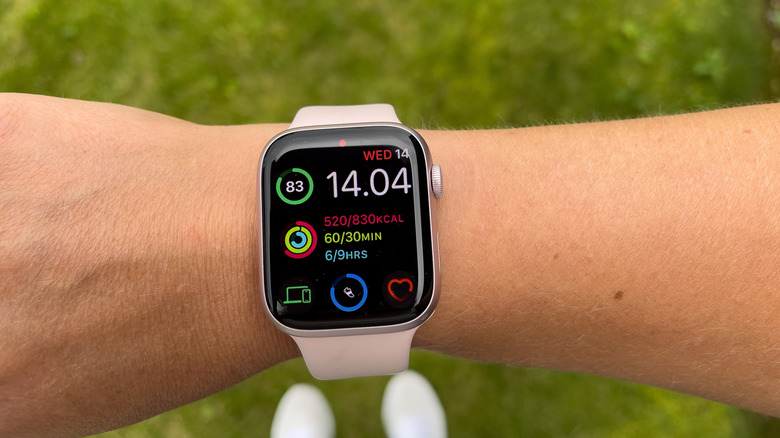
No matter which Apple Watch you have on your wrist, this device can help you track various health parameters that can be used to analyze wellness trends or discuss your activity with a healthcare professional. Two such values that appear on your iPhone in the Fitness app are Active Calories and Total Calories. Both are important for tracking your health and fitness goals, but knowing the difference between Active Calories and Total Calories will give you a better understanding of how your body burns energy when you're moving and when you're at rest.
The Active Calories value tracks the number of calories burned while doing an activity that requires physical exercise. That activity may be a Workout you start on the iPhone or Apple Watch, like a running session, cycling, or lifting weights, but it could also be something more mundane, like cleaning your home. Total Calories, on the other hand, is the sum of Active Calories and Resting Calories. The latter is the energy the body needs to keep you alive. It's energy you need for everything that goes on in your body, like brain activity, your heart beating and pushing blood to all the organs, breathing, digesting food, sleeping, and other processes.
Why are Active Calories important?
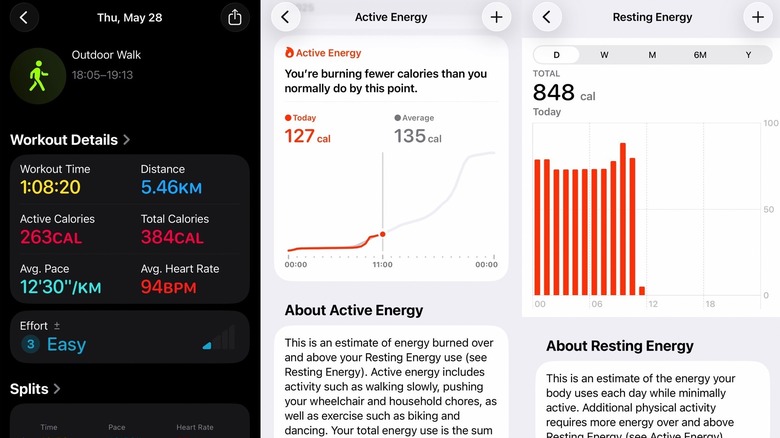
Apple Watch users can use the wearable to keep track of regular exercise because it supports various types of workouts and customizations. Each workout session will provide a report featuring health parameters, including Active Calories and Total Calories. For example, the screenshot above shows an Outdoor Walk session that lasted 68 minutes, and it burned 263 Active Calories and 384 Total Calories. If that was the only activity of the day using active energy, you'd have an idea of how the workout might affect your daily energy balance: Or to put it another way, if your daily Resting Energy average is around 2,000 calories, you'd need about 2,300 calories on the day of your walk to match that day's estimated energy consumption.
The Active Calories and Total Calories are estimates based on an algorithm that takes various parameters into account, including your gender, weight, age, and type of activity, instead of precise measurements. However, these values can be verified by tracking daily calorie intake and body weight over time. If you consume fewer calories than your Total Calories reading and you lose weight, it may mean the wearable is accurate. Similarly, you may notice correlations between staying at a targeted weight or gaining weight and the Total Calories readings. Active Calories can affect whether you maintain, gain, or lose weight. The more you move and the more vigorous the activity, the more Active Calories you'll burn during the day.
Don't look only at calories

But you shouldn't focus only on the number of calories burned as a gauge for your health and fitness goals. The Centers for Disease Control and Prevention (CDC) says that physical activity "is one of the most important things you can do for your health,", and it recommends 150 minutes of moderate-intensity activity (brisk walking) or 75 minutes of vigorous-intensity activity a week. Additionally, the CDC recommends including strength workouts in your schedule.
All of these will get Active Calories and Total Calories estimates when tracked with the Apple Watch, but the device will also offer trends about your activity, showing if you've been more active or if you've worked out less than usual. The app can also indicate if you may be overtraining and suggest you take rest days. Additionally, the Health app will show other parameters, including heart rate data during workouts and at rest. The iPhone will keep a history of your workouts, which can help you monitor your progress. For example, if you're training for a competition, like a marathon race, you should notice improvements. By analyzing multiple health trends, you should get an idea of whether you are making progress with your health and fitness, including weight targets.