

Cool New Google Drive Feature Helps You Organize Your Files (Finally)
Google Drive can be a handy way to back up your files to the cloud. However, keeping things organized isn't always easy, especially if you have a lot of loose files. Sure, you can make new folders and move the files into them, but you still have to manually sort through everything, which could be time-consuming depending on how many files you have.
At least, that used to be the case. Teased back in 2025, Google has now released a new update to Google Workspace that can help you finally get your chaotic Google Drive under control. The new feature will allow users who have a Workspace plan or those subscribed to one of Google's AI plans — like Google AI Ultra and Google AI Pro — to take advantage of AI-powered organization. When activated, the feature will scan your Google Drive using Gemini and then make suggested changes to help you organize it more efficiently.
The feature is just the latest in a lineup of several Gemini-powered AI features that Google has been adding to its various online services. This is after Google Docs added the ability to create audio versions of documents, along with several new AI-powered features in Google Photos. It's also worth noting that you will need to enable Gemini features in Google Workspace before you can start using this feature.
How 'Organize My files in Drive' works
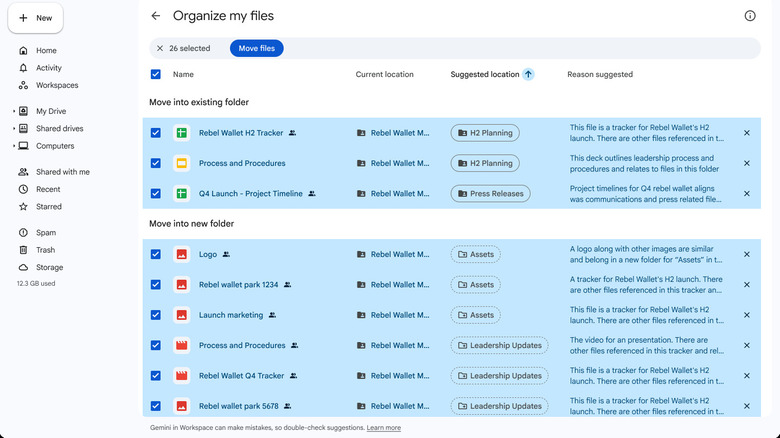
Based on what we've seen of the feature so far, it appears to be focused on organizing your files in existing folders or suggesting new folder creations to help break things down more easily. The feature can be triggered by selecting the Suggest file moves button at the top of the My Drive page. Gemini will then scan any loose files, determine how they should be indexed, and identify matches to existing folders before suggesting other locations for you to potentially move things.
Once the suggestions have been made, you can scroll through them and then select or deselect any of the ones that you don't want to take advantage of. You can also create new folders for items to go into if you disagree with the options chosen by the AI. Additionally, the feature does not appear to look at files that are already stored in other folders. So if you have already organized a few files, you shouldn't have to worry about Gemini messing with them — at least based on our testing of the functionality and how Google explained the way it works in the announcement document.
If you already have a Google One subscription, you should check if it includes access to Google's AI. This particular feature, as well as some of the other workspace-based AI features, is a great way to utilize some hidden Google One perks apart from the storage space.