

What Does 5G UC Mean In Your Phone's Status Bar?
The status bar of your phone holds all the information you might need at a quick glance. It can feature icons for notifications, it shows the battery level, it tells you whether you're on a Wi-Fi network and shows whether Airplane mode is turned on, and it indicates which carrier you're connected to, including signal strength.
The status bar will also tell you what type of network you're connected to, and that's where you might see "5G UC" appear at the top of the screen. The symbol suggests your phone is within reach of a 5G network, but not necessarily that you're getting 5G speeds (more on that later). The "UC" part stands for "Ultra Capacity," a 5G network brand label from T-Mobile that tells the user their current 5G connection may use mid-band or high-band (mmWave) 5G connectivity, which should offer faster data speeds and better coverage.
T-Mobile's explanation for 5G UC suggests this may be the type of 5G connection many users may prefer: 5G UC "provides connectivity for data-intensive applications like streaming high-definition videos, for example, or for things like gaming or transferring big files." The carrier also notes in its support document that 5G UC is different from the 5G Extended Range network, which is a low-band 5G option smartphone owners may encounter everywhere else. iPhone and Android handsets can connect to both networks, but the 5G UC icon may suggest that better data speeds may be available to the user.
How fast is 5G UC?
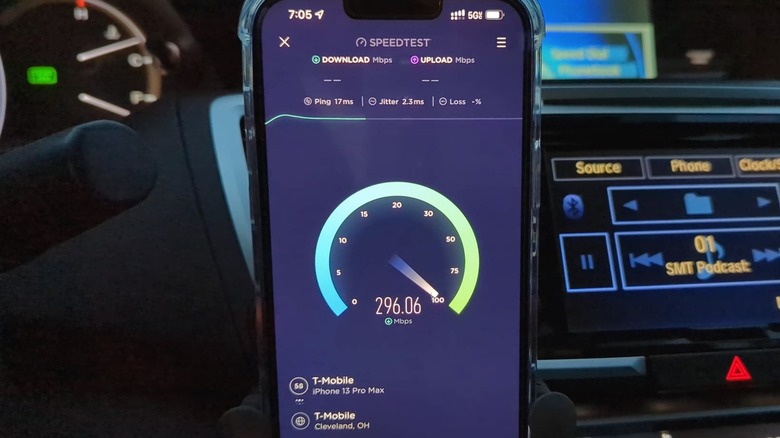
T-Mobile doesn't offer data transfer speeds in its explanation of the 5G UC marketing term, but HP explains that the 5G Ultra Capacity network can offer data speeds between 100 Mbps and 900 Mbps. Since 5G UC can also connect to mmWave 5G networks, it may offer faster connectivity where such support is included. Even without high-band availability, the 5G UC network will be faster than 4G LTE and low-band 5G. However, 5G UC also tends to offer better coverage than the faster mmWave 5G networks, which should improve the overall experience for using the web on 5G-connected devices for data-heavy tasks, like streaming video, playing games, and transferring files, which are the examples T-Mobile gives. According to HP, 5G UC is also a desirable connection option for specific applications like telemedicine and connected cars.
The now-defunct 5G Americas trade organization said in a 2024 paper about the evolution of 5G that "mid-band spectrum is typically most desirable as it provides the most suitable capacity/coverage tradeoff for the enhanced mobile broadband (eMBB) mobile network service." The report also cited a study from the Global System for Mobile Communications Association Intelligence that found that 5G networks that combined mid-band and high-band spectrum could provide the same or better service at a lower cost for carriers than mid-band-only 5G networks. Put differently, the 5G UC icon you may see on your phone can indicate the theoretical availability of strong mobile data performance for your device that may be suitable for most day-to-day mobile needs.
Is 5G always needed?
Other carriers may offer 5G connectivity similar to T-Mobile 5G UC. You'll see different icons in your phone's status bar when connecting to those networks. AT&T calls its network 5G+; it offers mid-band and high-band 5G connectivity. Verizon brands its mid-band and high-band 5G service as 5G UW, short for 5G Ultra Wideband. However, your 5G experience also depends on coverage and congestion. You may see 5G UC appear on your device, but your experience may vary.
Apple explains in a support document that the status bar 5G icons, including 5G UC, are based on the carrier configuration that a mobile operator may provide. Apple also notes that there are rare cases where a 5G icon will appear in the iPhone's status bar even though 5G coverage isn't available. Google also says that, on Android, 5G service may differ, depending on carrier, coverage, and potential signal obstructions. In other words, there may be cases where internet speeds will not be as good as you'd expect, despite seeing a 5G icon in the status bar.
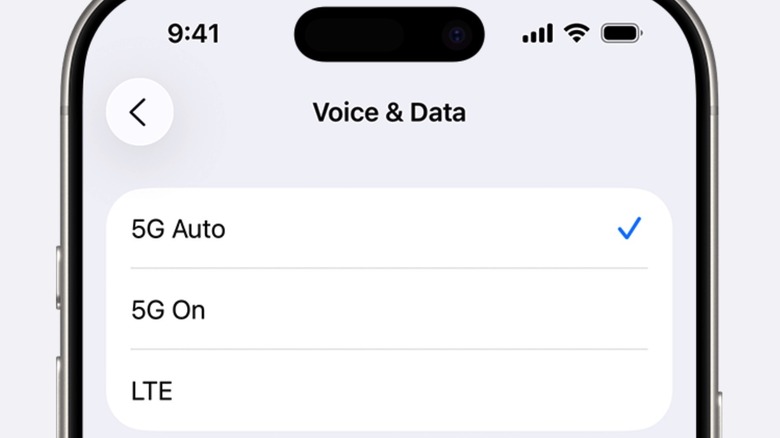
One way to mitigate potential issues is to select 5G Auto connectivity on your iPhone, an option that can help save battery life. The handset will only connect to 5G networks when the speeds are better than 4G. Google's Pixel phones offer an Adaptive Connectivity option that turns on 5G only when apps may need higher speeds than 4G. Smartphone users can also set 4G as the default connection and only seek 5G manually when faster data speeds are needed. You may want to try Ookla's Speedtest app to determine what sort of 4G and 5G speeds are available in your area to decide which network to use. However, T-Mobile will eventually phase out 4G LTE.