

5 Of The Best Audio Mixers For Every Budget
As the current rate of new podcasts popping up exponentially increases, so does the need for an audio mixer. Of course, these aren't just for podcast or online content creation, but should suit every facet of audio needs, across every budget. We've chosen five of the best audio mixers, so even if you're just starting out, there's something here for everyone. Our budgets are split like this: High-end between $600 and $1000; mid-range from $150 to $599, and then budget at anything below $150.
As the mixers get cheaper, it is worth noting that some functionality will be shed, and you will need to put in just a smidge of elbow grease to get them doing exactly what you want. Some of these will act like digital audio interfaces, or interact with audio software through the physical controls. However, every budding creator will have a unique need somewhere down the line, so be sure to do a tad more research to see if it'll completely suit your needs.
Rodecaster Pro 2
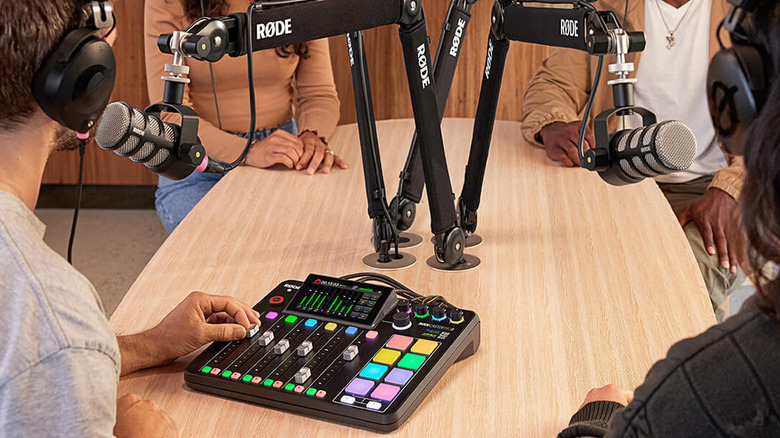
Rode's hardware is, ultimately, worth its price of admission. That is, if you intend to fully utilize it. At $700, the Rodecaster Pro II is a high ask, but it's an incredibly simple system built around a huge feature set. Some reviews have praised its simplicity, especially as it is a fairly complex device under the hood. Aside from the physical inputs, like four XLR ports (which will provide better audio than USB in some cases), multiple input and output jacks, it can also support incoming Bluetooth connections and acts as a digital interface.
Once connected over USB-C to a PC, it'll take all the incoming information and spread it across multiple tracks. The software provided by Rode will also allow you to alter the soundboard to whatever you wish as well. This is the big daddy of mixers for modern creators. It'll work for all creative outlets, including music and live streaming, so there are no real restrictions. Rode's alternatives include a smaller Rodecaster, the Duo ($499), which shrinks the inputs but brings the same overall high quality. The company has also moved into video mixers, including the gaming-centric Streamer X (a handy HDMI capture card) and Rodecaster Video series.
Mackie DLZ Creator XS
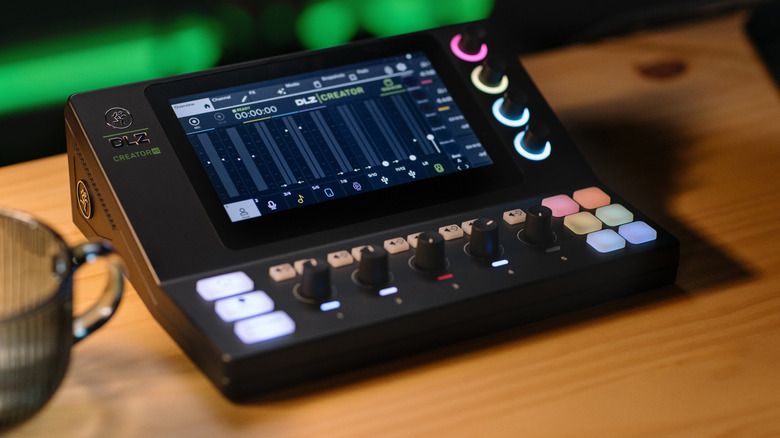
Similar in scope to the Rodecaster Pro 2, the DLZ Creator XS is a "cheaper" alternative, priced at around $500. Equipped with two Onyx preamp XLR ports and an additional two inputs via a jack connection, this is ideal for those who run a podcast or other voice-heavy content creation. There's support for Ethernet control, USB-C for connecting to the PC, and an SD card slot for recording the mix. The screen onboard gives all the information you'll need, and the various buttons activate sound effects.
As everyone appears to be getting a podcast these days, the DLZ XS has three modes depending on your skill with hardware like this. Pro, Enhanced, and Easy will alter the user interface depending on how well you can handle the mixer. Similar to the Rodecaster Pro 2, it's riddled with lights and indicators to give you a clear idea of what's happening at a small glance. As it's a Mackie mixer, it'll also easily take any instruments for those more inclined in the music way. That said, if you want a more music-focused mixer from Mackie, the ProFX12v3 is a $379.99 analog mixer with USB output, but it comes with some caveats if you want individual tracks.
It should be noted that Mackie was purchased by Rode in 2023.
Zoom LiveTrak L-6
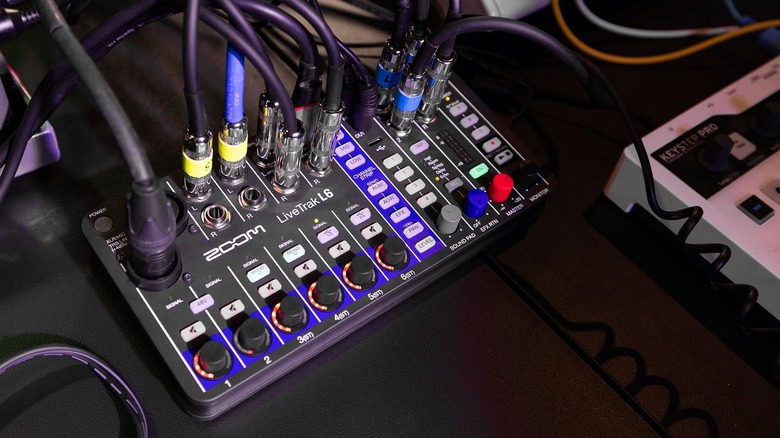
With USB recording, 10-track support, and all crammed into a tiny size, the Zoom LiveTrak L6 is an excellent option for those needing to save space. Mainly advertised for music, it also doubles as an audio interface once hooked up to a PC via the top USB-C port. Similar in size to the video mixer, ATEM Mini from Blackmagic Design, this is a dense package that will handle almost any audio mixing task thrown at it.
The Zoom LiveTrak L6 comes in at $249.99, so while not cheap, it hits above its weight class thanks to that dense feature set. There are sound pads for effects, MIDI support, and each track is discrete. When you pipe the recording into an editor, all inputs involved will be editable in an isolated fashion. Full stereo mixes can also be saved to a microSD card (which supports up to 2TB), so those who are covering events or live shows can independently record to another source.
For those in music production, using Digital Audio Workstation (DAW) software, the Zoom LiveTrak L6 can also be a physical controller. Capturing audio on the go? It'll even take four AA batteries for portable recording sessions. Zoom also has its own software for further control.
Behringer XENYX 802S
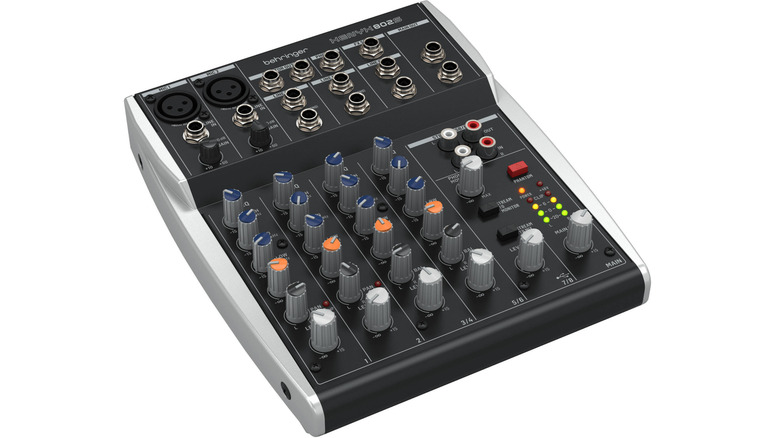
Typically under $100, the Behringer XENYX 802S is probably one of the better all-in-one deals you can get if you're just starting out or, like the price suggests, on a budget. It can handle eight different channels and can connect to a PC via USB, so outputs can be recorded digitally. However, you won't be able to record tracks individually, another concession when you start hopping down the price range.
To get around this, your outputs can be panned left and right when recording, so the stereo mix will have two tracks that can be edited in an isolated fashion. Behringer packs in Xenyx preamps, which will give your microphones a clear quality, and the more recent refreshes of the XENYX mixers have aimed to simplify the design for newer users. Once you've fiddled with the settings, this will make for a great entry-level podcast or streaming mixer.
For those that need even less, the XENYX 502S sits at a sub-$80 price on B&H. This removes three channels, leaving you with just one XLR input and two fewer alternative connections. If you're creating on your own, this might be a good, relatively inexpensive alternative.
Mackie Mix8
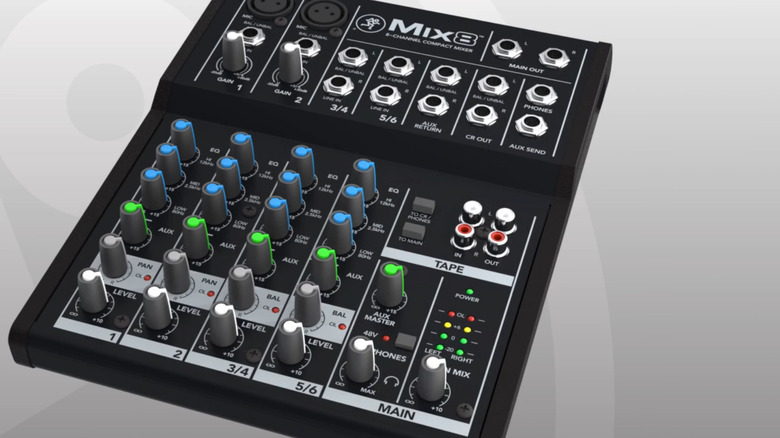
Once you start looking for budget options, sometimes you'll have to make a few concessions. At $99, Mackie also provides a solid 8-channel mixer, with support for two XLR inputs. However, it doesn't sport a USB port for easy PC connections, meaning you will need to wire this via the RCA, Main Out, or AUX Send outputs on the mixer. This is ideal for those who aren't delivering content that requires multiple tracks to be isolated. Live music, podcasts, and streaming can be done on a budget, without sacrificing sound quality.
A way around this would be to feed multiple outputs into the PC across multiple connections. Again, when it comes to budget gear, you'll need to put the elbow grease in. All said, the Mackie Mix8 will produce a good, professional-quality sound when paired with the right kit and mixed properly. You can monitor it on the device, giving you a clean signal to rely on, rather than the PC's digital recording of it. Just be sure not to run this through a USB hub with audio connections, as that can introduce electrical interference, which will be heard in the final mix.
How we chose the best audio mixers
I combined my experience with reviewing and working with audio gear in professional capacities, along with third-party information from the web to compose this list. This included gathering information from independent reviews, customer questions and reviews, and other coverage involving mixers. The various options were then split up into budgets, from the Mackie's sub-$100 range to the top end. Overtly expensive options that would typically be found fitted into studios or DJ mixing desks have been omitted.