

Here's How Google Meet Works On Android Auto While You're Driving
Sometimes your workday schedule gets a little quirky, and you end up needing to take a conference call while driving. Fortunately, Google just made this task much safer and easier for Android users. The long-awaited integration of Google Meet with Android Auto is here, after first rolling out for Apple CarPlay back in April 2026. It's one of many Android Auto features to look forward to in 2026. With it, Google baked native meeting controls right into your car's infotainment screen so you don't have to fumble to hit mute on your phone, for example. It's all-around easier now to take a meeting while driving safely.
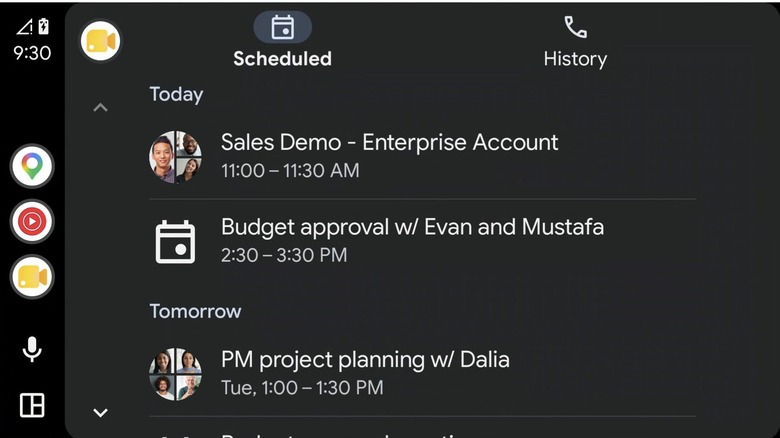
Getting started is a cinch. First, make sure your Meet app is updated. Then, connect your phone to your car and tap the dedicated Meet icon that appears in your car's app launcher. Here you'll see the new distraction-free interface and how it's split into two tabs: Scheduled and History. The Scheduled tab syncs with your calendar and displays any upcoming meetings you have, letting you join a call with one tap. Meanwhile, the History tab lets you easily dial recent groups or individual contacts.
One of the best quality-of-life additions here is the seamless handoff feature. So if you're already in a meeting on your phone as you get into your car, plugging in or connecting wirelessly automatically moves the audio and control to your car's system. Likewise, once you park and disconnect, meeting controls instantly switch back to your phone so you keep up with your team. Your Google Meet meetings will also seamlessly follow you between devices once you're back in your office.
Google says safety first, creates an audio-only experience
While having a powerful meeting tool in your pocket (or rather, on your dashboard) is super convenient, using Google Meet on Android Auto is obviously fundamentally different than using it on your computer. Google has heavily modified the app for this use case, adding a strict safety-first approach. Most notably, this is strictly audio-only. On Android Auto, you can't see video feeds of your coworkers, and you won't be able to view shared presentations or screen recordings. In fact, all of the standard interactive elements (like the ability to participate in polls or type in the chat) have been disabled to help keep your eyes on the road ahead.
When you join or start a call, your phone moves to this new, more restricted mode by default. On your car's display, the controls are stripped down to the absolute bare essentials: you can mute or unmute your mic, and you can hang up. Meet can also automatically mute your microphone if you're joining a larger call; this helps block out any background road noise.
However, if you absolutely need to see visuals from your meeting (or want to adjust other settings), Google's built-in safety parameters dictate that you'll need to pull over, put your car in park, then switch back to the Google Meet phone app. Ultimately, this integration offers a functional yet responsible way to stay connected at work without sacrificing your safety. It also pairs well with Android Auto's May 2026 update for Google Maps.