

4 Android Auto Features You Can Look Forward To In 2026
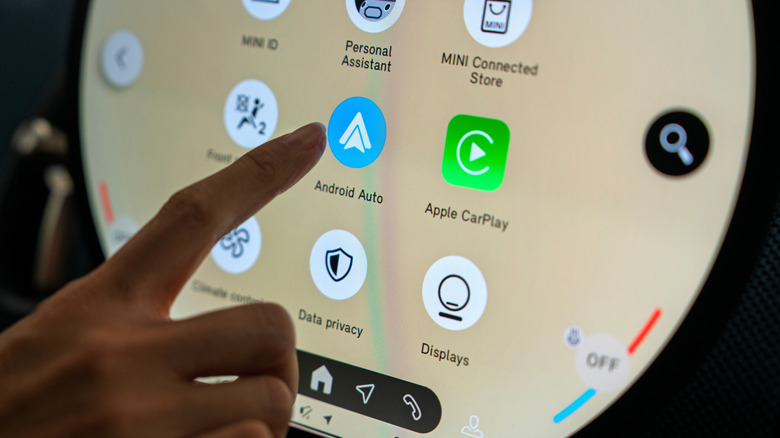
Google's Android Auto is getting new features to vastly improve the in-vehicle dash experience. For example, it recently unveiled a Material 3 Expressive makeover for the interface, a series of unique design elements previously available only on the Android phone version. The biggest change is the option to customize the dashboard's layout and look and feel. The goal is to unify and equalize the user experience across platforms, while also delivering more "premium" opportunities.
Many of those features will improve how you interact with your dashboard. While there were already some pretty clever ways to use Gemini on Android Auto, the new update will also introduce a host of new functions for that. Google refers to it as Gemini Intelligence, an assistant-like platform that aims to help you keep your attention on the road while it handles a variety of minor tasks.
Ultimately, the latest update — Android Auto 17.0 — is starting an early rollout to users, but not everyone just yet. Those interested in testing beta builds will be the first to try it all out before it's available as a public release. There aren't too many big changes in this one, per Autoevolution, despite what Google has promised is on the way. It also means that most of the new features won't arrive for folks until later this year.
1. Android Auto is getting dashboard widgets
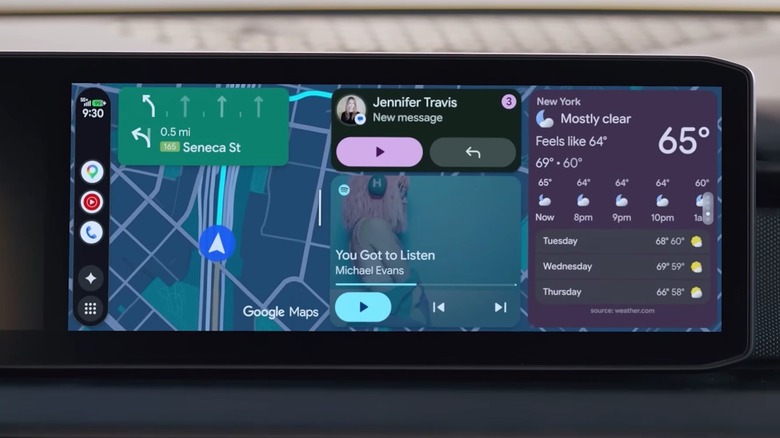
On Android smartphones, you can customize your home screen by adding widgets, many of which are tailored to the apps you have installed. Some examples include a financial ticker that shows real-time stock prices, a trading app, personalized notes you've created, calendar alerts, weather notifications, and much more. Widgets are finally coming to Android Auto, too. Google is planning to make widgets already available on Android phones compatible with Android Auto, meaning they should work fine and appear side by side with core UI elements. That may also result in more support when the feature launches with a higher degree of compatibility, if developers don't have to create an entirely separate widget model.
A simple swipe will bring up a list of widgets to choose from, including popular options like weather, calendar, and smart home controls. Once selected, you'll be able to see those and the information they provide at a glance, right on your main dashboard. You could also put pictures of your kids or pets on screen via a gallery widget, which Google showed off during its I/O announcement. It's exciting to know these changes are on their way and will be available soon.
2. YouTube (while parked) will be available to watch in full HD

You and your family can kick back, relax, and watch movies or shows from the comfort of your vehicle. Video apps like YouTube will play on your Android Auto screen at 60 frames per second while parked. Once you start driving, the video portion of the feed will go away, but the audio will continue playing in the background, like an audiobook or podcast. That's so there are no distractions while driving.
There are some limitations to be aware of. The video resolution depends on your vehicle's display, so full HD won't be available in every car. Google named a few brands that will support the full functionality, including BMW, Ford, Hyundai, Kia, Genesis, Mercedes-Benz, Volvo, and more.
In addition, while YouTube will support these new features as soon as they're available, any future apps will need to do the same. That means they'll need to support background audio and, in some cases, may require a premium subscription to continue streaming the audio-only portion. YouTube Premium is generally needed to play audio in the background.
3. Google Maps is getting a ton of new enhancements, visual and beyond
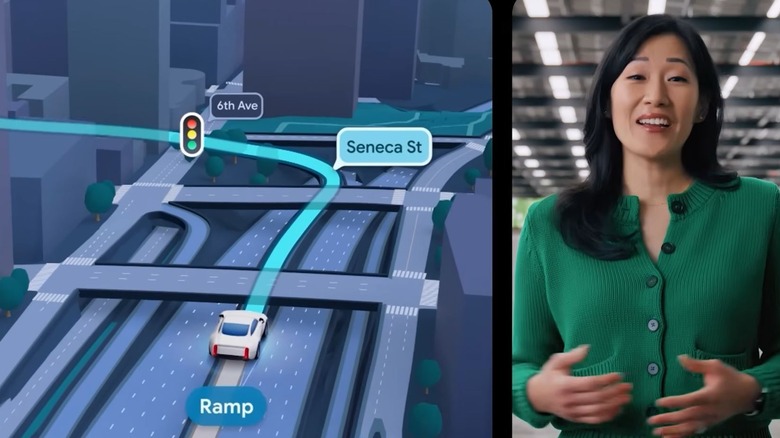
Google has previously said that Google Maps will now show more immersive visuals when navigating roadways, but we got to see this firsthand at Google I/O. When those updates become available, you'll see more realistic 3D buildings and skyscrapers, along with the precise locations of streetlights and traffic signs, street names and road changes, such as when a ramp appears. The goal is more informative, more accurate guides that will come in really handy when you're traveling through new, unfamiliar places.
Maps will also now offer direct lane guidance, telling you when to merge left or when to be prepared for a turn, rather than just throwing high-level instructions at you. One of the technologies empowering this is Gemini, combined with cars that have Google built in. Gemini Intelligence can use your car's front sensors and other data to assess lanes and driving conditions, presenting them to you on your dashboard. The result is a more visually appealing, more contextually aware navigational interface that, dare I say, creates fewer headaches and frustrations during a road trip.
4. Better hands-free experiences with Gemini Intelligence
Regardless of how you feel about AI, there's one thing it tends to get right, and that's improving most hands-free experiences, voice assistants especially. Google is now making that a reality in Android Auto vehicles with the help of Gemini Intelligence. It goes far beyond simply giving you instructions or handling vehicle-related tasks. In one example Google presents, Gemini looks up an address and automatically sends it to a contact via text message, all with a single tap, allowing the driver to focus on the road. It gleans this information from emails and contact details, looking up a calendar appointment to find the address.
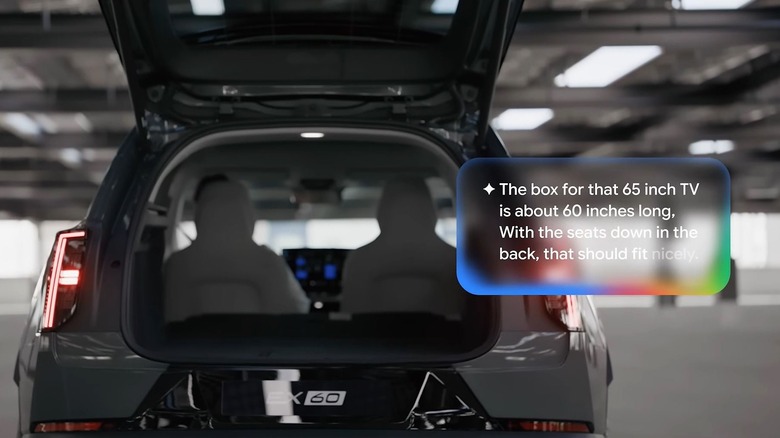
Google also shares an example of someone ordering their usual meal through DoorDash but doubling the amount, or checking if a TV will fit in their vehicle's trunk. It reviews the box specifications and compares them to the car's trunk dimensions. No more frantic Googling in a hurry to find out if you made a mistake at the register. It can also tell you exactly what a mysterious warning light or dashboard indicator means. Gemini should help you plan better for various situations, on the road and off.
Visual design and experience improvements for all
The integration of Material 3 Expressive visuals makes a much bigger difference to the updated experience than you think. Android Auto is now more adaptive than ever to dashboard screens, accommodating unusual resolutions or non-rectangular shapes and allowing the software to make optimal use of round screens and beyond. It's also "designed to feel uniquely yours," according to Google, which is very much in line with the traditional Android experience on smartphones. It sounds like a lot of this will eliminate common apps or settings that may be ruining your Android Auto experience. Gemini might reduce the need to train your Google Assistant, and the visual changes to Maps might make it look better overall.
Spatial sound will be available through Dolby Atmos in supported apps and cars. That means your music will sound more dynamic. Plus, those apps are also getting visual tune-ups with new looks for Spotify, YouTube Music, and more.
The point is that some of the minor upgrades happening beneath the surface are just as exciting as the big ones. Sure, you can watch YouTube and customize widgets, but the entire experience is seeing a more responsive, more personal overhaul, and that seems to be a net-positive change.