

How To Reserve Your WhatsApp Username On iOS & Android

Usernames have been part of the everyday online experience for decades, but until this year, WhatsApp ignored them. You authenticate in the world's most popular chat app with your phone number, which also secures your account. But since Meta added email support to WhatsApp, the company is finally moving forward with a username initiative that some people may like.
Meta will let you associate a username with your phone number this year, a feature that should improve privacy. Instead of sharing your number with strangers for new WhatsApp chats, you can give them your username. Before the feature rolls out, Meta is letting WhatsApp users reserve their desired username, a process that is available on both iOS and Android.
Android and iPhone users can start securing their alias from a notification they may see in the app. The alternative is to open the app's settings and go through the username reservation process, which is identical on either smartphone operating system. Usernames are optional, and WhatsApp will continue to support phone numbers just like before. However, those who want to protect their mobile contact information and secure a specific username will want to act fast, as there will be significant competition over common names and aliases, even though the feature is rolling out gradually.
The WhatsApp username reservation process on iPhone and Android
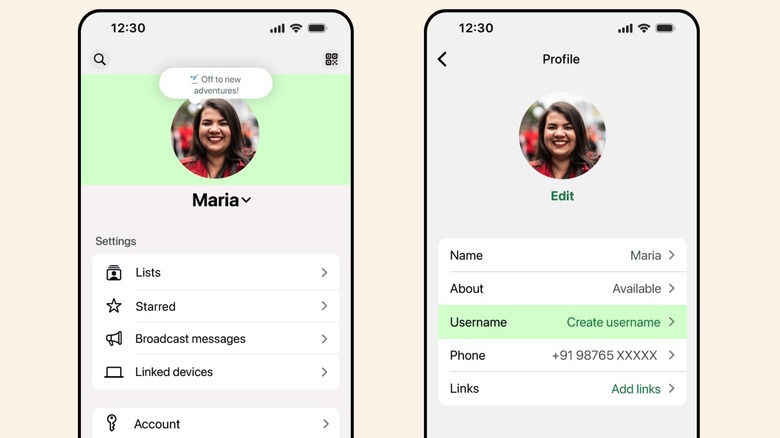
WhatsApp will notify you when the username reservation feature rolls out in your country. Once that notification appears in the app, you can start choosing your desired handle. On iPhone, tap the You button at the bottom menu, tap your profile image, and look for the Username menu. It will contain a Create username or Reserve username option. The app will let you enter your username, but it will warn you if it's already taken. You can add extra characters and symbols to create a unique name or use a suggestion from the app. Once the process is finished, you can tap Save. The username will become active when the feature is enabled in your location.
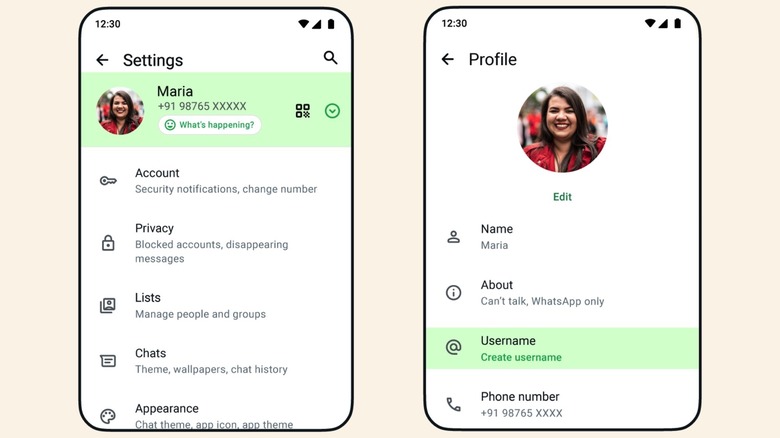
If you use WhatsApp on Android, the reservation process is almost identical. However, the procedure starts in the three-dot menu, where you'll have to tap Settings. Tap your profile, then tap the same Create username or Reserve username option. Enter your desired handle, which must be unique, and tap Save. Usernames can be between three and 35 characters long and include letters, numbers, underscores, and periods.
The username reservation process isn't available on the desktop version of WhatsApp, but Meta offers an alternate route some people may find useful. You'll be able to connect your Instagram or Facebook account to WhatsApp and keep the same username you already have on these platforms — if it's not already taken. This feature is optional and available on both WhatsApp for iPhone and Android. Choosing the Instagram or Facebook handle happens on the same Create username page.
Before you make a Whatsapp username reservation
If you're interested in securing a WhatsApp username, be aware of some caveats and rules Meta has set. Among them is the ability for users to delete and change their handles. When doing so, the old alias becomes available for anyone else to claim after 14 days. Also, there will be a limit to how many times a person can change their username, although Meta hasn't defined it yet. To avoid spam, you can select a username key that will help you limit who can find you by your handle, which may help prevent unwanted chats. WhatsApp contacts who already have your phone number will continue to see you in the app, but those who don't have it will see your username instead.
Linking your WhatsApp username to Instagram or Facebook handles may not be advisable if you want to protect your privacy, since your WhatsApp identification may give Meta more information about you. After all, Meta (previously Facebook) tried to force WhatsApp users to share data with Facebook through a privacy policy change in 2021, a move that backfired.
Meta also explains that some WhatsApp usernames are restricted, including those tied to celebrities, businesses, and governments. That means you won't be able to claim a username like @TomHanks, @Apple, or @Tesla, even if you are the first person trying to register it. Some restricted words and phrases may not be available, either. Since the WhatsApp username reservation process is rolling out in phases, some users may miss out on their preferred username, considering the app has over 3 billion users who may claim that handle first.