

What Does The Red Dot Mean On Your Webcam? (It's Not Always Recording)
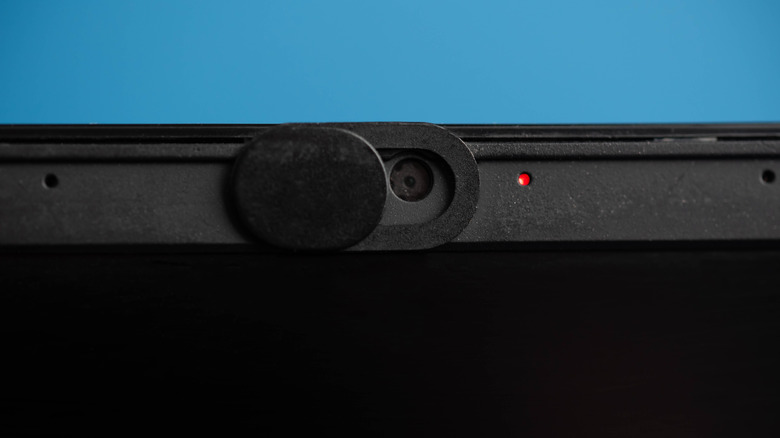
If you have ever looked at your laptop's webcam and noticed a glowing red light when you're not on a video call, it could feel concerning. Often, the first thought is that your laptop has been hacked or that your webcam is spying on you. And that's a reasonable concern, given how many privacy-conscious users around the world put tape over their laptop's camera. But the red dot or light on your webcam isn't necessarily an indicator that your webcam is recording.
On Windows laptops, a red light on or near the webcam during the initial sign-in process could be a sign that it features near infrared (IR) sensors used by Windows Hello for facial recognition. Windows Hello is Microsoft's built-in authentication system for Windows laptops that allows users to sign in using PIN, facial recognition, and fingerprint instead of the standard password-based login.
Apart from that, some laptops use a red dot instead of a red light as an indicator for the privacy shutter. This is the sliding webcam cover that now comes fitted into laptops and serves as a smart alternative to other means for covering the camera. Some have privacy shutters with a red dot that appears when the webcam's lens is covered, while others add simple privacy shutters with no such visible marks. All of this confusion stems from the fact that manufacturers are adopting different laptop designs, and there's no standard convention.
The webcam is active
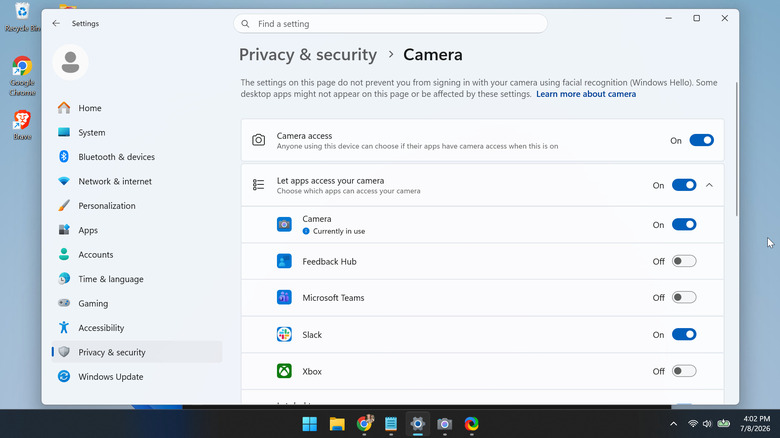
More often than not, the red dot that you see near the webcam is actually an LED light, which glows when a program or process is accessing the camera – also sometimes referred to as the "Camera Activity Indicator." Keep in mind that it's not always a red LED. On some laptops, it's white, while on MacBooks, it's green. Also, the red or any other colored LED light is simply a visual indicator. It doesn't tell you much else about the program that's accessing the camera, but you can easily find out.
To identify the program or application accessing your webcam on Windows, press the Windows + I keys to open "Settings," go to "Privacy & security," select "Camera" under "App permissions," and look for the app that reads "Currently in use" under it. That's the one accessing your webcam and is responsible for the red light. Besides, you can reconfigure the permissions here, allowing access to apps you trust and disabling it for ones that you don't.
Closed webcam cover or privacy shutter
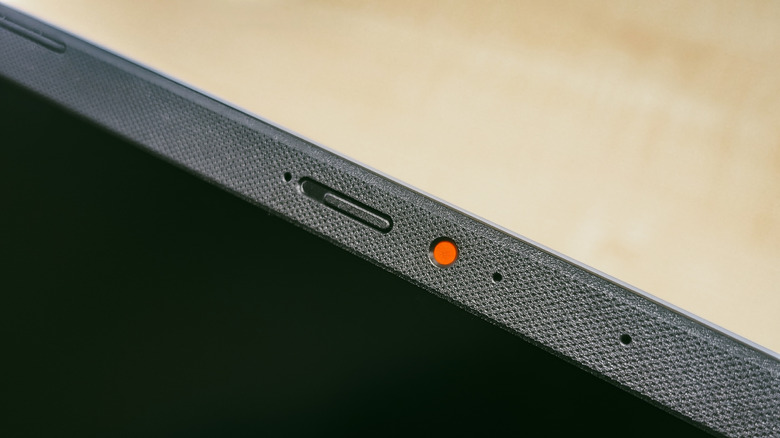
All that said, not every red dot is a visual indicator of your webcam's activity. As briefly explained earlier, if you see a red dot or light over the webcam in a bright area when turning on your laptop, Windows Hello's facial recognition could be responsible. What you see here isn't a recording indicator, but the near infrared (IR) sensor that Windows Hello's facial recognition uses. Keep in mind that this is not a security risk and usually appears when you are trying to get past the sign-in page.
This red indication could also be the built-in camera cover or privacy shutter. Many modern laptops from HP, Dell, and Lenovo feature these. For the average user, this is far more convenient and eliminates the need to purchase a separate external cover for the built-in webcam. The confusion stems from the design of these webcam privacy shutters on some Lenovo laptops and monitors. When you slide the shutter to cover the webcam's lens, a red dot shows up near the edge or sometimes in the center. The design choice can be confusing since the red marking, which many mistakenly assume to be a red LED light, is typically associated with active recordings.