

New Google Photos Update Changes How The App Looks On Your Android Phone
Android handset owners who use Google Photos to manage their images and videos may soon notice a significant design change that gives the app a more modern look, in line with the iPhone version of the app. Google has started rolling out the floating bottom bar menu in Google Photos, which replaces the previous menu bar that extended from edge to edge on the bottom and was attached to the lower edge of the display. The new menu bar is detached from the bottom edge and appears to be floating on top of the content shown behind it. That's why it's routinely referred to as a floating bar. The navigation menu is also split into two elements, giving it a distinct look. The pill-shaped menu includes the three categories that Google has used before, including Photos, Collections, and Create, while a circular floating element allows users to search for content in Google Photos and use Ask Photos, a Gemini-powered AI search functionality that Google introduced for the app in 2024.
If the design seems familiar, that's because Google has already used the floating bar in a different version of the app, the Google Photos release for iPhone. Google rolled out the floating menu bar to iOS devices in February 2026, introducing the same user interface elements seen in mid-July 2026 on Android phones. While the floating menu seems to be more in line with Apple's app menu redesign on iOS that appeared with iOS 26's Liquid Glass design in 2025, Google's new menu isn't about transparency or accommodating Apple's needs. Google has added similar menu designs in other Google apps, including Google Chat and Finance.
The main Google Photos menu remains the same
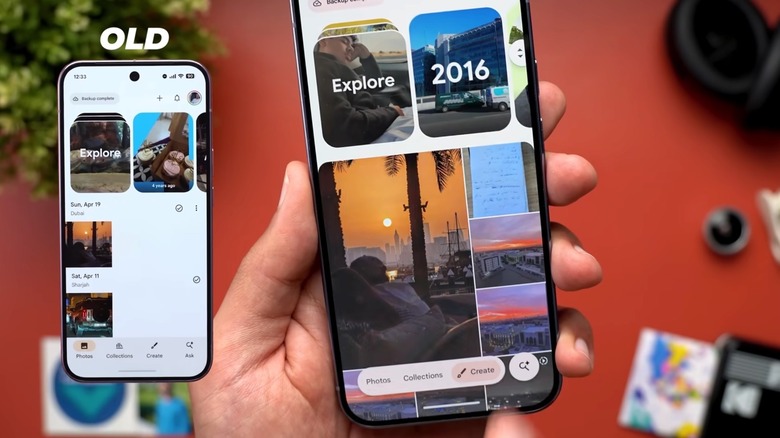
While Google is moving from a bottom menu to a floating bar in Google Photos, the functionality remains the same. The menu buttons have the same names as before: Photos, Collections, and Create, which means users should have no issues adjusting to the new appearance. They won't have to relearn how to use Google Photos because the main navigation menu looks different. On that note, the icons associated with each of these three menu items aren't permanently visible as was the case before the update. The icons appear only when one of the three menu items is selected, showing up on the left side of the word. For example, the Photos menu item will feature an image icon on the left. Also, pressing a menu item will highlight the entire word and the icon associated with it, instead of just the icon.
The only thing that's different is the Search/Ask Photos button, which Google ungrouped from the main menu. Instead of sharing the pill-shaped floating bar with the other three options, the search menu has its own floating button, placed centrally in a circular UI element. While before Google used an "Ask" word for the menu, the new design only shows a magnifying glass to indicate search support, and a star, which tells the user this is where AI features may reside. However, the Ask Photos feature isn't enabled by default in Google Photos. Users have to enable Ask Photos to use the Gemini-powered feature when searching for specific content in the app.
There's one other change that Google Photos users may observe in the app. The day indicator appears briefly in a floating pill at the top when you scroll through images.
Is this about AI?
Google separating the Ask/Search button from the other menu items may seem like a way to highlight AI search in Google Photos, but the design change doesn't appear to be related to existing or new AI features. Google hasn't announced the update, and it didn't provide any explanations to suggest AI features may be why Google Photos is getting a redesign. But this update has been in development for years, starting with the Material 3 Expressive design principles that Google developed for Android. Google has introduced the floating toolbar UI as part of its Material 3 Expressive design for Android, in addition to a new docked menu bar that can replace the old bottom menu bar.
Also, Google has been adding AI features to Google Photos for years. For example, the Ask Photos feature was first announced in May 2024, rolling out to supported devices since then. Similarly, the Create tab was introduced in the summer of 2025, when Google grouped several AI-powered features under this new menu to help Google Photos users find editing tools with ease. Create includes several AI features, such as Photo to Video and Remix. As for the Collections tab, Google renamed the menu element in August 2024. Previously, it was called Library.
Put differently, the Google Photos user interface redesign has been years in the making. Google has added several AI editing features to the app during that time. The introduction of the floating bar in July 2026 only concerns the appearance of the navigation menu. On that note, not all Google Photos users may see the redesigned UI in the app, even if they have the latest version installed. They'll have to wait for the update to reach their region.