

6 Cool Aviate Features That Make It The Best Flighty Alternative For Android Phones

Flight delays are probably the most annoying part of the air travel experience. That's because airlines and airport authorities are rarely ready to provide detailed explanations about a flight's delay or to provide them promptly. That may be why the iPhone-only Flighty app has been so popular with users since its introduction in 2019. Flighty lets users monitor flights in real time and can provide more detailed information about the status of a flight than airlines do. Flighty can give users some peace of mind as they don't need to desperately figure out the new departure time from an airport employee. But you're out of luck if you're an Android user, as Flighty has not yet launched on Google's platform.
While some Flighty alternatives exist, the best Flighty equivalent for Android may have just launched. It's called Aviate, and the app is exclusive to the Android platform as of July 2026. Like Flighty, Aviate is a flight companion app that provides extensive information about your scheduled flight, but the app also includes a variety of features that are not available in Flighty or some of the Flighty alternatives for Android.
Also, like Flighty, Aviate can be used free of charge, but some of the more advanced features will require a subscription or a larger upfront payment for the lifetime tier. But that tier is cheaper than Flighty's lifetime option.
The price

Flight companion apps like Flighty and Aviate lock some of their best features behind a subscription or a larger one-time payment that unlocks lifetime access. Other Flighty alternatives for Android also offer similar in-app purchases, but Aviate has lower prices for the premium experience than its rivals, Flighty included. For example, the yearly Aviate Pro plan costs $39.99 compared to $59.99 for Flighty. Android apps ByAir and Flights25 cost $49.99 per year, while TripIt is priced at $49 for the same period. Other flight-tracking apps may include ads for the free experience, including Flightradar24 and FlightAware. The annual plans for these apps may be more affordable at $39.99 (Flightradar24 Gold) and $8.99 (ad removal in FlightAware), but the apps may not be as feature-rich as Aviate.
The new app also has a more affordable lifetime-access price: $199.99, which matches ByAir's lifetime option. Flighty is the more expensive option, at $299. Flights25 sits in the middle with a $229.99 lifetime fee. Other apps that come with subscription options may not offer lifetime access.
But travelers who don't fly as frequently but who want access to paid features in apps like Flighty and Aviate have a short-term subscription covering only their travel period. The Aviate Pro Pass starts at $1.29 for a week, $2.49 for two weeks, and $2.99 for three weeks. A 21-day subscription can cover a summer vacation that can involve several flights. Users can cancel the Pro subscription at the end of the period and reactivate it for the next holiday. The three-week deal is cheaper than ByAir's $4.99 one-week subscription and Flights25's $3.99 one-week subscription. FlightRadar24 Silver has a $2.99 monthly subscription.
Support for boarding passes
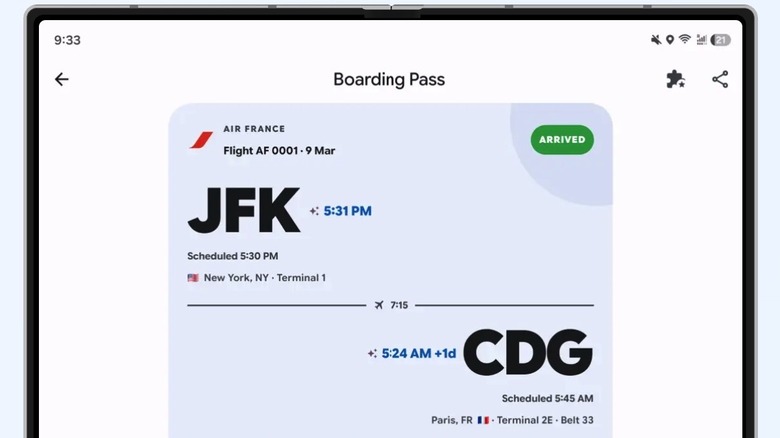
You don't have to buy an Aviate Pro subscription to track flights in real-time and use some of the app's best features. For example, the free version of Aviate offers basic flight tracking and real-time gate changes. The app lets users set up widgets and offers calendar synchronization support. These features can be useful for accessing quick information about your flights without having to deal with several apps at the same time.
The free tier also offers access to a few nice-to-have features that can further improve the flying experience, like the ability to store digital boarding passes securely in the app. You don't need apps like Flighty and Aviate to create digital boarding passes. That's a feature your airline should typically offer in its app. From there, you can export the boarding pass to the phone's wallet to have it ready whenever it needs to be scanned. But Aviate supports boarding passes, which is a great feature to have in an app that you're likely to have open while at the airport.
Flights25 also offers support for boarding passes, and the feature is included in ByAir's paid plan. But Aviate offers it for free, and the boarding passes are available offline, as they would be in a Wallet app.
Trip Checklists and the Starlink checker

Whether you're planning a short weekend getaway or a two-week vacation, you may use to-do lists available from various task management apps to ensure you're prepared for the journey. You may create packing lists that include the outfits you want to take with you and lists of essential items, like your passport and driver's license or a specific charger for the country you're visiting. Aviate includes a feature called Trip Checklists that lets you create those lists directly inside the flight companion app. Also, the feature is available in the free version of the app, so you can create your checklists without paying for a subscription. It's another nice-to-have feature in this type of application, one that doesn't have an equivalent in Flighty, ByAir, and other rival apps.
In-flight internet may also be a must-have feature for some travelers, especially people who fly for business rather than leisure. They may want to work on the plane, but not all airlines offer Wi-Fi connectivity. Aviate includes a Starlink WiFi Checker feature that allows users to see whether Starlink internet is available aboard specific flights. Some users may choose their next business flight only after confirming that Starlink support is available. Flighty and other rival flight companion apps for Android do not offer a similar feature.
Advanced live tracking features
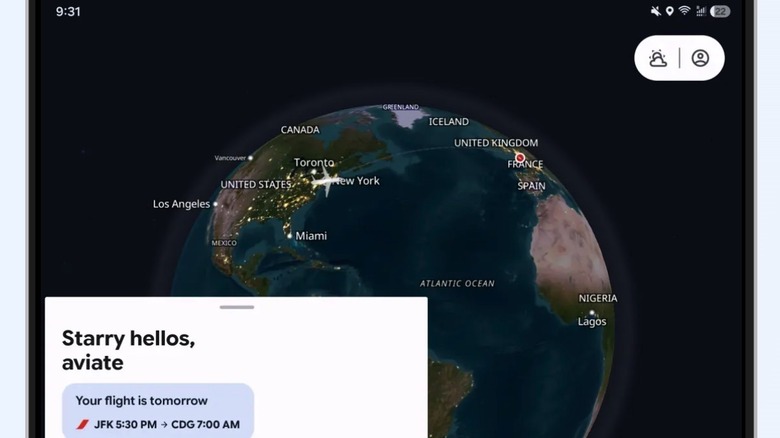
The Aviate Pro version includes more advanced flight tracking tools that users may appreciate. For example, the paid version of the app offers live notifications for events related to the upcoming flight, as well as support for live activity features like the Now Bar tool available on select Samsung Galaxy phones. Additionally, users can customize live tracking updates in the Pro version. These features are available on top of the real-time flight tracking information available in the free app, which includes updates about gate and terminal changes. Flighty and ByAir also support live notifications.
Aviate Pro also offers live tracking for the plane you're about to board, showing it on a map. The feature can come in handy for flight delays involving an aircraft delayed on a previous flight. The live tracking feature can help you get a better idea of that flight's status, so you can decide whether to stay in the lounge or a restaurant or whether to head to the gate. Also, Aviate Pro will use AI features to predict delays. "Where's My Plane" features are also available on some rival apps, including ByAir and Flights25.
Finally, Aviate will also show your entire trip on a single screen, providing all the essential information. The app is optimized for both traditional Android phones and foldable handsets, so it can take advantage of larger displays where available.
Indoor airport navigation
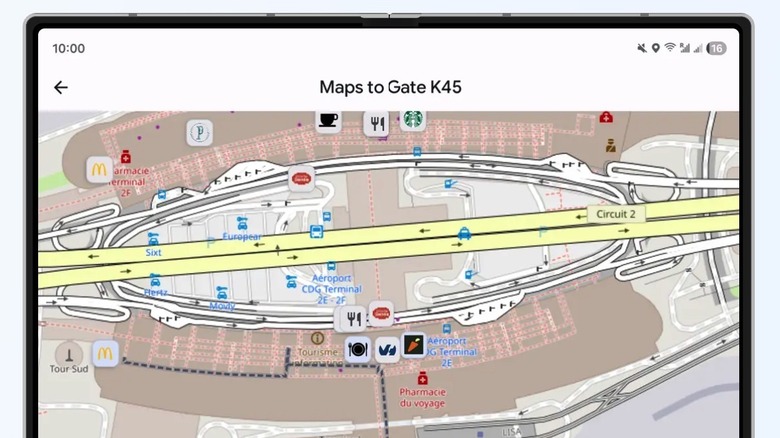
The flight experience isn't only about completing check-in and TSA security procedures as quickly as possible and heading to your designated gate. Since you have to arrive early at the airport, you may want to shop for souvenirs, stop for food, and visit the local lounges. Similarly, you'll want to explore a new airport during a layover on the way to your final destination. But navigating unfamiliar airports can be a problem, especially if you're pressed for time. The paid version of Aviate offers a handy feature to help with that: indoor airport mapping and navigation. Paired with walking time estimates, the feature can make it much easier to navigate an unfamiliar airport.
You'll be able to inspect maps of the layover airport before you get there, so you know what to expect when you're on the ground. You can check stores and restaurants, see where your next departure gate is, and find other places of interest. The feature will also offer restaurant and lounge recommendations, which will come in handy when navigating busy airports for the first time. The airport navigation tool is unique to Aviate Pro, as Flighty and most Android rivals do not have a similar tool. ByAir does offer airport guides and AI tips. Like the interactive map feature, the airport navigation tool will look even better on larger displays, like foldable phones and Android tablets.
You can use Google Maps to inspect some airports, but having airport navigation features built into a flight companion app means that you wouldn't have to switch apps.
How we chose these Aviate features
While comparing Aviate to Flighty and other Android alternatives, we prioritized interesting features that might not be available in many competing products. We also looked at nice-to-have features that rivals might not have considered, but which could be implemented in the future. Since real-time flight tracking and information sharing are core features in Flighty, Aviate, and other apps, we prioritized other built-in Aviate features that can assist travelers beyond tracking flight delays and gate changes.
Also, we looked at both paid and free features that users may appreciate. After all, some of the premium features might not be needed for all trips, especially by more frugal travelers who need only the basic features.
We'll also point out that Aviate has generated some strong reactions, with some users praising its design and the extra features that might make the app a must-have download for Android users. That said, it might be too early to declare Aviate a successful Flighty equivalent for Android users. Flighty proved its worth to consumers after years of use, having an average rating of 4.8 stars out of over 144,000 reviews in the App Store. We can't yet determine that Aviate will have the same accuracy and success at helping users manage flights and deal with delays and other airport-related issues, as more testing might be needed following the late July 2026 launch.