

Is Google Chrome Safer To Use Than Microsoft Edge?
A browser is your main window into the internet, but it's also one of the primary ways hackers target you. Cyberthreats are aplenty, from viruses to ransomware to phishing scams and identity theft. You can get exposed to all of these through your browser, making it important that you pick the right one if you're a security-conscious individual. According to StatCounter, Google Chrome has cornered 69% of the desktop browser market. However, Microsoft Edge is often considered a top contender, despite having a significantly smaller share of 5%. While both browsers are developed using the Chromium engine, their developers have outfitted them with out-of-the-box features that enhance your security and privacy, keeping you safe online from hacking and unwanted intrusion. In this regard, Microsoft Edge is safer than Chrome.
Edge is particularly strong when it comes to blocking trackers, warning you of malicious sites (works best with Windows), and private browsing. Chrome also does a good job of protecting you from phishing and malware sites, but fumbles when it comes to blocking trackers. However, you can use extensions in Chrome, most of which also work with Edge, to get the security and privacy features that you need, especially VPNs. Also, they share a lot of other similarities, including password protectors and incognito modes. Both Google and Microsoft have moved to a two-week major update cycle for their browsers to combat highly evolving AI threats.
How Microsoft Edge has an advantage over Chrome
Edge has Microsoft Defender SmartScreen, a feature that warns you against unsecured and malicious sites, including those that can infect your computer with malware or subject you to phishing scams. Chrome has something similar called Safe Browsing, which uses AI to protect you in Chrome, but Edge is particularly strong on Windows, as it works with several features of Microsoft Defender to give more robust protection for the entire operating system. Edge also has Typo Protection, which protects you from phishing sites that replicate real sites. It works by catching the spelling mistakes in their URLs. For instance, if the scammer spells "PayPal" as "PeyPal." It has nothing to do with correcting your spelling and grammar mistakes.
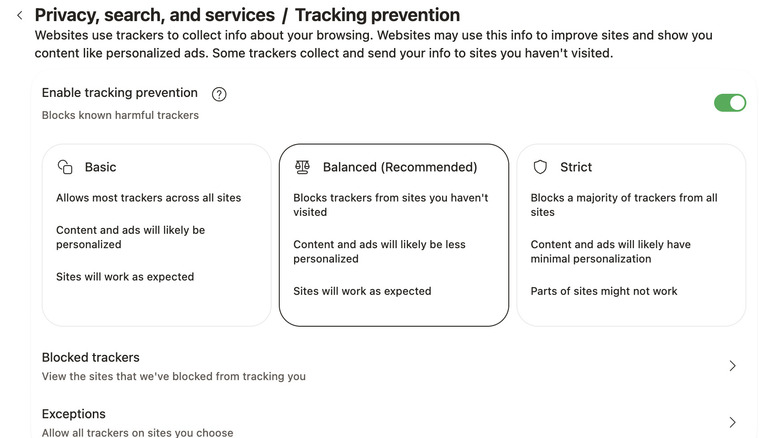
Websites use trackers to spy on your internet activity so they can build a private profile about you and serve you "relevant" ads. Tracking prevention on Edge allows you to choose whether to allow all trackers, block trackers from sites you haven't visited, or block a majority of trackers from sites you've visited (at the cost of some of the site's features not working properly). Chrome only allows you to send a "Do Not Track" request to websites, but it's up to site owners to accept or deny it. Edge also has Edge Secure Network, which uses VPN technology to encrypt your internet traffic, protecting it on open or unsecured networks. However, you only get 5GB free per month.
Chrome just requires a little extra work
Just because Chrome doesn't have the same out-of-the-box experience as Edge, it doesn't mean that there's no way for it to bridge the advantage gap that Edge has. Remember, Chrome is massively popular, meaning that as much as hackers frequently target it to harm its users, there's massive support from third-party developers pushing extensions that make it a safer browsing experience for all. While there are many extensions you should avoid, there are quite a few reputable ones that can enhance your privacy and experience for free. For example, you can install Malwarebytes Browser Guard if you want to block trackers, as well as phishing attempts, malicious websites, and intrusive ads.
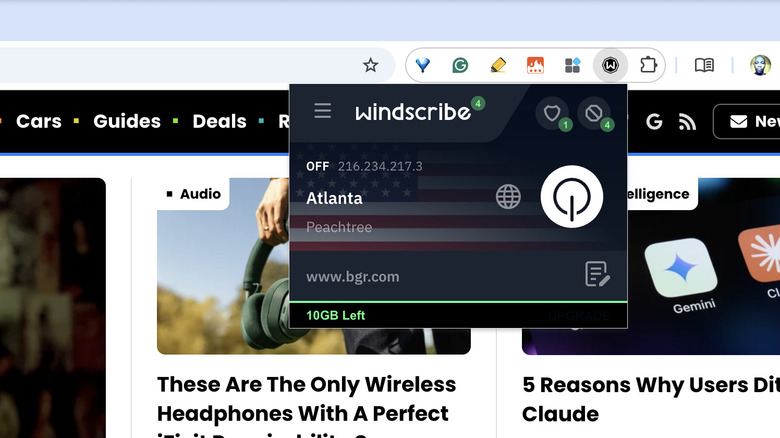
If you need a VPN to mask your internet activities from hackers and your ISP, you can use an extension like Windscribe. You get 2GB free per month (10GB if you add and confirm your email address) and access to servers from several locations, including the U.S., UK, and Canada. So compared to something like Microsoft Edge Secure Network, it's a pretty good option for accessing geo-blocked content. For typo protection, you can use something like TypoProtect, which can block over 10,000 known phishing domains and lookalike websites in real time. Furthermore, it's free, open-source, and doesn't collect your data.