

Mac Studio (M5 Ultra) Review: The Ultimate AI Workstation
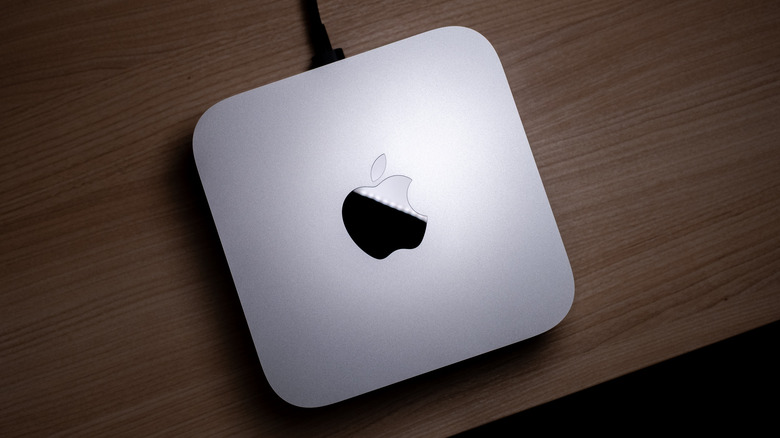
The new M5 Mac Studio feels like a very different machine than the M3 Mac Studio I reviewed last year. It's not that different, of course — it's still Apple's performance-focused desktop computer, and this generation gets a solid performance boost over the last one. The things that make it feel different, though, are somewhat external. There's the memory shortage, which is seeing prices — including Apple's — skyrocketing, with no end in sight. Then there's AI, which feels like it has shifted in the last year or so too, in that it's now not uncommon to run LLMs locally on your machine. I've been doing just that, for a variety of tasks, to varying degrees of success.
Of course, those two things — the memory shortage and AI — are deeply related, and the Mac Studio is stuck in the middle. More RAM means higher prices — and it also means more capable local AI models. That's why Apple is offering a 512GB RAM model for this generation of Mac Studio, and also why it'll be priced well north of the $10,799 that the 36-core, 256GB model already costs.
Alas, at the time of this writing, the 512GB model isn't available yet — the model I'm reviewing is the 256GB model, with a 36-core CPU M5 Ultra chip, which starts at $5,499. Is a machine this powerful and expensive worth buying if you're not interested in running local LLMs? And, if you are interested in that, should you shell out the cash?
Design and connectivity
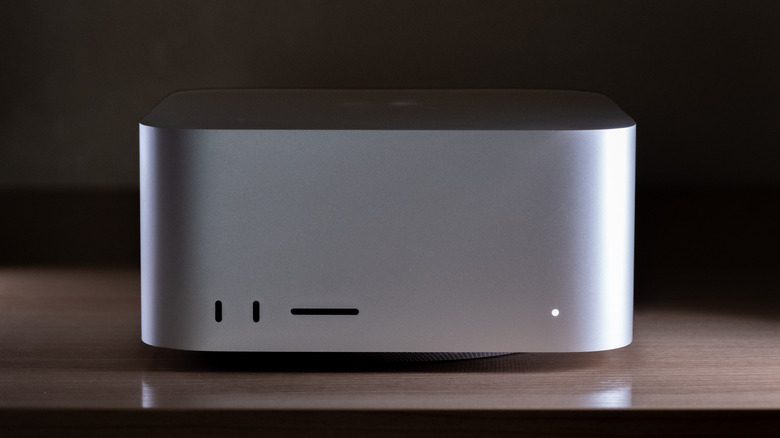
Nothing about the design of the new Mac Studio is different from the previous generation, which isn't an issue, since the 2025 model was a sleek and compact machine. I like Apple's approach of having its Mac Studio essentially be a scaled-up Mac mini, and I love that despite its relatively small footprint, it's far more powerful than anything of its size on the Windows side.
You'll still get a chassis that's 3.7 inches tall, 7.7 inches wide and deep, and built from the classic Apple Silver. It perhaps might have been cool to see a space grey or black version of the computer, but that's a small complaint, and I still like silver.
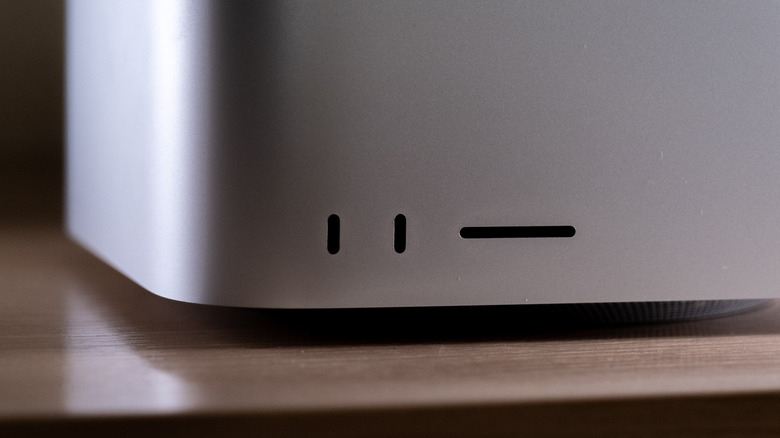
I also like the fact that there's an SD card slot on the front of the machine that I use almost daily to transfer product photos to my computer. I love that Apple has thought about making some ports accessible, even if it interrupts an otherwise minimalistic design. Also on the front can be found two USB-C connectors. If you have an M5 Max Mac Studio — which starts at $2,499 — the two ports on the front are USB-C ports at up to 10Gb/s (USB 3.2 Gen 2), while the M5 Ultra model features Thunderbolt 5.
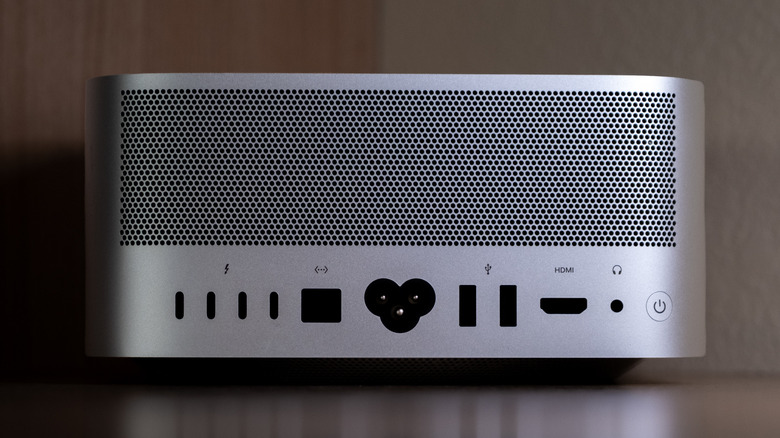
The ports on the back of the Mac Studio are identical no matter which chip you have, though. You'll get four Thunderbolt 5 ports at up to 120Gb/s, two USB-A ports, an HDMI 2.1 port, a 10Gb Ethernet port, and a 3.5mm headphone jack. It's a solid selection of ports, and the Mac Studio remains the only Mac that has kept the legacy USB-A, which is nice to see.
Connectivity is improved under the hood, too. The M5 Mac Studio gets Wi-Fi 7, Bluetooth 6, and Thread. Apple says the SSD architecture is up to twice as fast as the previous model.
That selection of ports means the M5 Ultra Mac Studio can power an impressive array of accessories. It can drive up to eight external 6K displays at 60Hz (or 4K at 165Hz) or up to four 8K/60Hz, 5K/120Hz, or 4K/240Hz displays, with VRR, HDR, and multichannel audio along for the ride. The M5 Max model tops out at five displays. Apple has also added genlock over USB-C, which synchronizes a display's refresh with professional camera capture — including from an iPhone 17 Pro.
Basically, the Mac Studio is still sleek, stylish, and professional looking, while remaining extremely compact next to the slew of tower PCs that are far larger.
Performance
The new Mac Studio comes with your choice of an M5 Max or M5 Ultra chip. The M5 Max is the more traditional of the two. It's an 18-core CPU with 6 "super" cores and 12 performance cores, paired with either a 32-core or 40-core GPU, a 16-core Neural Engine, and up to 128GB of unified memory. Bandwidth is where the two configurations split — the 32-core version runs at 460GB/s, while the top 40-core setup steps up to 614GB/s. Both keep the Neural Accelerators in the GPU and hardware-accelerated ray tracing.
The M5 Ultra, on the other hand, is more interesting. The M5 Ultra is Apple silicon's first quad-die design. What that means is that instead of fusing two Max chips together like previous Ultra chips, Apple is combining two dual-die M5 Max chips using a new UltraFusion interconnect, which the company says provides more than 4.4TB/s of inter-die bandwidth and over six times the connection density of the prior design. The point of all that plumbing is to make four dies behave like one processor, so software doesn't have to think about the seams.
There are two M5 Ultra variants. The base model has a 30-core CPU (10 super cores and 20 performance cores), a 64-core GPU with Neural Accelerators, and a 32-core Neural Engine. The higher-end variant has a 36-core CPU and an 80-core GPU, along with up to 512GB of unified memory (available starting in October), and up to 16TB of storage. Memory bandwidth is 1.2TB/s across the board — Apple says that's 50% higher than the M3 Ultra's roughly 819GB/s, and it's the number that matters most for the AI workloads this machine is aimed at tackling.
AI performance
So, how does the M5 Ultra Mac Studio actually perform in AI? Well, markedly better than the M3 Ultra Mac Studio. I used both models for a series of local AI tasks, largely through LM Studio. On average, I found that the M5 Ultra Mac Studio performed 30% to 40% better than the M3 Ultra Mac Studio. For example, while I might get up to around 40 tokens per second with a 4-bit MLX optimized version of Qwen 3.8 27B on the M3 Ultra Mac Studio, the newer model generally got closer to 55 tokens per second. Likewise, while it almost always took over a second for the first token on the M3 Ultra model, it was common to get closer to half a second on the M5 Ultra model. With more lightweight models like Qwen 3.5 122B A10B, I hit closer to 80 tokens per second on the M5 Ultra versus 60 tokens per second on the M3 Ultra.
On slightly more demanding tasks like image generation in ComfyUI using a model like Z-Image Turbo, results were even more impressive. I found the M5 Ultra to generate images at least twice as fast as the M3 Ultra — and often three times as fast, under the same conditions.
That can play a role in day-to-day life beyond running local LLMs instead of using cloud services like ChatGPT or Claude. For example, I sometimes use small local models to help with cleaning up dictation when I'm writing using voice. I found that on the M5 Ultra, those admittedly lightweight tasks were even faster than they already were on the M3 Ultra.
The improvements, of course, are due to a variety of factors, including memory bandwidth and increased GPU cores. Regardless, it is indeed much faster for local AI tasks. For those who need even more performance, Thunderbolt 5 plus RDMA support — a networking technique that lets machines share memory directly without bogging down the CPU — allows multiple Mac Studios to be clustered. Apple says a four-system cluster delivers up to three times the AI-inference performance of a single unit. Of course, that will mean spending at least double the cash, so that's probably aimed at enterprises more than individuals.
What about the M5 Max? Well, I didn't have an M5 Max Mac Studio to test during this review, but I did have an M5 Max MacBook Pro with enough memory to run the aforementioned Qwen 3.8 27B. The M5 Max is still a serious chip for local AI, and perhaps a much more realistic one for anyone who doesn't want to spend the thousands of dollars required for an M5 Ultra machine. It actually performs similarly in AI to the M3 Ultra, getting similar tokens per second and taking a similar amount of time to process a prompt. That's solid, given how widely praised the M3 Ultra was when it was released last year.
Graphics and media
Not everyone has bought into the local AI craze, and there are plenty of things that the M5 Ultra Mac Studio is great at besides running local LLMs. The M5 Ultra's GPU supports second-generation Dynamic Caching (which allocates GPU memory on the fly rather than reserving worst-case amounts), hardware-accelerated mesh shading, and third-generation hardware ray tracing. For 3D and VFX work, those architectural changes are arguably a bigger deal over the M3 Ultra than the modest CPU bump — the M3 Ultra had an 80-core GPU ceiling too, but a much older design.
The Media Engine is where the Ultra pulls the hardest away from the M5 Max. It offers hardware acceleration for H.264, HEVC, ProRes, and ProRes RAW, plus AV1 decode — and the Ultra packs two video-decode engines, four video-encode engines, and four ProRes encode/decode engines, which is double the M5 Max's capacity. Apple says the machine can play up to 33 streams of 8K ProRes 422 at 30 fps simultaneously, up from 24 on the prior generation.
In practice, these upgrades allow for incredibly impressive performance. I'll be the first to admit that my graphics and video needs are not demanding by any means, but in render and conversion tests, the M5 Ultra Mac Studio was blazing fast, even compared to the M3 Ultra model. The basic videos I make exported from Final Cut instantly, and more demanding projects that I loaded up also felt surprisingly fast. Basically, the M5 Ultra Max Studio is an incredible machine for video editors, photographers, and anyone else who needs some of the best graphics performance you can get in a desktop computer right now.
Conclusions
Almost nobody needs an M5 Ultra Mac Studio, but you sure might want one, especially if you are an AI enthusiast. It's a very expensive machine, but what you get for that money is an incredibly powerful local AI workhorse. You also get an ultra-powerful video editing workstation, but one that's probably overkill for all but the most demanding users.
In truth, if you're looking for a powerful Apple desktop computer, then the base M5 Max Mac Studio is an incredibly compelling option. It's still an expensive machine, with prices having gone up due to the memory crisis, but it's also a very capable machine. If you don't want a laptop and don't need top-of-the-line performance, it's the way to go.
The M5 Ultra roughly doubles the top-end compute and bandwidth, doubles the media engines, drives eight displays instead of five, and upgrades the front ports to Thunderbolt 5. Those are real advantages, but they only pay off when a project can't fit in 128GB, when a workflow demonstrably scales across the extra cores, or when the media and display requirements demand it. If those are issues you need to account for in your workflow, the M5 Ultra Mac Studio won't let you down.