

If Your Tablet's Speakers Sound Muffled, Try This

We may receive a commission on purchases made from links.
Tablet speakers aren't usually designed to be very powerful, but there are now plenty of affordable tablets with great sound quality in the market. These models have decent speakers that are perfect for binge-watching your favorite TV show and streaming music and podcasts. Like any other hardware, though, tablet speakers can still run into issues that affect their overall performance. One of the most common problems is muffled audio. This makes the tablet sound like you're using it under a blanket, which is particularly annoying when you're listening to dialogue.
If your tablet has the same issue, sometimes, a quick restart is all it takes to restore the functionality of the speakers. However, if that doesn't do the trick, then there's a chance your tablet is damaged and due for a repair. Before you send it off to a service center, though, there are still some DIY fixes you can first do at home.
Inspect the speakers for blockages
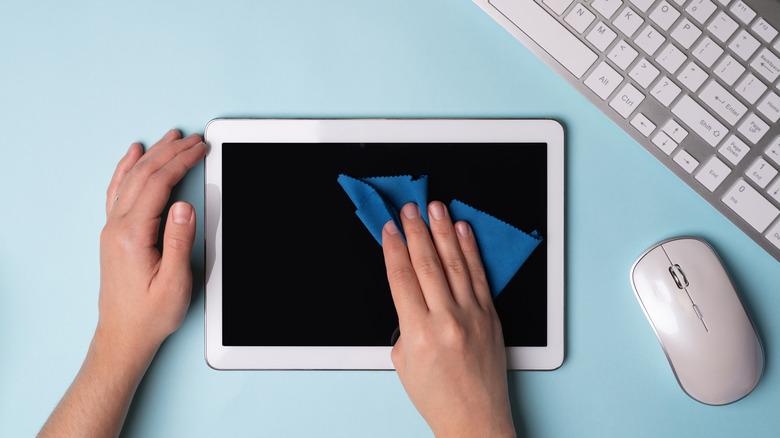
One common cause for muffled speakers on your tablet is blockages. This can range from something as simple as a wrong case to something more serious like water damage. First things first, check whether the tablet case is the right fit. Make sure the speakers are fully exposed through the openings and aren't covered in the slightest. If they are, take the tablet out of the case and test whether the speakers are still muffled.
If your tablet case isn't blocking the speakers, try cleaning the openings. All you need is a dry (and clean!) soft-bristled brush. If you can get your hands on a cheap anti-static brush from Amazon like this Nylon Anti Static Brush Set, that would be even better. With the brush, go over the openings to remove visible dirt and debris and be careful not to push them inward. Other than a brush, a putty or sticky tack, such as the Stikki Cleaning Putty, is also a useful tool for cleaning your device. Simply use a small piece to gently dab the tablet's speakers without pushing it too far inside. When cleaning, it's best to stay away from compressed air as the forceful airflow could potentially damage the internal electronics, doing more harm than good. Don't poke toothpicks, needles, and the like into the speaker holes as well.
Meanwhile, for tablet speakers that accidentally got wet, what you need to do is use a soft cloth to blot water off the openings as soon as possible. Then, leave the tablet with the speakers facing downward. Some users also suggest playing a sound from fixmyspeakers.com at max volume to eject water. Afterward, let the tablet air dry. It isn't recommended to apply heat to the tablet to dry it off.
Check your tablet's sound settings and apps
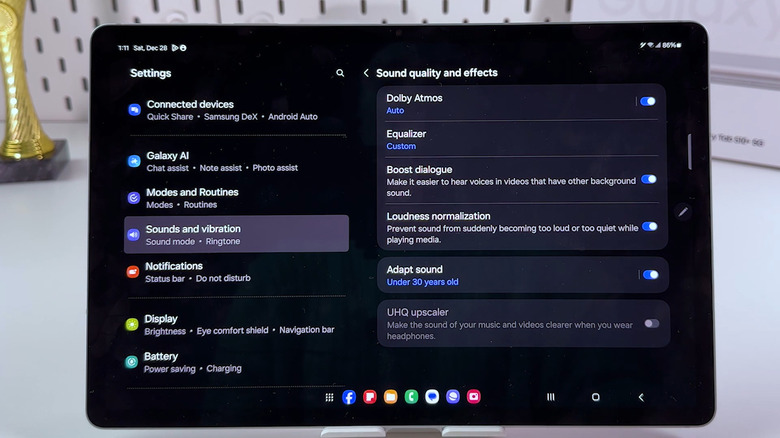
There are cases when muffled sound from a tablet's speakers can easily be fixed with some changes in the sound settings. For instance, on Samsung Galaxy Tab models, some users reported that enabling Boost Dialogue (might not be available on some versions of One UI) and changing the equalizer to Clear helped reduce the tablet speaker's muffled audio. Here's how to edit those settings:
- In the Settings app, go to Sounds and vibration.
- Select Sound quality and effects.
- Toggle on Boost dialogue.
- Tap on Equalizer.
- Choose Clear.
If setting the equalizer to Clear doesn't work, you can try the custom equalizer settings shared by another user on Reddit: 63 and 125 set to -1, 250 and 500 to 0, 1k and 8k to +2, 2k and 4k to +3, and 16k to +1. From the "Sound quality and effects" page, check whether turning on or off Dolby Atmos would make any difference as well.
Meanwhile, on Lenovo tablets, see if disabling the smart audio features will help with the muffled sound. In the Settings app, navigate to Sound and open Advanced. Then, turn off Lenovo Audio Effects or Smart Audio. If you have any iPad or an Android tablet without the same audio features, look around in the Settings app for any similar options you can tweak.
It's also a good idea to update the tablet if you've been ignoring software updates on the device for a while. You can easily do so from the Settings app. If you're okay with wiping the tablet clean, a factory reset might fix any unwanted audio-related bugs. Just make sure to back up your data beforehand. If all else fails, you can always bring the tablet to a professional to get it checked out. The speaker, or worse, the entire unit might need replacing.