

5 Handy Mini PC Accessories You Can Get On Amazon For Under $50
We may receive a commission on purchases made from links.
While mini PCs are popular for their compact designs, their small stature often comes with a few drawbacks. Depending on the model you have, you might have to deal with lackluster cooling solutions, little room for storage upgrades, or fewer connectivity options than you actually need. The good news is there are plenty of mini PC accessories under $50 on Amazon that can help you out.
The Rgeek Mini PC Cooling Fan with Adjustable Speed Controller, for example, uses a 120mm fan to either pull heat away from your mini PC and vent it out of the bottom, or push cool air up across its components depending on how you set it. This can help reduce thermal throttling while running stressful applications, giving your mini PC a cheap performance boost. If you travel for work or commute to school, the Againmore Travel Case is a great option for keeping everything in your setup (minus the monitor) together in one organized place.
And if you've been stuck using tinny built-in monitor speakers, the affordable Creative Pebble V3 USB-C Desktop Speakers are a game-changer at under $45. We've rounded these mini PC accessories up based on key criteria including build quality, value for money, performance, and user reviews to find which are worth adding to your setup.
BENFEI Mac mini M4 Dock
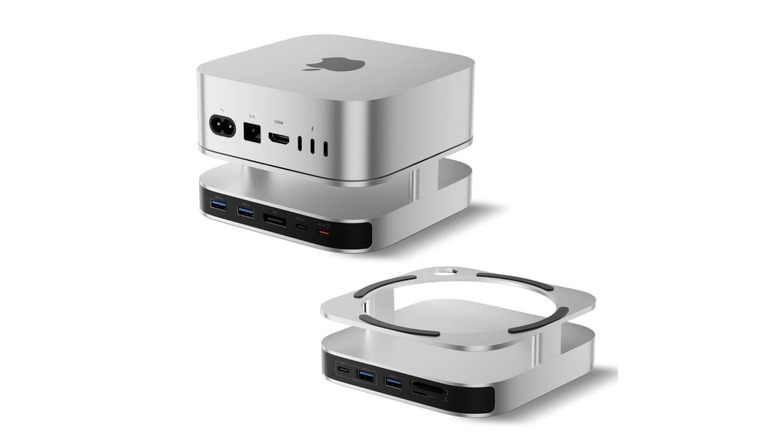
The BENFEI Mac mini M4 Dock ($49.99 at Amazon, on sale for $40.49 when written) is a handy multi-purpose accessory that, despite saying Mac mini in the name, is compatible with any mini PC of similar dimensions, such as the Minisforum UM890 Pro, according to a verified customer review. It combines a desktop stand for better airflow and cable organization, a USB hub for expansion options, and an external SSD enclosure for up to 8TB more storage at a price tag under $50.
It offers a DisplayPort connection rated at 4K 30Hz (4K 60Hz with DP 1.4), 2K 60Hz, or 1080P 120Hz to extend or mirror your display across multiple monitors (check out tips and tricks for dual monitor users to boost your productivity), a USB-C port, one USB-A (3.2) and three USB-A (3.0) ports for peripherals, and an SD/microSD card reader for quick photo transfers or even more storage. The built-in SSD slot supports M.2 NVMe SSDs between sizes 2230 and 2280 only — it does not work with traditional SATA drives.
Some users have mentioned problems with the external NVMe drive temporarily disappearing on them, needing a quick reset for it to appear again. It's worth noting that if you make use of this connection, you should back up your mini PC frequently.
Againmore Travel Case for Apple 2026/2024 Mac mini
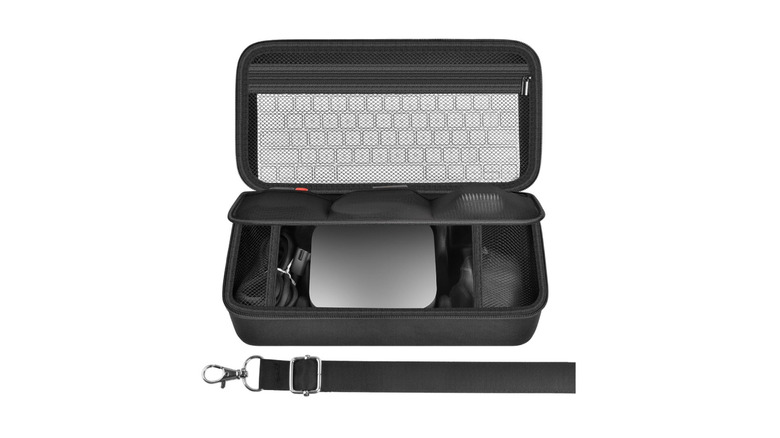
Againmore's Travel Case for Apple 2026/2024 Mac mini ($31.99 at Amazon) is particularly useful if you commute to and from work or school with your mini PC. This 12.2-inch case was purpose-built for the Mac mini, but will work just as well with other mini PCs of a similar size. It gives you a convenient place to store your entire mini PC setup (aside from the display), including the PC itself, a mini keyboard and mouse, power adapter, cables, wireless headphones, and more. The Travel Case for Apple 2026/2024 Mac mini features a three-layer design so you can organize the compartments as you like.
The top layer is a zippered mesh pocket for keyboards, notebooks, or power adapters. The second layer has three small pockets to store accessories, and the base layer is made to house the mini PC itself, accompanying cables, and small peripherals. Since it was designed with small Apple peripherals in mind first and foremost, this case will not work well if you like to use a full-size keyboard, mini PC dock, or other large accessories.
The outer shell is made of a hard EVA material for protection against drops and scrapes, while the inner lining is soft and safe for your electronics. Againmore includes a shoulder carry strap too, which is a nice addition for taking the weight off your hands during commutes. Some customers have noted that the strap feels a little thin and cheaply made, though, so you might want to rely on the built-in top handle for bumpy rides.
HumanCentric Thin Client Mount Bracket
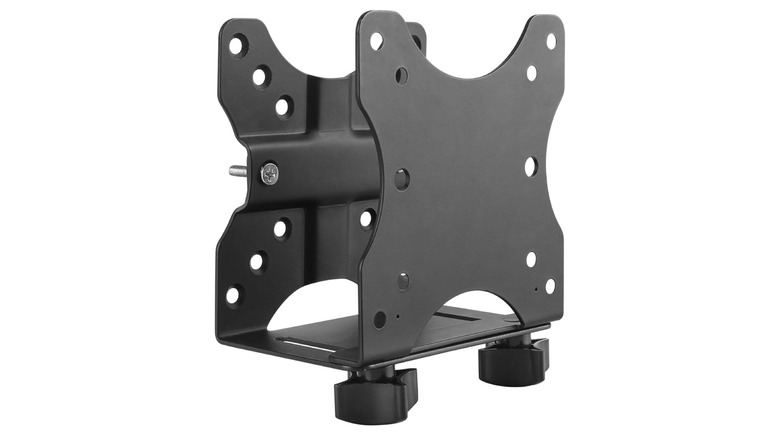
The HumanCentric Thin Client Mount Bracket ($26.99 at Amazon) is a simple but effective way to free up desk space and organize the cables that connect to your mini PC. You can configure it three different ways: attach it under your desk, directly to the back of a monitor, or to a monitor arm using VESA passthrough (via arm to bracket, then bracket to monitor).
The bracket supports 75x75mm and 100x100m VESA mounts, covering a wide range of monitors and mounting poles. If you're planning to connect the bracket to a monitor arm, you will have to check if your mini PC and monitor are under the supported 18lbs limit, though. Some users have been less than impressed with the bracket strength when it comes to connecting larger monitors like the LG Ultra Gear series, mentioning that it droops down further than they'd like. Mounting the bracket under your desk may be a better option if you plan to use a monitor arm with heavier displays.
The HumanCentric Thin Client Mount Bracket is adjustable and can fit a wide range of powerful mini PCs between 0.65 inches and 2.55 inches, including the Mac mini, Chromebox, and more. It features a durable aluminum construction with included silicone strips to prevent scratches and dings on your hardware.
Creative Pebble V3
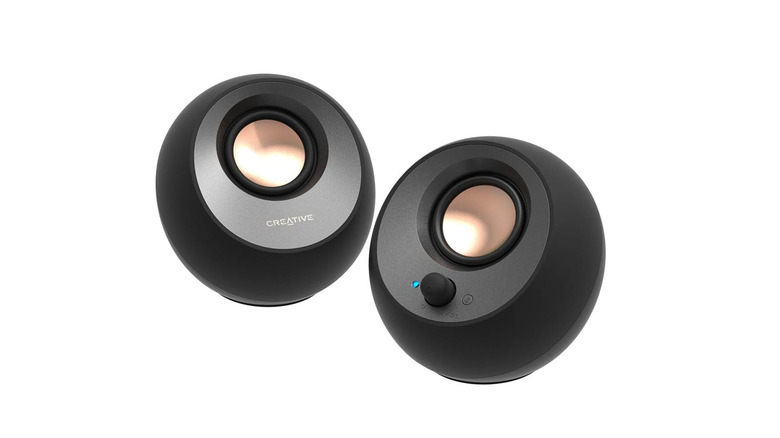
The Creative Pebble V3 USB-C Desktop Speakers ($44.99 at Amazon, on sale for $39.99 at the time of writing) are a great, affordable speaker setup for your mini PC setup, especially if you want an alternative to your monitor's built-in speakers. They're nice and compact at 4.8 by 4.7 inches, so they won't take up much desk real estate, and you can feasibly fit them in a backpack or travel bag alongside your mini PC. As for cable management, they connect to your mini PC through a single USB-C port or through the included USB-C to USB-A adapter. You can also use Bluetooth 5.0 if you want to go wireless.
These 2.0-channel speakers feature 2.25-inch full-range drivers at a 45-degree angle to send sound up towards your ears rather than flat out of the front. Combined with Creative's Clear Dialog audio processing, you get solid sound quality for songs in the mid to high range, podcasts, and video calls. There's no subwoofer in this set, though, so don't expect to get much punch when it comes to bass.
At under $50, the Creative Pebble V3 USB-C Desktop Speakers are a much better choice for everyday desktop listening rather than filling a whole room with sound, making them a perfect mini PC accessory to keep with your kit.
Rgeek Mini PC Cooling Fan with Adjustable Speed Controller
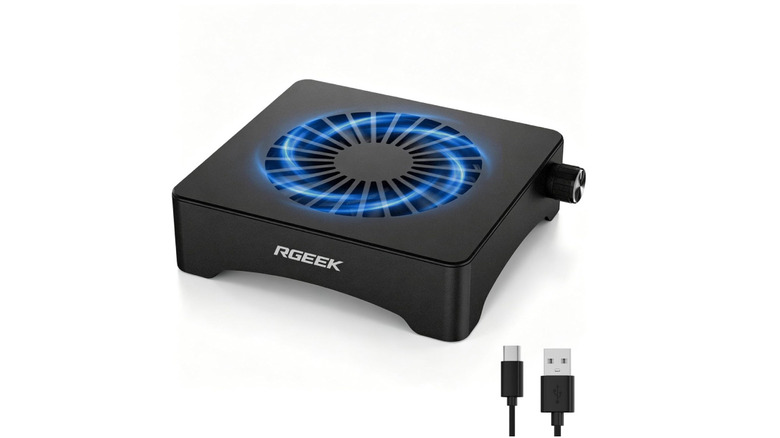
Mini PCs pack all of the necessary hardware — oftentimes fairly powerful hardware — into such a small chassis that cooling is often one of the sacrifices manufacturers have to make. The Rgeek Mini PC Cooling Fan with Adjustable Speed Controller ($33.99 at Amazon) uses a 120mm fan to pull that heat away from your mini PC's components and vent it out of the bottom, or push cool air up from underneath depending on the orientation you set it to. Not only does a better cooling solution better protect your PC's expensive hardware, but it can also have sizable impacts on performance.
If you use your mini PC for resource-intensive programs like video editing software or gaming, you may have noticed stutters in performance or programs that stop responding altogether. This could be a result of thermal throttling, where your mini PC dynamically caps performance to prevent heat from damaging its components. A cooling pad that improves airflow can help your mini PC maintain higher clock speeds for longer.
The Rgeek cooling fan features adjustable speed control so you can balance performance with fan noise, which some Amazon customers have said is definitely noticeable in small rooms. Its aluminum construction is fairly sturdy, and it connects straight to your mini PC through a single USB-C cable.
How we chose these mini PC accessories
In order to choose these mini PC accessories, we laid out the foundation first: the accessory needed to be readily available on Amazon, affordable and a good value at under $50, and it needed to have a user review rating of at least four stars. We put a particular emphasis on reviews that highlighted real-world use cases, with both pros and cons of the accessory listed.
Rather than stopping solely at the star rating, we considered feedback that came up across multiple reviews regarding criteria such as build quality, installation procedure, performance, longevity, and whether the accessory performed as advertised. It should also be compatible by a wide range of mini PCs. With these key criteria in mind, we browsed Amazon for mini PC accessories of all types, including USB hubs and docks, carrying cases, SSD enclosures, speakers, and more.
We sought to include a range of accessories that improve various aspects of owning a mini PC. We also considered which accessories were most applicable to the majority of mini PC owners. In other words, do we believe the accessory is genuinely worth recommending to most customers in the market for a USB dock, cooling pad, or carrying case? If so, we listed it here.