

Here's What The Blue Snowflake Symbol Means On A Tesla
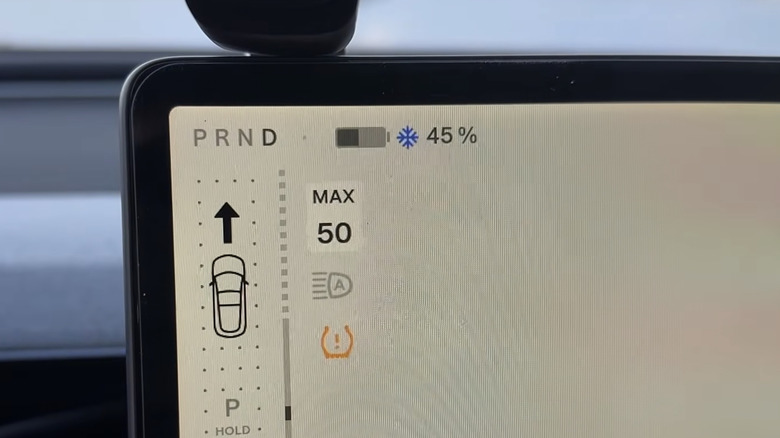
If you jump into your Tesla on a bitingly cold morning and start the car, you might see a blue snowflake symbol appear on the touchscreen or the mobile app. No, it's not a warning of wintry driving conditions, but instead a notification that your battery may currently be too cold to function at its full potential. Once you get moving, though, it should gradually warm up, with more of its stored energy becoming available.
For Tesla drivers, it's worth knowing that a cold battery can affect three aspects of your vehicle's performance, namely regenerative braking, acceleration, and charging speeds. There may be a reduction in regenerative braking, so your car won't slow down as much when you take your foot off the accelerator. This means you might find yourself having to use the brake pedal more often, especially when approaching things like junctions and traffic lights. A cold battery can also temporarily limit acceleration power, which is likely to make your Tesla feel less responsive when you're performing maneuvers like pulling away, merging into traffic, or overtaking. Finally, don't be surprised if charging speeds appear slower, as a cold battery is unable to accept energy as quickly as it can in warmer conditions. However, if you select a Supercharger station using Tesla's built-in navigation tool, the car will precondition the battery on the way there, working to bring it closer to the ideal temperature for fast charging.
Fortunately, these limitations should be temporary and improve as the battery warms up, causing the snowflake to disappear. In the meantime, just proceed with a little more care, allowing extra room when slowing down, while also being aware that your car may not offer its usual acceleration performance until further into your drive.
Tips for driving a Tesla in cold conditions
As we've just seen, a Tesla can precondition the battery while you're driving to a Supercharger station, enabling faster charging when you arrive. But you can also precondition it before setting off, warming up both the cabin and the battery before you get on the road. To do so, use the touchscreen's Schedule feature or the Climate controls via the mobile app to warm the cabin and, if necessary, the car's battery before you leave. Tesla recommends activating the climate settings 30-45 minutes before you hit the road.
You can also help preserve your Tesla's already impressive range in colder conditions by using the seat heaters instead of relying on the cabin heater. The seat heaters use less energy than the cabin heater, enabling your car to use the saved energy to drive further on its existing charge. If your Tesla has a heated steering wheel, this can help keep your hands nice and toasty, too. Of course, if you're really cold, you'll want to turn on the cabin heating, but you can always lower it once you're feeling comfortable.
Freezing conditions can cause problems for a car's wipers and mirrors, and a Tesla is no different. In this case, the automaker recommends raising the wipers using the Wiper Service Mode before snow or ice has a chance to accumulate. This helps prevent the wipers from freezing against the windshield, reducing the risk of damage. It also suggests disabling Auto-Fold Mirrors if you're expecting icy weather, as ice can prevent the mirrors from properly folding or unfolding. Some electric cars perform better than others in wintry conditions, so if you're considering getting one for colder climates, it's worth finding out which models cope best when the temperatures drop.