

6 Free Alternatives To Photoshop You Should Try ASAP
Arguably the most well-known image editing software of all time, Photoshop is so popular that it became a verb. But not everyone agrees with the crown prince of pixel pushing. As an Adobe product, Photoshop is subject to the same expensive subscription-based profit model the company rolled out to all of its software suite. Not just that, but Adobe's embrace of generative AI features has left plenty of artists and editors uneasy about the service.
Fortunately, Photoshop doesn't have as big of a monopoly on image editing software as you might think. And while they try to compete by having an official free Photoshop iPhone app, there are plenty of powerful Photoshop alternatives publicly available that are just as good, if not better. But "good" is subjective. A digital artist won't have the same needs as a professional photographer. The real key to finding the best alternative to Photoshop is to lean into your specific needs.
Adobe has one of the hardest subscriptions to cancel, though. So to make it easier for you, we've scoured through all the most popular and commonly recommended image editing apps and found the right one for every kind of user. Best of all, they're all free! So, there's no harm in trying them out ASAP. If you're tired of paying $23 a month for software you aren't happy with, then you need to download these alternatives to Photoshop and see what you're missing.
For something approachable - Paint.NET
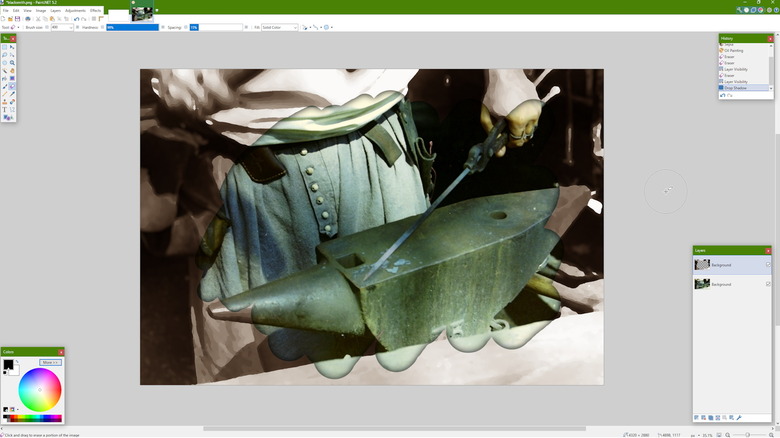
If you're not already a bit of a tech wizard, then a lot of image editing programs can be very overwhelming. Even computer savvy folks might not understand a lot of the graphical nuances and functions like frequency separations, histograms, or blending modes. Not everyone needs all that, but they still need something with more utility than the default Paint app. That's what Paint.NET is for.
The software offers a lot of the common functions you'd expect from Photoshop, like multiple image layers, cropping, resizing, painting, and erasing. It has blurs and other filters, along with a few basic specialist functions like color curves. And if it doesn't quite do what you need, you can expand its capabilities with plugins from the official forum plugin index.
Out of everything, Paint.NET is most commonly praised for its easy interface and surprisingly intuitive workflow. It's more than enough for most casual users. That said, it's not the right fit for everyone. If you need complex editing and powerful visual processing abilities, you might find the app's limitations sluggish and frustrating. It's also not available on Mac or Linux computers. But if you're just someone looking to do some basic editing, Paint.NET delivers. The full software is completely free on the Paint.NET website.
For Linux and Mac - Pinta
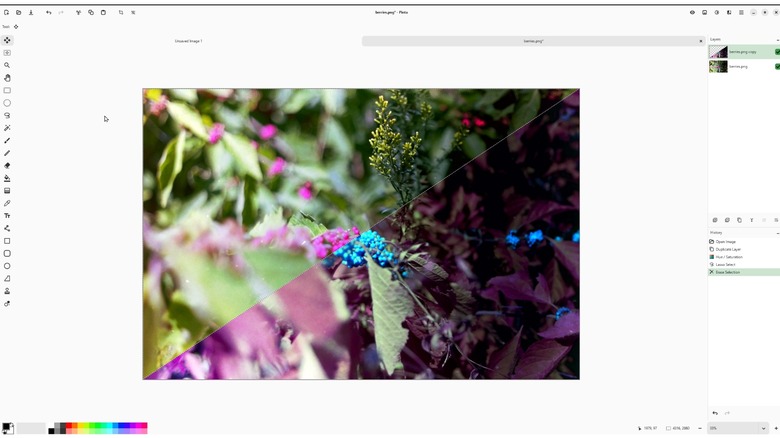
Pinta is, quite literally, Paint.NET for non-Windows machines. At least that's how it started. Pinta is an open source project initially developed by Jonathan Pobst in 2010. He was inspired by an article highlighting "a need for something like Paint.NET for Gtk," according to his personal blog. What began as a port slowly grew beyond the initial scope, adding in more functionality and a sleeker UI.
As you might expect, Pinta offers the same benefits as Paint.NET: a simple, intuitive interface that anyone can use. With a bit more polish and power, it's also praised by experts for its lightweight build but impressive toolkit. Some even consider it more intuitive than Photoshop when it comes to basic image layer manipulation.
All of that buries the lede, however. Photoshop is one of those essential Windows apps you won't find on Linux. So Pinta's greatest strength over software like Paint.NET and Photoshop is that it's available on both Mac and Linux computers. The app ecosystem outside of Microsoft is often a neglected one, so to have such a capable image editing app available makes all the difference to anyone not on Windows. No matter what you use, Pinta is completely free to download from its website.
For web browser editing - Photopea
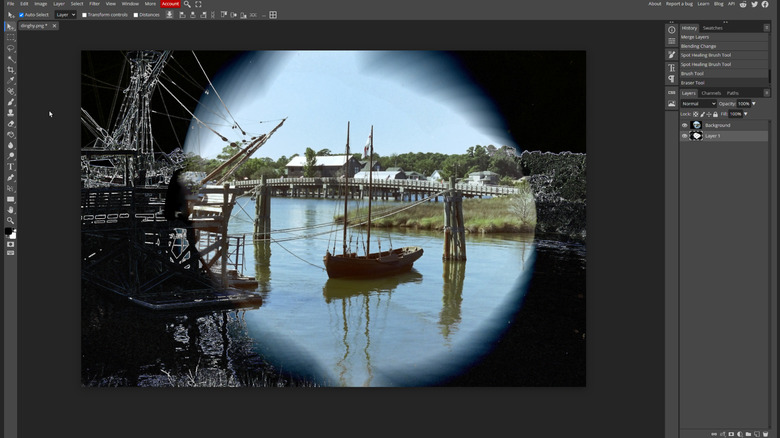
Image editing is a surprisingly resource-intensive process for computers, even basic effects like blur can be demanding. The fact that Photopea is a completely web-based image editor is already impressive, but the fact that it almost keeps up with Photoshop for functionality is outstanding. Not only does Photopea have everything you'd expect; layering, blending, adjustments; it has a handful of unexpectedly advanced options, like vectors, automation scripts, and even video editing. It's received great praise in expert reviews, partly due to being able to open PSD files, making the transition from Photoshop even easier.
But its boon is also its bane. Being entirely web-based means actual power is remarkably low compared to properly installed software. A lot of actions, especially complex ones like filters, can be slow to apply. The more you have going on in your project, the more you can expect to feel that sluggishness. Fortunately, there are web browsers more powerful than Google Chrome that can handle it. There is, of course, the need for an internet connection to begin using it.
While it works well as a daily-use app, Photopea shines brightest when you need to do some substantial image editing away from home or at a computer with software limits. Any time your usual option isn't available, really. You can access the app on Photopea.com, no download needed. The full app is free with an option to remove ads for a monthly subscription.
For powerful functionality - GIMP
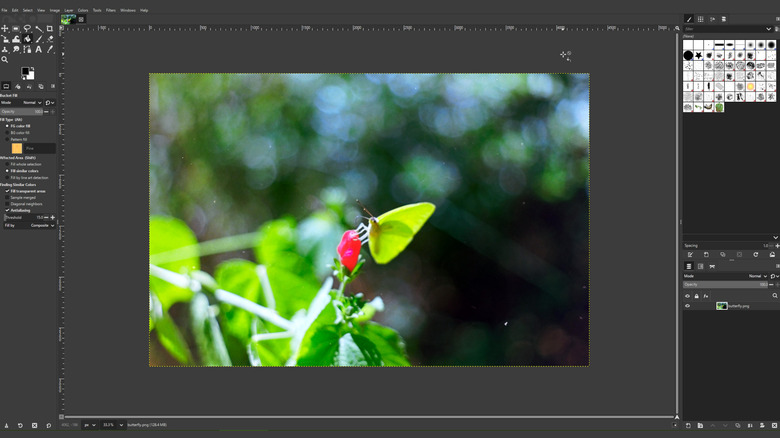
An acronym for "GNU Image Manipulation Program," GIMP is often touted as the biggest and baddest in the image editing scene — in a good way. And while it may not be that dramatic, it's still one of the most extensive options on the market. There are seven different selection tools, hundreds of filters, and over 30 layer modes. It has dynamic paint brush rendering, 3D and liquid transform, and symmetrical painting. And for the code-savvy out there, it has multiple coding language implementations for more back-end level customization and control. Regardless of what kind of work you do, odds are GIMP has the tool for it. That's what GIMP is best known for, and it's the highlight of all expert reviews.
It's not flawless, though. The most common criticism of GIMP is the unintuitive and sometimes overwhelming interface. And despite having the most impressive selection of powerful editing tools, performance issues hold it back from being a speedy workspace. If you're someone who knows image editing inside and out and wants full control, GIMP has your back. But choosing software that's too advanced is an all too common mistake. So, if you want quick, simple work, this app might be overkill.
GIMP is an open source project, and is available for free on Windows, Mac, and Linux computers. You can download it at gimp.org.
For digital artists - Krita
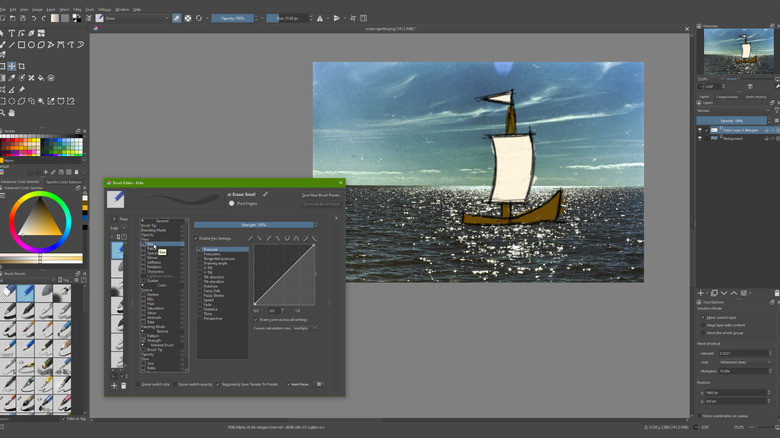
For countless creatives, image editing is more than just tweaking color tones and erasing blemishes; it's a blank canvas for digital art. And while some of the programs we've listed so far have things like paint brushes and vector graphics, none of them are as kitted for painting like Krita. It has hundreds of brush options, all drawing on the in-depth brush engines. There are brush stabilizers, vectors, and a dedicated resource manager so you can import whatever you need. It even has a full 2D animation suite.
Most importantly, and what is often a main point in expert reviews, the UI is built with artists in mind. The default layout shows clear and accessible details about each tool, but can be customized how you see fit, including a pop up quick settings menu. The numerous hotkeys can also be changed freely, allowing for a very streamlined workflow. And if you connect your Android tablet directly to your PC for drawing, Krita can utilize unique functions like pressure and pen angle.
We also appreciate how Krita offers several online tutorials on how to get started with digital art basics that aren't specific to Krita. The toolkit comes up shy for non-art-related functions, though, so it's not a great choice for someone more interested in editing images than making them. As an open source project, Krita is completely free to download via the website.
For doing it all - Affinity
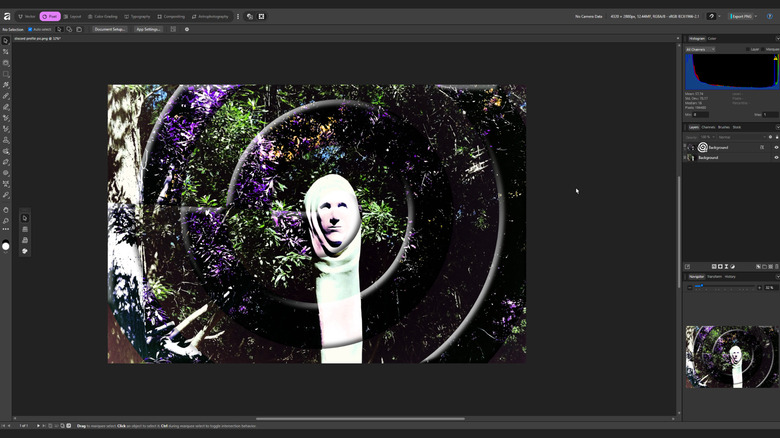
Affinity is the closest thing to what we could call a "Photoshop killer." Reviews point out the extremely expansive selection of tools and functions which experts think are fast, efficient, and wrapped in a very sleek and intuitive interface. It has the most comprehensive selection of tools we've seen, with the only complaint being a lack of photograph cataloging.
But who's it for, exactly? Well, almost everyone. It has tons of vectoring tools, numerous brush options, and fantastic pixel editing. There isn't enough time to list everything it can do, frankly. Workspace layouts are organized between different "Studios," going beyond just the Vector, Pixel, and Layout options commonly promoted. Photographers can develop RAWs with lens correction profiles for more camera models than we can count, for example. There are studios for typography, compositing, and even astrophotography.
The biggest flaws with Affinity don't actually lie with the software but the company that owns it. In 2024, Canva acquired Affinity. The following year, it re-released as a free product. The new version included Canva's AI generation, however, which sparked controversy among creatives. The full Affinity suite can be downloaded from affinity.studio for free. The Canva AI related features are locked behind the Canva Premium plan.
Methodology

When searching for the best alternatives to Photoshop, candidates had to fulfill three qualifications: A strong majority of its functionality must be available for free; it's available for personal computers; and its main suite of features is most closely comparable to what's offered by Adobe Photoshop. Software more closely resembling other Adobe products, like Lightroom or Illustrator, was not considered.
For the qualifying software we looked to community reports and recommendations, plus critical reviews by experts in the industry. The final selection was chosen with the best options for specific types of users, as indicated.