

Don't Pay For Photoshop And Acrobat: Use Them For Free In ChatGPT First
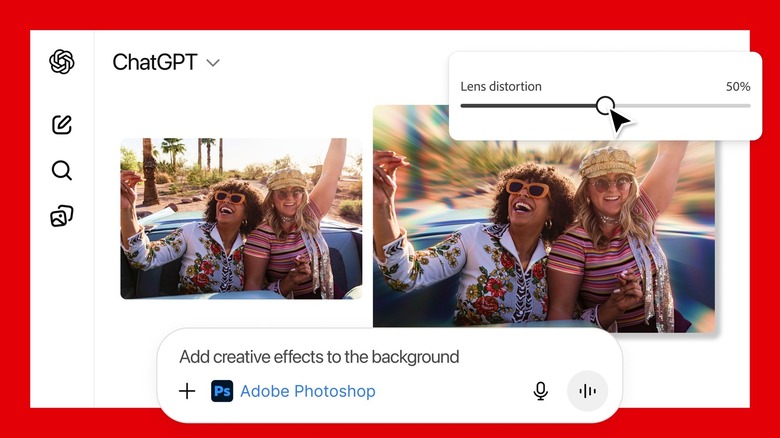
Frontier AI chatbots like ChatGPT and Gemini offer several advanced features beyond text generation that may reduce your need to use (and pay) for a different specialized app. AI image generation and editing capabilities are so advanced that you don't need to learn how to use Photoshop. Just tell the AI to create or edit images for you. Gemini's Nano Banana Pro is so advanced that it can create infographics and slides, so it can replace Adobe Express. The chatbots can also handle documents for you, which can be useful for data analysis, and may reduce your reliance on Adobe Acrobat.
But while it seems that generative AI services are eating into Adobe's revenue streams, the company has been anything but resistant to AI innovations. Instead, Adobe has embraced generative AI, developing its own models for its creative suites, and continuously updating them. Adobe has also unveiled AI agents that may further help with the creation process, and the Firefly app already supports third-party AI models, including Gemini's Nano Banana.
With that in mind, it's no surprise to see Adobe become one of the first companies to launch support for ChatGPT apps. Starting this week, Photoshop, Express, and Acrobat are all available directly in ChatGPT everywhere the chatbot can offer users access to third-party apps. The three apps are available for free, which means you only need to invoke them in the prompt composer to start working on files without leaving ChatGPT. Put differently, you should not pay for any of the three Adobe apps until you've tried them for free in ChatGPT. Of course, there are some caveats that users should know about.
What can you do with Adobe apps in ChatGPT?

Photoshop editing in ChatGPT won't get you access to the most advanced editing tools Adobe built for its popular app. But you'll be able to tell the AI to perform simple edits with Photoshop. Add the Photoshop app to the prompt, and type an instruction like "Add creative effects to the background" to edit with the app. You'll also have access to brightness, contrast, and exposure settings, including a slider that lets you customize the image. Some creative effects will also be available in ChatGPT.
Adobe Express lets you create professional designs with images and text inside ChatGPT. A prompt like "Create an invite for my dance party" paired with the Express app will let ChatGPT use the app to offer sample designs. You'll be able to refine the edits inside the chat via additional replies.
Finally, ChatGPT can use Adobe Acrobat to edit PDFs, extract information that you may need to use elsewhere, redact details, and even merge multiple files into the same document.
How much do the Adobe apps cost?

If you thought using Photoshop, Express, and Acrobat for free in ChatGPT was too good to be true, you'd be right. First of all, users in Europe can't use apps in ChatGPT at the time of this writing. Secondly, Android users only have access to Express integration for the time being. Finally, and most importantly, Adobe did not bring the full Photoshop, Express, and Acrobat apps to ChatGPT. You'll only be able to use specific features in ChatGPT, as explained above. For more complex tasks, you'll likely need to move to the full Adobe apps, which offer richer experiences. The good news is that you'll be able to seamlessly switch to an Adobe app, and continue your work from where you left off.
As of this writing the Photoshop and Express bundle starts at $22.99/month, while Acrobat starts at $12.99/month. Photoshop is also available on the web and mobile via the Firefly Pro app ($19.99/month), the Photography and Lightroom bundle ($19.99/month), and the Creative Cloud Pro plan ($69.99/month). Adobe Express is also included in Firefly Pro and Creative Cloud Pro. A standalone Adobe Express Premium subscription costs $9.98/month.