

5 Essential Costco Gadgets Every Remote Worker Should Try

Remote work might look easy on the outside, but it's actually challenging to get all the right equipment in place. You'd have to choose a suitable computer, pick out an external monitor to go with it, and figure out the best way to get a reliable internet connection for your home office. But beyond the basic computer, monitor, and internet setup, you'll also need some extra gadgets to make your workday more productive and comfortable.
If you're looking to spruce up your workstation at home, there are a couple of Costco items that would fit right in. Buying electronics at Costco instead of Amazon even has a few perks, including a generous return policy and free tech support. So, you could easily get your money's worth. That said, we've rounded up five Costco finds, perfect for every remote worker's home office, including an adjustable standing desk and a portable power station.
ApexDesk Elite Series 71 x 33 Height Adjustable Desk

Studies show that sitting for long hours has a negative impact on our health, from back and neck pains to metabolic slowdown to hypertension. As a remote worker, though, you're usually forced to stay seated in front of your computer all day long. To set up your desk to avoid back and neck pain and all those other health implications, you might want to consider using an adjustable desk like the ApexDesk Elite Series 71" x 33" Height Adjustable Desk from Costco. This desk is fully motorized with a dual-motor lift system. You can manually change its height from 30 to 49 inches using the up and down arrows in the control panel. But if you tend to keep your desk at the same few heights, you can opt to save up to four positions for quick one-touch adjustments.
Design-wise, the ApexDesk Elite features an ergonomic shape with a curved front edge to help you stay closer to your keyboard without reaching out too much. It's spacious enough for three monitors and durable enough for 235 lbs of load. The desktop itself is made of a medium-density fiberboard with a PVC laminate finish to make it scratch and stain-resistant. To keep you comfortable, the ApexDesk Elite doesn't run a crossbar underneath. That means you have more room even for an exercise bike. The desk also includes a cable management tray installed underneath, so your cords are hidden and organized.
The ApexDesk Elite is a Costco online exclusive, available for $649.99 and comes in five colors. It doesn't come pre-assembled, but it's easy to put together in under an hour.
Skylight 15 Smart Touchscreen Calendar and Organizer
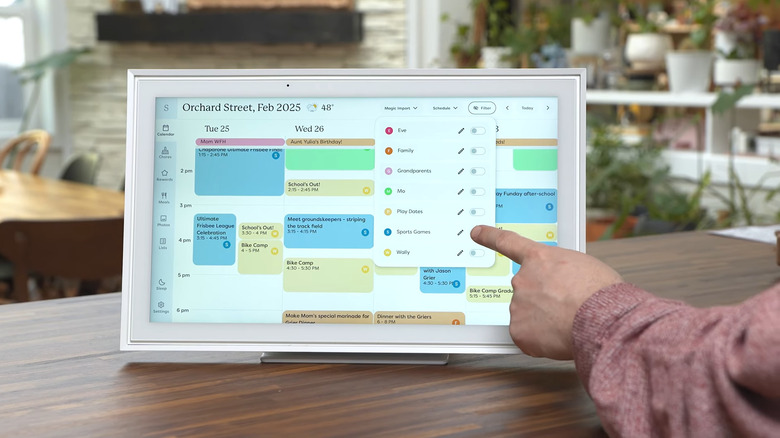
Days in your home office can quickly get chaotic if you don't have an organized list of your scheduled events. Sure, you could keep opening your calendar app, but it's much easier to have a dedicated display for your daily agenda. That way, instead of tapping around to get to your calendar, you can simply glance up and see what's coming next. For Costco members, the Skylight 15" Smart Touchscreen Calendar and Organizer is a great option for this purpose.
The Skylight Calendar is a digital calendar, where you can add and view events and scheduled to-dos. You can make edits directly on the smart touchscreen display or through the companion Skylight mobile app. If you already use a digital calendar from platforms like Outlook, Google, and iCloud, though, Skylight can sync with it and automatically import your existing events. The events you add directly on the Skylight Calendar will also sync back to your Google and iCloud calendar for easy viewing on your phone.
Other than a calendar, the Skylight Display also features a chore chart. You can use it to list to-dos for you and your team and even assign colors to each member. There's a checkbox list available on the display as well, handy for listing out personal errands and groceries. Whenever you're not using the display as a calendar, it can show your photo and video screensavers instead. To install the Skylight Calendar in your home office, you can either stand it on a tabletop like a picture frame or mount it on a wall like a paper calendar.
Type S 4 in 1 Electric Air Duster
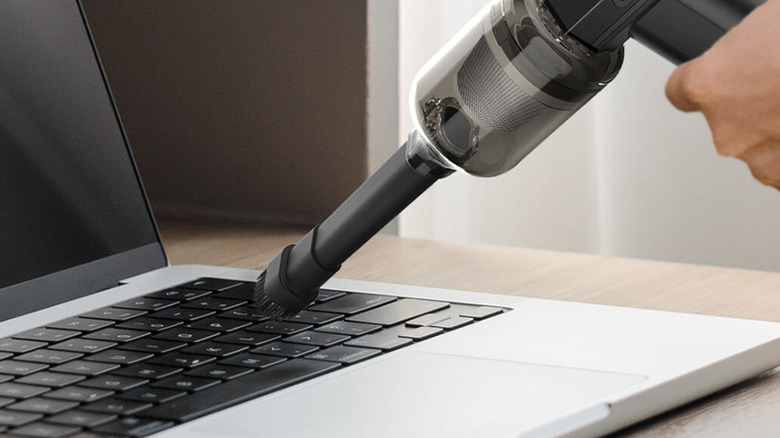
Dust may look harmless, but once it accumulates, it can quickly become your number one enemy. Dust buildup can block out the vents in your electronics and cause overheating. It can also interfere with the keys on your keyboard and prevent them from registering at times. To safely remove dust from any electronics in your home, a can of compressed air can usually do the trick. However, it eventually runs out, so you'll need to buy another one. If you want a more reusable option, Costco offers one in the form of the Type S 4 in 1 Electric Air Duster.
Packing in a 110,000 rpm high-power motor, this $49.99 electric air duster comes in handy for clearing dust off your laptop vents, keyboards, and desktop tower. You can also use it as a mini vacuum for your desk. Just attach the included brush and washable filter, and you can start cleaning up food crumbs and paper bits. With four speed settings, ranging from 35,000 rpm at Level 1 up to 110,000 rpm at Level 4, you can easily adjust the air pressure as needed. It's not particularly loud, either. It's just 56 dB, which is around the same level as a dishwasher.
Conveniently, the Type S Electric Air Duster doubles as a power bank to charge your phone in a pinch and as a flashlight for emergencies. It comes with a 4,000 mAh battery that can last for two hours on Level 1, an hour on Level 2, 30 minutes on Level 3, and around 12 minutes on Level 4. It does take a while to charge the device, though, and you'll have to wait for up to three hours.
Bose QuietComfort SC Noise Canceling Headphones

Noise cancelling headphones are a godsend for remote workers. They help you stay focused on your task by removing distractions around. And if you're frequently on calls, they can also block out unnecessary noise to make your meetings clearer. If you need noise cancelling headphones at work and are on the hunt for a reliable pair, you can find one at Costco for $329.99: the Bose QuietComfort SC Noise Canceling Headphones.
The headphones feature two modes, Quiet and Aware. Quiet mode, as its name suggests, completely mutes the outside noise. Aware mode, on the other hand, lets you hear ambient sounds from the environment. This means you can still pick up car honks and people's conversations nearby even while you're listening to your playlist, ideal for when you're in a public place and need to stay alert. On top of these preset modes, you can make two additional listening modes from the Bose Music app. The app also lets you customize the equalizer settings (bass, treble, and midrange) to your liking.
In terms of control, the headphones are designed with buttons on both earcups. The right buttons are for playing and pausing playback, answering and ending calls, raising and lowering the volume, and activating the voice assistants on your phone (Siri or Google Assistant). With the left buttons, you can switch to your preferred listening mode or access Spotify Tap. You can use the Bose QuietComfort Headphones for as long as 24 hours even with noise cancelling enabled. Once the battery is empty, it takes around 2.5 hours to charge fully but even a quick 15-minute top-up can get you two to three hours of playback.
EcoFlow River 3 Plus Wireless Boost Combo
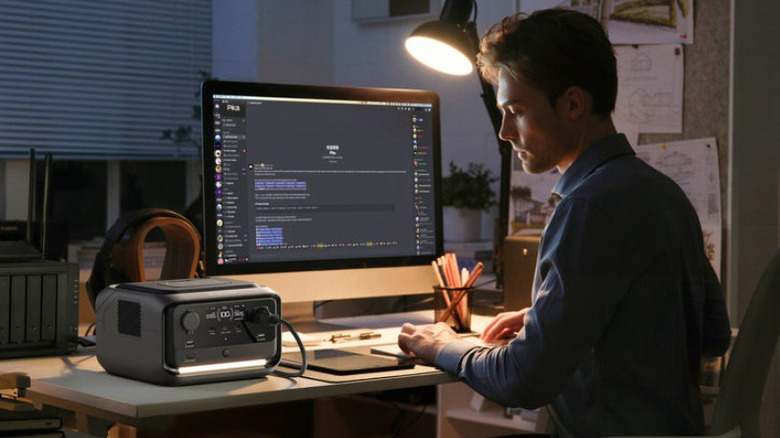
As a remote worker, power outages are your worst nightmare. You can't work, access important files, or attend meetings. Plus, your home becomes uncomfortable to be in without lighting and air conditioning. To make sure your workday won't be interrupted by unexpected blackouts, it's best to be prepared with a portable power station like the EcoFlow River 3 Plus Wireless Boost Combo, available at Costco for $279.99.
With a capacity of 286Wh and rated output of 600W, this power station is enough to run your work essentials for a few minutes to a couple of hours. It can power a 3W Wi-Fi router for roughly 35 hours, or your 600W desktop for 21 minutes or so. You can also use the unit for other AC gadgets like your monitor (plugged into the AC outlet) and small electronics like your phone (connected to the USB-C and two USB-A ports). While powerful, the EcoFlow River 3 Plus only produces 30dB within 1.6 feet, which is as soft as a whisper.
When it's time to recharge the power station, you can do so via wall outlet, generator, solar, or car. It only takes an hour to charge it from 0 to 100% via AC and generator, 1.5 hours via solar, and a little over three hours via car. Besides the power station itself, two 5,000mAh magnetic power banks are included in the package. These can fast charge your phone and works both wirelessly and via the built-in cable. You can also find an integrated light in the unit for emergencies. For convenience, the power station has Wi-Fi and a companion app, where you can look at the battery health, change the charging speed, and more.
How we came up with these recommendations

In choosing these products, we first considered their relevance and usefulness in a work-from-home setup. They should integrate seamlessly into any remote worker's home office and come in handy either for daily use or in emergencies. To ensure you also get your money's worth, we picked products with good reviews on the Costco site and at least 4.4-star ratings.