

You Can Use One Of Android's Best Features To Spot Scams Quicker

Scams are everywhere these days — sometimes it feels like you just can't escape them. You get scam calls, messages, and even emails, and the red flags are becoming harder and harder to spot. But what if we told you there's an easier way for people with Android phones to check on scam text messages before they fall for them?
When Google first dropped Circle to Search on Android, the feature was mostly about being able to easily look up items you saw on your screen. However, the functionality evolved quite a bit, particularly after a massive AI upgrade. In December 2025, Google added the option to use Circle to Search to check if messages were a scam. This is exceptionally useful, as many of the text message scams we receive these days are written to look just like official texts from real places.
These can include texts like toll road charges, or even messages that appear to come from financial institutions like PayPal or your bank. Luckily, if you have trouble distinguishing the real ones from the fake, Google's Circle to Search can now help. Of course, we do want to note that it is not recommended to blindly trust AI or other automated systems without further verification. But, by using Circle to Search, you can at least get a baseline to help determine if something is a scam or not.
How to check for scams using Circle to Search
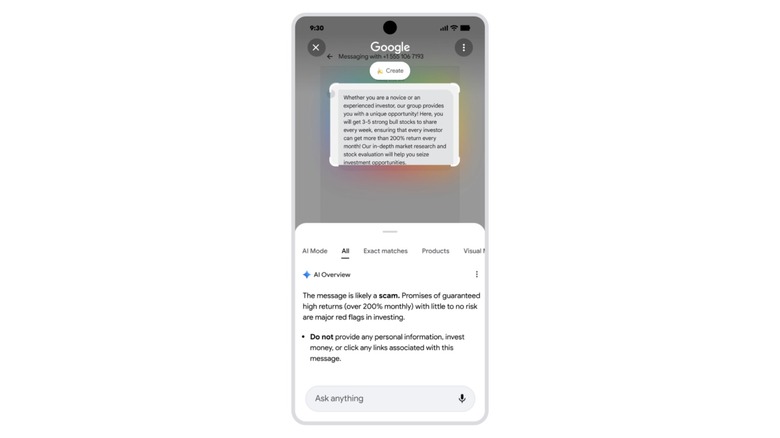
To use Circle to Search to check messages for scams, all you need to do is pull up the message that you want to verify and then activate the feature. You can trigger it a few different ways, but it mostly depends on your device and what type of navigation settings you're using. For example, with three-button navigation, all you need to do is long-press the home button to bring up Circle to Search. If you're using gesture mode, you'll long-press the small "drag handle" found at the very bottom of the screen.
Once you activate Circle to Search, simply circle the text that you suspect is a scam. From there, Google will search the internet for details and assess whether the contents of the message are likely a scam. If it is a scam, then Google will provide you with more details about why that is likely, as well as some warnings not to approve payment requests, share private information, and so on. Circle to Search can even point out common patterns found in other scams, which will hopefully help you identify them yourself in the future.
Ultimately, the best way to use this functionality is to make a habit of it. Some recommend pulling up Circle to Search on every payment request you get or odd text message — especially ones you aren't expecting. This routine can make it easier to spot red flags and avoid scams altogether.