

The 5 Most Reliable Mesh Wi-Fi Routers, According To Consumer Reports
We may receive a commission on purchases made from links.
Finding the most reliable mesh WiFi routers for your home can be a challenge, since a poorly made purchase can come with dead zones, buffering, and dropped connections when you most need it. Unlike the traditional and older routers, where in order to have the WiFi working in all rooms of the home you need to use clunky extenders or similar devices, the mesh WiFi systems offer a simpler way to have the same range. So for these devices to work properly, you need to buy the right ones.
However, they also come with a catch, which is the price tag. While the Mesh WiFi routers offer a significant step up in the overall quality of your network when compared to traditional routers, the investment for one often ranges from $100 to over $500. This kind of investment makes choosing the wrong device hurt more than it would with a cheaper router. Having a WiFi that under-delivers speed and also comes with dropped connections is a mistake that many users can't afford to make.
As part of its reviews, Consumer Reports has tested dozens of models across a range of criteria and also considered the experience of actual owners to know how well they'll hold up over time. So if you're interested in having a mesh WiFi network to improve the internet performance in your home, these are the options that offer the best starting point.
Google Nest Wifi Pro 6E

While it may not have the same raw power as other Mesh Routers, the Google Nest Wifi Pro is a great choice for those who want a device that is easier to use. The setup can be handled through the phone app, which helps the user during the install process and makes this mesh kit one of the most user-friendly options available. This router is also compact and lightweight, making it easy to put it in tight spaces or blend it without drawing attention.
Where the Nest Wifi Pro 6E quietly shines is in how it handles your data. In Consumer Reports' testing, it earned strong marks in both data security and data privacy, so it does a solid job of protecting your home network while also limiting how much personal information it shares. For privacy-conscious buyers who are wary of how some smart devices handle tracking and analytics, this policy can be a major reason to use the Nest Pro 6E.
The Google Nest Wifi Pro 6E is an entry-level device for those interested in testing mesh routers, but don't want to spend a lot on the best options in the category. So when compared to other competitors, this device delivers noticeably weaker speeds at close and mid-range distances, and only middling results at the end of coverage and with only two Gigabit Ethernet ports, it's suited for heavy users. However, for small houses it's a good and cheaper choice.
Netgear Orbi 870 Series BE21000

If you want raw speed in your new device, the Netgear Orbi 870 series is one of the best WiFi routers and most reliable options that you can buy in stores. That's because this device comes with a Wi-Fi 7 (802.11be) kit, which pushes the latest wireless standard across all bands, including 2.4, 5, and 6 GHz, keeping a stable and fast connection throughout the house, according to Consumer Reports' lab testing. This means that this mesh router has excellent performance on near and far distances.
Using the Orbi 870 is fairly easy, since you can install and use it with a simple mobile app or a web-based wizard that will walk the user through every step, being one of the best options for beginners that never had a mesh router before. It also comes with multiple Ethernet ports, so, for example, if you need to plug your internet into gaming consoles, a Smart TV, and even a desktop, it's possible to do so without needing to spend more on an extra hub.
However, all the performance, reliability, and ports that Orbi 870 has come with a price, since you can find a kit with two pieces with a $699.99 tag. Despite it being among premium options, the Orbi 870 also has some trade-offs, since, according to Consumer Reports, it doesn't perform well in data privacy, and there's no built-in Quality of Service, which some users may miss for traffic prioritization.
TP-Link Deco BE65 Pro
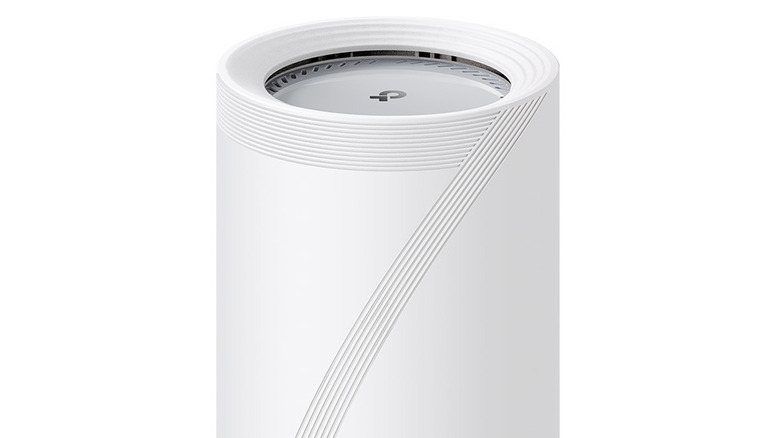
The TP-Link Deco BE65 Pro is a good choice if you want to improve the speed and connection coverage at your home, but, at the same time, aren't interested in paying the premium price that the most reliable Mesh Routers have. According to Consumer Reports, it's among the better-performing mesh systems they tested, yet the three-pack typically sells for about $450, making it noticeably cheaper than many Wi-Fi 7 options that you may find when searching for options.
The support offered by TP-Link is also another great point for this model, since the manufacturer backs the system with a two-year warranty, which is longer than many competitors, and the software comes with Quality of Service for users who want traffic prioritization. Each unit has two 5 Gbps and one 2.5 GBps Ethernet ports, which can be more than sufficient to plug consoles, smart TV, and other devices to a faster connection.
Still, the affordable price that the TP-Link Deco BE65 Pro has comes with some trade-offs. For example, its speeds tend to slow down at the very end of your coverage, meaning that the rooms furthest from these mesh routers may not have the same connection quality as those close in. And while the security tools do a good job of protecting your network from outside threats, the privacy policy still allows for some data collection, which more cautious users may want to review.
Asus ZenWifi AXE7800
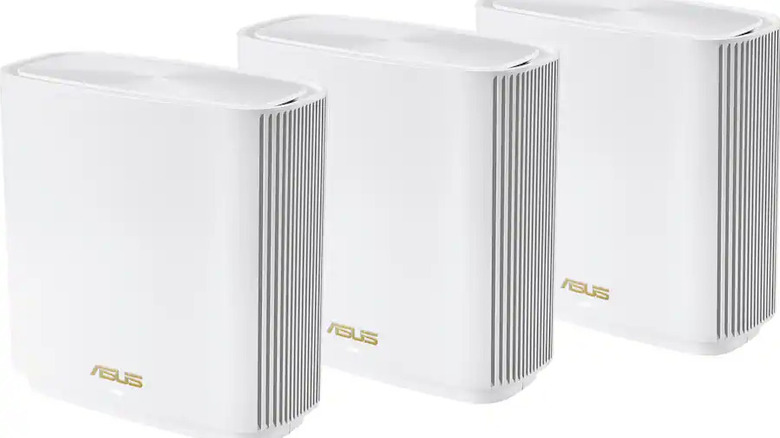
If you want a mesh router that delivers the same performance wherever you are in the house, perhaps the ZenWifi AXE7800 by Asus is for you. While it comes with Wifi 6E instead of 7, the router does a good job when it comes to delivering the connection and keeping it steady in the house, maintaining a good performance in different rooms, instead of falling off on the edges. According to Consumer Reports, it sits among the better-performing mesh kits they've tested.
Where the ZenWifi AXE7800 really shines from other mesh systems is in connectivity. Each unit packs with four Ethernet ports and one USB 3.2 Gen 1 port, so you can have a desktop PC, consoles, Smart TVs, and other devices plugged with a cable without worrying about getting extra switches or leaving one out. The setup can be done either through a simple smartphone app or a more traditional web-based interface if you like to tweak every detail yourself.
Asus backs the ZenWifi AXE7800 with a three-year warranty, which is more than most of the manufacturers tend to offer on their devices, and also has an affordable price, since a pack with three routers often sells around $499.99, which is reasonable when considering the price for each unit. While the security is fair, it's worth taking a minute to review the privacy settings if you're careful about how your data is handled by Asus.
Asus Zenwifi BD5
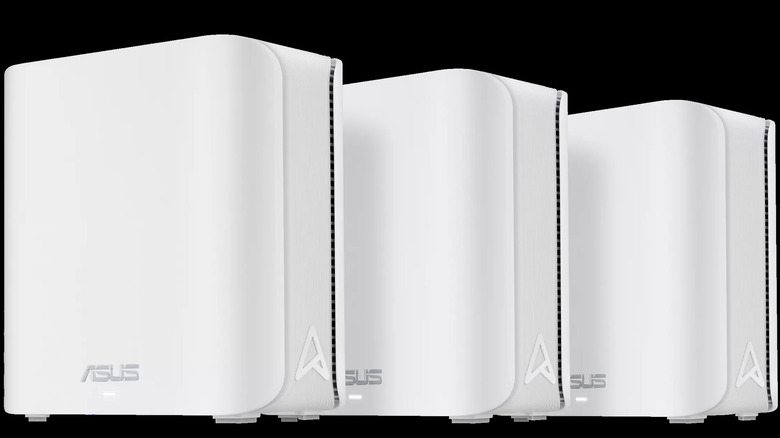
The Asus ZenWifi BD5 mesh router is one of the best options for those who want to experiment with Wi-Fi 7. This model is one of the most affordable that supports the 802.11be standard across the 2.4 and 5 GHz bands, which means that it's a great upgrade if you have an older router. Despite that, according to Consumer Reports, it's a smart buy, since the price usually starts around $199.99 for two units.
The Asus BD5 also delivers performance better than users can expect at this price range, since it holds up especially well at longer distances, making it a solid choice for larger homes, especially where some rooms don't have a good signal with the older router setup. Near and mid-range speeds are above average, making it possible to stream or casually play online without the need for extra cables.
You do give up a few niceties to hit that lower price. The BD5 offers two 2.5 Gigabit Ethernet ports but no USB ports or print server, so you can't plug in external drives or a USB printer directly. On the plus side, Asus backs it with a generous three-year warranty, which is great since the BD5 is a budget mesh kit, and includes handy software extras like parental controls and traffic prioritization to keep everything working smoothly.