

2 Hidden Spotify Features That Can Make Your Playlists Better

Spotify is one of the most popular music streaming services out there, and there's a good reason for that. Whether you're using the web player or the app, the experience is smooth and seamless (at least if you're using the premium version), made better by the vast selection of songs and tons of handy features that jazz up your jam sessions.
Many of these Spotify features are targeted toward helping you curate the perfect playlist for whatever you're feeling. There's Smart Shuffle that adds songs that Spotify thinks you might like, Mix sections that give you customized song playlists based on stuff you've been listening to, and even Spotify's new Smart Reorder feature that makes your song transitions more seamless.
However, there are also a number of hidden Spotify curation features that most people don't know about, but that can make your playlists better. These include even more ways to get customized playlists and song recommendations by Spotify, custom album art to make your playlists pop even more, and even a dedicated AI-assisted DJ with the sole purpose of curating your playlists.
1. DJ X, the AI music assistant
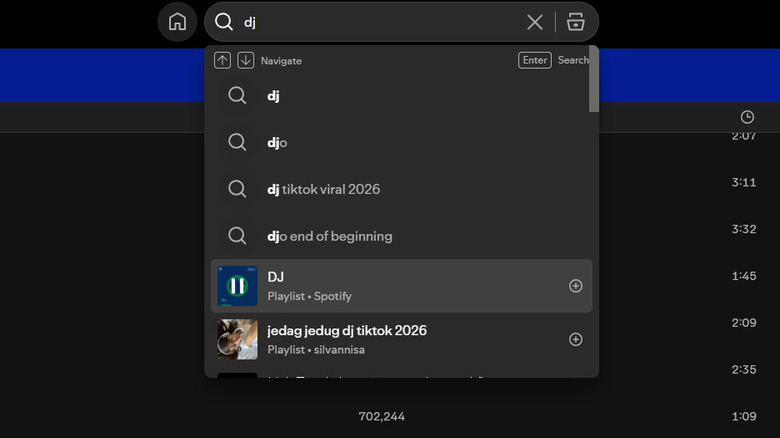
Every major company has incorporated AI into its app in one way or another. For Spotify, one of these ways is its integrated AI assistant that functions as your personal DJ, DJ X. To start DJ X, you can simply search for DJ on Spotify and select the DJ playlist by Spotify. This will prompt a voiced AI assistant that introduces itself to you and explains some of its features.
After this, the DJ essentially analyzes what you've been listening to and curates a playlist based on your likes. There's no option to prompt it with specific commands — unlike in many other similar assistants — but you can choose to tap on a new button beside a song if you don't like it. This will tell the DJ not to put that song or any similar ones in the queue. Overall, this doesn't function much differently than any other playlist curation method, but it is a mostly hidden Spotify feature that you might want to try out.
2. Track exclusions to fine-tune your taste profile
Spotify has a lot of features that help you curate your playlists and give you new song recommendations based on what you like. Whether you're using the base Smart Shuffle, the Radio, or even Spotify's AI DJ, there's a way to ensure the recommendations you get are tailored even more to your specific tastes by telling Spotify which recommendations or songs you aren't a fan of.
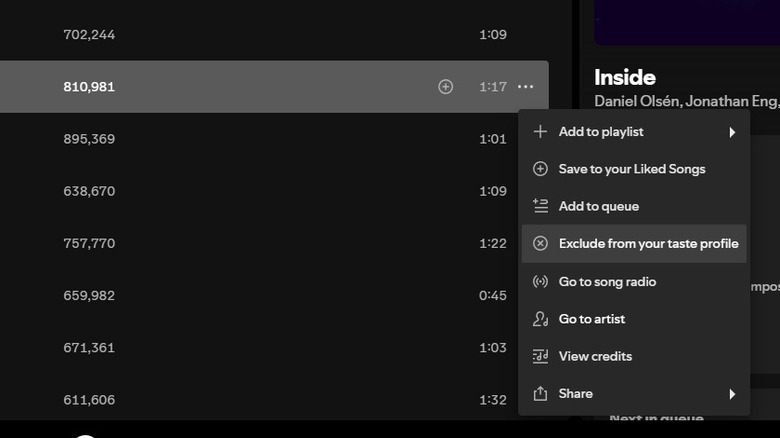
Doing this is very straightforward. Whenever you see a song that you don't like — whether it's one recommended by Spotify or not — you can click on the three dots beside it and select Remove from your taste profile. Then, the next time you use any Spotify recommendation feature, the algorithm will do a better job to ensure you don't get similar songs presented to you. The more often you exclude songs this way, the more accurately Spotify will be able to figure out what songs fit your tastes best.