

9 Essential Apple Watch Apps You Should Install In 2026
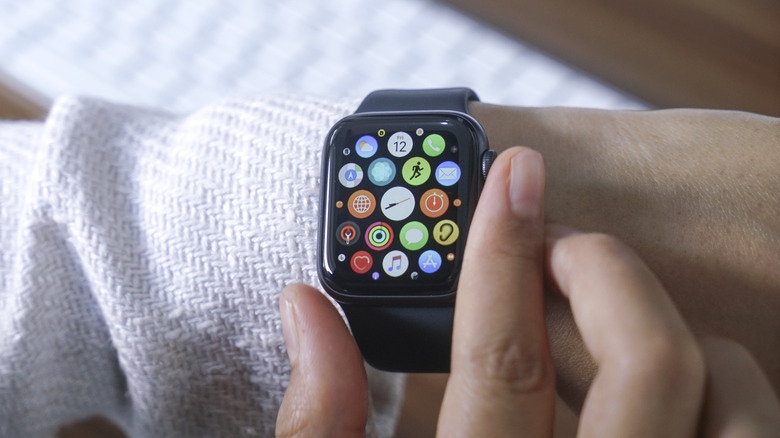
The Apple Watch is the perfect sidekick for daily life. It shows you all your notifications and messages, helps you track your workouts, and lets you answer calls and control media on your iPhone. It has quite a few hidden features that you should be using, but to take it to the next level, you'll need apps.
Just like with the iPhone, the Apple Watch's default functionality and apps are quite good. But third-party apps can unlock entirely new use cases, and offer extra features and customization options that Apple doesn't. For example, the Workouts app on the iPhone is great, and you can change the metrics you see on the screen, but that's it. You can't create a custom interface to see the key details you really want when you're out trying to set a personal best on an outdoor run. Similarly, the Activity app shows you your Rings, but doesn't really give you an overall detailed picture of your health.
When you install dedicated third-party apps crafted specifically for the Apple Watch, you can unlock extra features for streaming music, tracking your steps, workouts, and more. And you can do all of that without ever picking up your iPhone (as long as there's access to Wi-Fi or cellular data). Here's our collection of the apps that will upgrade your Apple Watch experience the moment you install them.
Nike Run Club
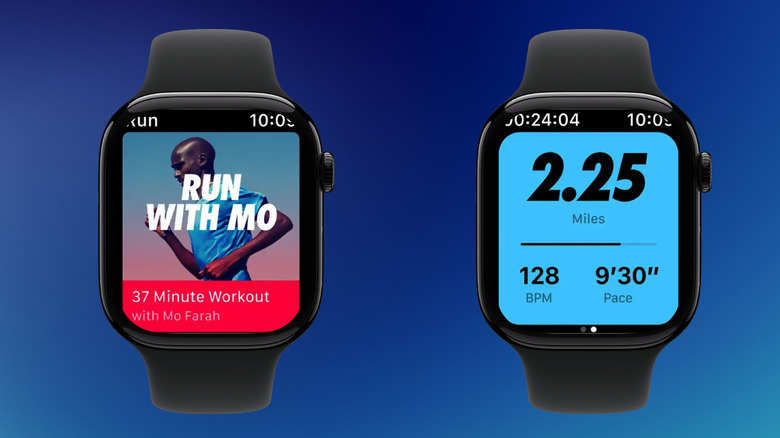
If you're just starting to pick up running or jogging as a hobby or a workout, what you need is a simple app with coaching you can trust. And that is what Nike Run Club offers. The Apple Watch app is native, designed for iOS and Android, and features the bold design language that Nike is famous for. In fact, Apple and Nike have a long history of collaboration, and you'll find some specially designed watch faces from Nike on your Apple Watch.
The Nike Run Club specializes in guided runs. You can choose beginner-friendly runs or start training for a marathon with audio-guided runs. The app will give you helpful tips to improve your runs in real time, based on data collected by the Apple Watch. You can also sign up for challenges designed to motivate you to get moving and connect with the community through friendly competition. Nike Run Club's workout screen gives you all the important details at a glance. You can follow your heart rate, running pace, and cadence at any time. If you would rather not follow a set program, you can just start a one-off guided run from Nike's library.
The Nike Run Club is completely free to use. There are no subscriptions or upgrades here. The running community seems to adore the app as well. Nike Run Club has over 412,000 ratings on the App Store, with an average of 4.8 stars. The app has also received an Editor's Choice award.
WorkOutDoors
The built-in Workouts app on the Apple Watch is quite capable, offering many fitness tracking options for running, biking, and hiking workouts. But you can't really customize it to your needs. Sure, you can swap out one metric for another, but the layout stays the same.
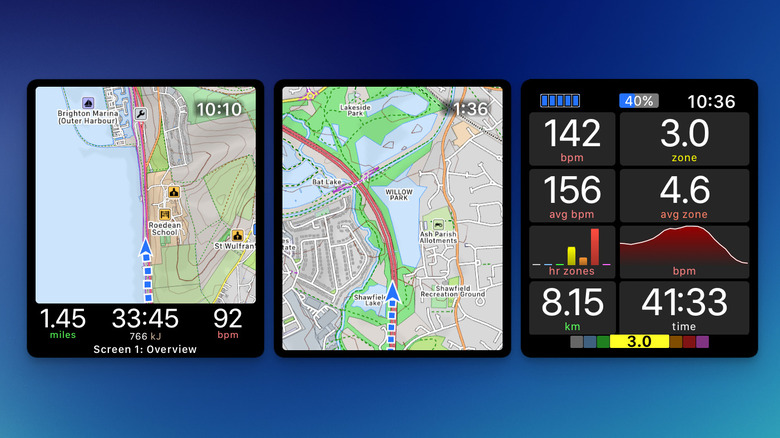
While there is no dearth of fitness apps on the Apple Watch, you may consider upgrading to the WorkOutDoors app. The app can track 42 different types of activities, and there are more than 800 metrics for you to survey on the screen. The app offers a completely customizable interface for working out in the real world, essentially turning the Apple Watch into a data-heavy sports watch. You can put up a nice big map on the workout screen with real-time tracking (there's also support for offline maps).
The best part about the app, though, is the immensely customizable screen options. You can create custom layouts using the WorkOutDoors app on the iPhone. Each workout type (cycling, for example) has multiple preconfigured screens that you can swipe left and right when working out. You can dig deep and change the layout, font size, and metrics for each screen. If you want to see your current pace in big font, well, that is possible here. The app costs $8.99 to buy on the App Store, where WorkOutDoors has over 1,600 ratings averaging 4.7 stars.
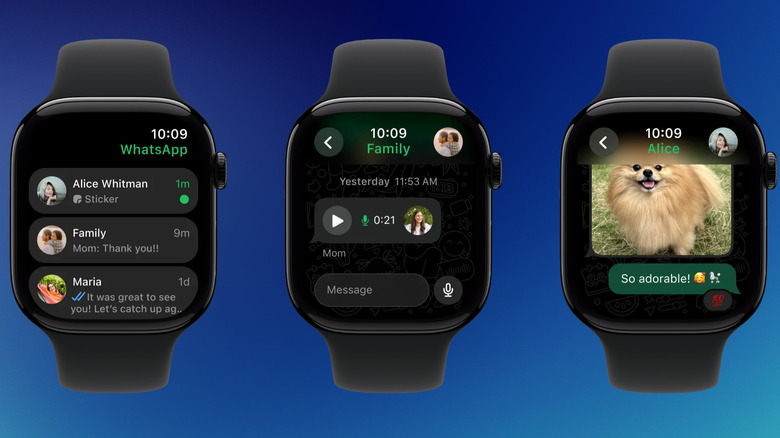
Since the launch of the Apple Watch, the only way to interact with WhatsApp messages was to reply to them from the Notification Center. If you dismissed the notification, the message would disappear from the Watch as well. After years of waiting, WhatsApp finally launched a native app for Apple Watch in November 2025. As long as you have WhatsApp configured on your iPhone, the Watch app will automatically sync all your data.
Now, users can launch the WhatsApp app on the Apple Watch to see all active conversations, with the pinned chat at the top. Tapping a conversation will reveal the full chat with recent messages and images. If you have the latest Apple Watch (anything after the Series 7 or Ultra) with a larger screen, you can also message anyone (or reply to a message) using a full QWERTY keypad. Though it's better to reply using the preconfigured canned messages or using Apple's dictation feature.
You can also skip text altogether and send a voice note instead. You can also receive WhatsApp call notifications on the Apple Watch (no video calls here, though). The Watch app is also limited in a few ways. For instance, you can't view videos in the Watch app, only images. And because WhatsApp on the Apple Watch is linked to the iPhone, your iPhone needs to be connected to use any of the features. WhatsApp is one of the most popular messaging apps on the App Store, with over 18 million ratings, with an average of 4.7 stars.
Spotify
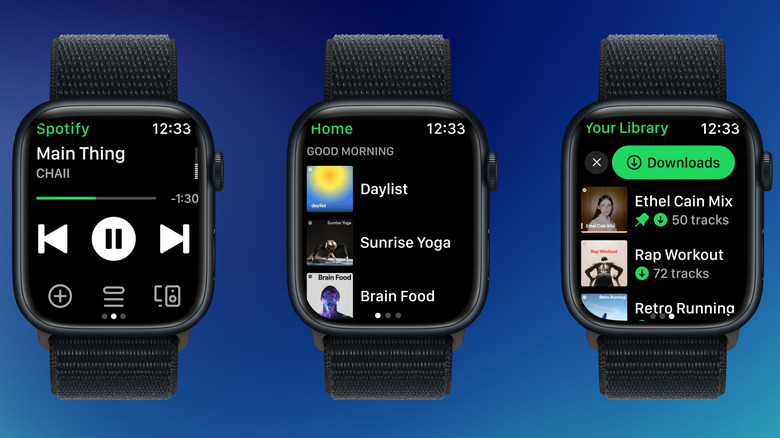
If you use the Spotify app as your preferred music streaming service, the Apple Watch app will make a perfect remote control for Spotify. Anyone with a free Spotify account can control the Spotify app's playback directly from the watch. From the app's home page, you can browse recent playlists and Spotify's suggestions (there's also a search feature), and you can access your entire library on the last page (including podcasts). The playback screen also features Spotify Connect, so you can control playback for any device that's using Spotify (like your computer).
If you're paying for Spotify Premium, you can stream content directly from your Apple Watch, no need for an iPhone (as long as your Apple Watch has a Wi-Fi or cellular connection). The latest Apple Watch models (like SE3, Series 10, Ultra 2, and higher) can play music from the Watch speakers, or you can connect Bluetooth headphones for wireless playback. Premium subscribers can also download music and podcasts for offline playback (up to 100 items for a playlist). You can also like songs, shuffle a playlist, and download tracks right from the playback screen on the Apple Watch. And because Siri works with third-party music apps, you can use Siri to play music and podcasts directly in the Spotify app on the Apple Watch (instead of using the default Music app). Spotify is the most popular app on this list, with a 4.8-star average over 39 million ratings
Pedometer++
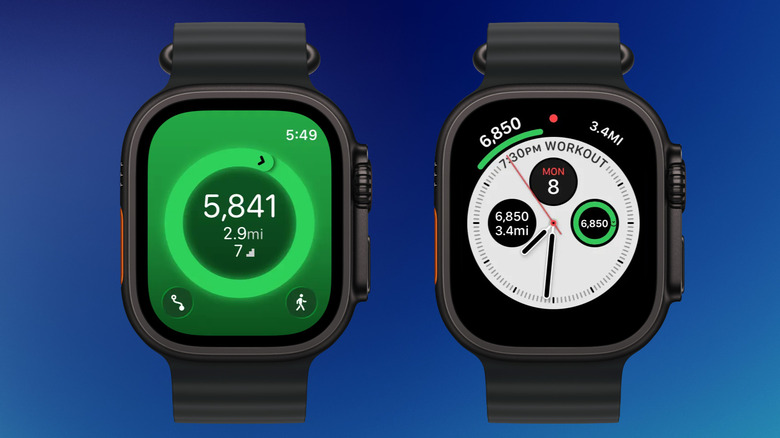
If you're trying to get active, lose weight, or just introduce movement into your day, tracking your steps is a great way to incorporate fitness into your day. The Apple Watch has a capable built-in step counter, but there's no way to view your step count on the watch face. You'll have to open the Activity app and scroll all the way down to the desired information – an oversight considering many budget Fitbit devices and fitness trackers have this as the main feature.
Pedometer++ solves this problem. The app tracks your step count, total distance covered, and number of stairs climbed. The Apple Watch app shows your step count and your progress toward your daily goal. The app is best utilized as a complication on the watch face. This way, you can see your step count and walking distance without opening any app. To add the Pedometer++ complication, press and hold on a watch face, tap the Edit button, swipe over to the Complications tab, go to the Pedometer++ app section, and choose a complication that you like.
The app also has a Badges system with a unique monthly challenge badge and awards for longest streaks. You can set a daily walking goal from the iPhone app and track your streaks. Streaks won't break if you miss one day a week (after six continuous days of reaching your goal). Pedometer++ also offers a Premium subscription for $3.99 per month or $29.99 per year, which adds the Maps feature to the Apple Watch and Live Activities support on the iPhone lock screen. Pedometer++ is quite popular among fitness enthusiasts, with 172K ratings on the App Store and an average of 4.8 stars.
Bevel
The Apple Watch collects a lot of data as you go about your day. It records your sleep stages, your average resting heart rate, how much you moved, your vitals during your workouts, and even your blood oxygen levels and wrist temperature. You can find all this data in the Apple Health app, but only as independent data.
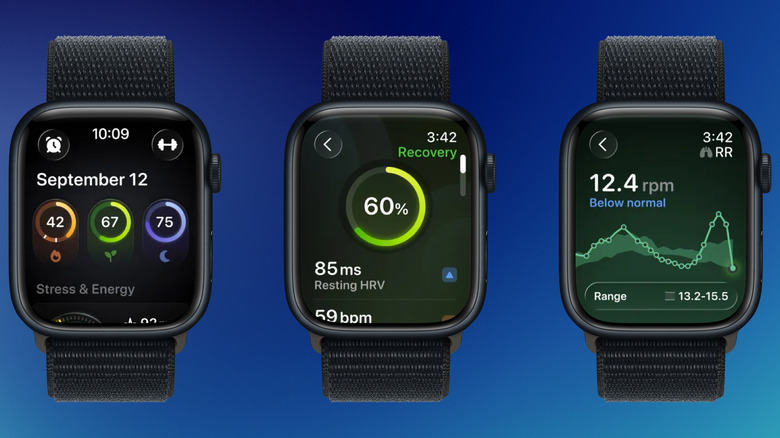
There's no way to bring them all together to glean insights into your overall health, show your fitness trends over time, and provide insights into your health metrics that are easy to miss. Should you take it easy today? Should you strain yourself and go for a more intensive workout? This is where Bevel comes in. The app collects all the data from your Apple Watch and shows you an overall health score (considering your recovery), making it a great free alternative to the Whoop band. The Apple Watch app also has a smart alarm, which can wake you up when you're in a light sleep cycle.
When you open the app, Bevel gives you three scores: Strain, Recovery, and Sleep. The Strain score tells you the target for the day based on your workouts and movements. Recovery combines multiple stats, such as your sleep, heart rate variability, and resting heart rate, to give you a readiness score. The Sleep Score measured the quality of your sleep, including the time you were awake, and the time spent in different sleep stages. The basic Bevel app with scores and nutrition tracking is free. To add the AI-assisted Intelligence feature, you'll need to upgrade to Bevel Pro for $5.99 per month or $49.99 per year. Bevel has over 7,500 ratings on the App Store, averaging 4.8 stars.
Waterllama
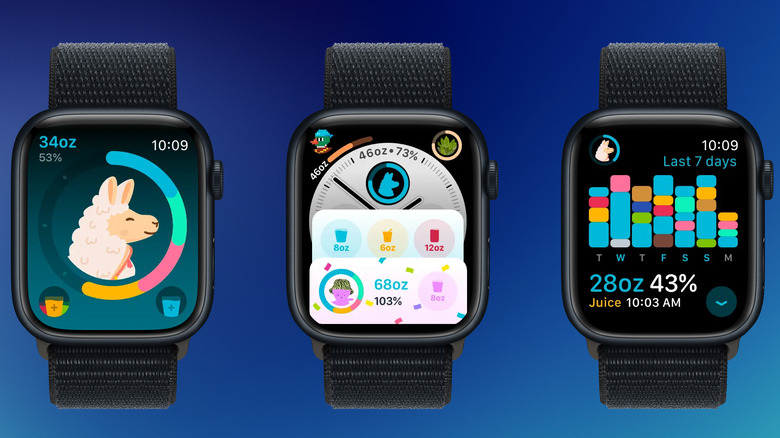
If you're the kind of person who forgets to drink water until you're dehydrated, a dedicated water tracker and reminder app will help. If it's a cute llama, it might help a bit more. The Waterllama app for Apple Watch offers a quick and easy way to log your hydration. And it's not just water; Premium users can track things like coffee, tea, energy drinks, and custom drinks.
You can set a hydration goal for the day when you first set up the app. Then, the Watch app will get to work. You'll get notifications throughout the day to remind you to stay hydrated. You can log your water intake (like an 8 oz cup) right from the notification reply options. The Apple Watch app shows a circle with your daily goal. There's an option to quickly add your water intake as well. Each day you reach your goal, you add one more day to your streak. You can also see a seven-day history of your water tracking on the Apple Watch.
Premium users can also take part in unique challenges and unlock over 100 cute characters as daily goal achievements. Waterllama's free plan, though, is enough for most users, as it includes basic water tracking and smart reminder notifications. Waterllama is also quite popular on the App Store. It won the App Store Award in 2022 and has over 150,000 ratings, averaging 4.9 stars.
Cheatsheet
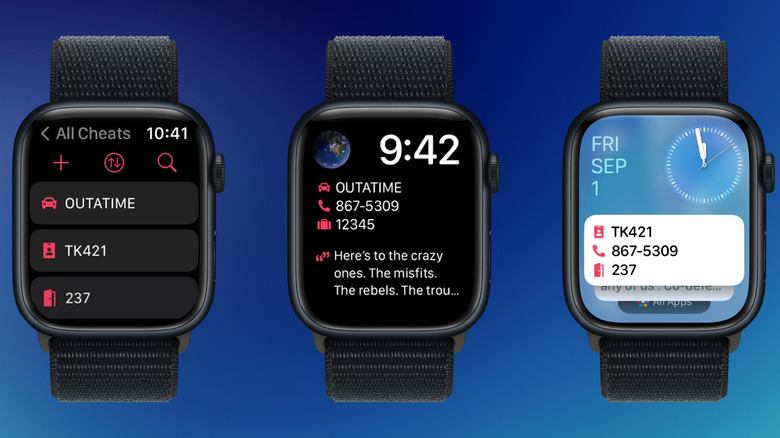
There are things that are just easy to forget. The phone number for your office, ID number for your college, ticket codes for a movie, locker numbers, or a one-time password for an upcoming delivery. Instead of crowding your dedicated notetaking app, you can add these to the Cheatsheet app. Cheatsheet is a micronotes app for all Apple platforms, but it really shines on the Apple Watch, with a fully functional Watch app for adding and editing notes.
You can create small notes for things you usually forget and view them directly on the watch face, or as a widget. Pair it with an emoji icon (there are more than 200 options), and it becomes easy to view multiple short notes from the same Apple Watch widget. The Pro version removes all note limits and lets you sync your notes across your Apple devices via iCloud. The Cheatsheet app has over 1,800 ratings on the App Store, averaging 4.7 stars.
Zenitizer
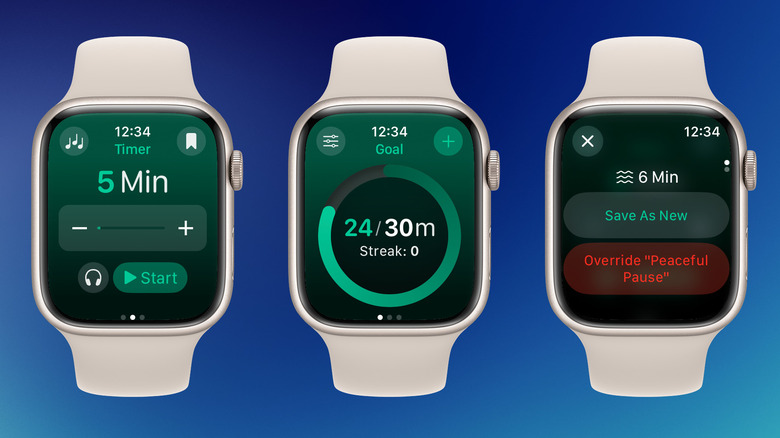
There are plenty of meditation apps on the App Store, many of which offer structured programs and guided meditations. But once you've got the hang of mindfulness meditation, all you really need is an app to keep track of your meditation sessions. And that is what Zenitizer does best. You choose a timer, a bell sound, and background music if you wish, and you start the meditation. Once the time is up, you'll hear a bell, and the app will log your meditation time and sync it with Apple Health.
Zenitizer shines especially on the Apple Watch, providing a native meditation timer that's fast and easy to use. Plus, if you have an Apple Watch with speakers, the app can use the Watch speaker for bell sounds and background music. Everything from the bell sound to interval bells and the background music is customizable. This allows you to meditate in peace, away from the distractions of your iPhone. You can set a daily meditation goal, and the app will send you notifications to help you complete it. Each day you finish your goal adds to your daily streak. Meditation can help you relax and reduce stress over time. Building a daily streak can prove beneficial for practitioners.
The core functionality of the app is available for free, but you can upgrade to Zenitizer+ ($2.99 per month, or $19.99 per year) to create custom routines, unlock background sounds, and fully customize preparation and interval bells. Zenitizer has over 190 ratings on the App Store with an average of 4.8 stars.
Methodology
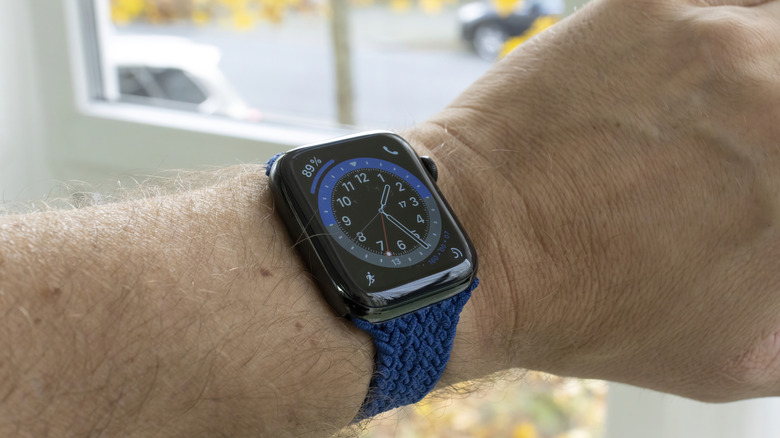
To build this list, we focused on apps that deliver a genuinely useful experience on the wrist, not just shrunken iPhone apps. The final list was prepared after personal testing (the author has used the Apple Watch since the first Series 0 release) and feedback from r/AppleWatch on Reddit and reputable software review sites.
Every app here holds a 4.6-star rating or higher on the App Store, and we considered a mix of pricing models: You'll find one-time purchases, free apps, and a few subscriptions, but only where the Watch-specific value clearly justifies the cost.