

What The Orange Light Means On Your AirPods Case

One of the Apple AirPods case's most convenient features is its status light. This tiny LED indicator gives you an at-a-glance breakdown of how much battery your white-stemmed earbuds and charging case have left. Fortunately, there's not a dizzying amount of color codes to decipher — just green and amber. Green means your AirPods, charging case, or both are fully charged, and amber is what you'll see when either your AirPods or charging case has less than one full charge remaining.
When your AirPods are in the case with the lid opened, the status light shows the charge status of the buds. You can check your case's charge status by removing your AirPods; the status light will then reflect the case's battery level. You can also see how much battery your AirPods and case have left on an iPhone, iPad, or Mac (one of several tips and tricks Apple never told you about), but Apple's inclusion of a simple LED is a convenient on-device tell.
Checking the status light is just one way to stay on top of your AirPods battery life
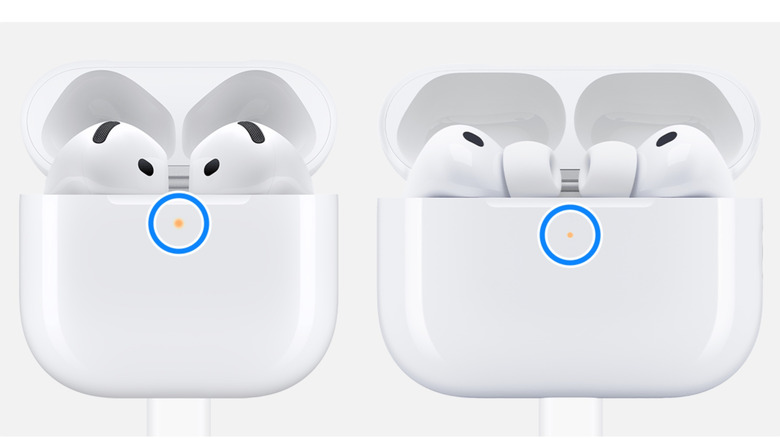
Recent Apple firmware for the AirPods 4, AirPods Pro 2, and AirPods Pro 3 includes a new indicator. If the status light slowly pulses amber, it means that your AirPods or charging case have less than 95% battery remaining. When the amber light flashes repeatedly, it means that your AirPods have less than 95% battery remaining, and your charging case has less than 25% battery.
If you feel like your AirPods always die before it's charging time, it might be in your best interest to enable charging notifications (we'd also recommend one of these Consumer Reports-approved portable chargers). You can turn on charging reminders for AirPods Pro 2 and Pro 3, as well as the AirPods 4 (ANC). Just pop your AirPods in your ears, grab your iPhone or iPad, and tap Settings > your AirPods > Battery, then turn on Charging Notifications. If you've owned a pair of AirPods for quite some time, we urge you to keep updating them as long as Apple continues to provide new firmware; you never know what new AirPods features and settings the company might add.