

This $3 USB Gadget Can Make Your Old Laptop Run Like New
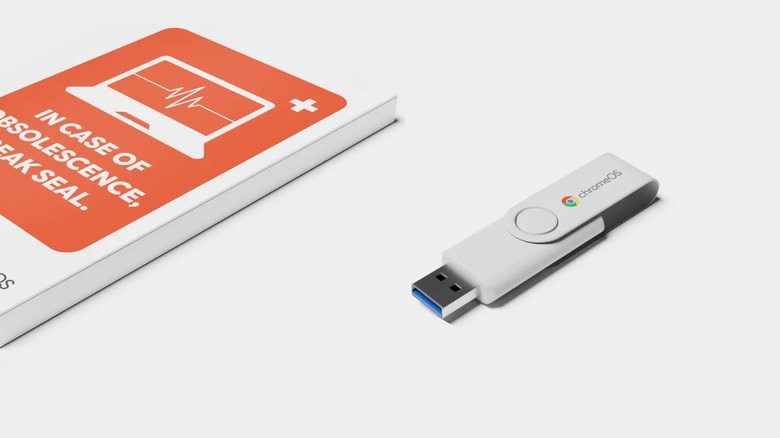
Installing a Linux distro is a great way to breathe new life into an older laptop, but there are a ton of options to choose from, and someone not well-versed with the ecosystem might end up feeling overwhelmed. Google has partnered with a company called Back Market to provide a solid alternative — it's a ChromeOS Flex USB kit that allows you to transform an old or aging laptop into a more stable machine.
Google and Back Market's ChromeOS Flex USB key is only $3 brand new, with no subscriptions or additional purchases needed. It's a pre-loaded USB stick that makes it easy to install ChromeOS Flex on most computers with an Intel or AMD processor. There are some subtle differences between ChromeOS Flex and the version of ChromeOS that you'd find on a Chromebook, but for the most part, this little USB stick can essentially turn your aging laptop into a less resource-heavy ChromeOS machine. Simply put, ChromeOS Flex is a free operating system from Google that can breathe new life into your old laptop as a DIY solution.
If you have no idea what any of this means and this is your first time working with a device like this, don't worry. The USB kit comes with simplified guides and video tutorials to walk you through everything. Google says it will "demystify the installation process." Do note that your laptop must be a compatible model — Google maintains a full list of available models that you can reference. Many popular brands are on the list such as Acer, Apple, Asus, Dell, HP, Lenovo, and Samsung. But for only $3, you really can't beat having one of these handy when you want to bring an old laptop back to life effortlessly.
What can you actually do with ChromeOS Flex?
ChromeOS Flex works with a wide variety of devices — in fact, installing the lightweight OS can be a clever way to get more use from your old MacBook. So you're not confined to Windows- or Linux-based devices, though ChromeOS itself is based on Linux. And there are many ways to install the operating system beyond the Back Market USB — you can make your own USB drive if you know how, or even mass-deploy the OS commercially if you're running an enterprise or business.
The reason why it runs well on older machines is that it's much less resource-intensive than something like Windows or macOS. It doesn't need a stronger processor or extra RAM to run well. That results in a more responsive, snappier experience on aging laptops that are no longer supported by their manufacturers or other software operators like Microsoft — which is especially relevant after Microsoft officially discontinued Windows 10 support in October 2025. ChromeOS Flex will run on many machines, including those that previously ran Windows 10, and it still gets security updates regularly.
Once installed, ChromeOS gives you access to many Google services, like Google's office suite, the full Google Chrome browser, and other ChromeOS-supported apps. The biggest difference between ChromeOS Flex and regular ChromeOS is that Flex will not run Android apps via Google Play natively. There are workarounds for Android apps, but it's not supported out of the box except for a limited selection of VPN apps. Overall, it's a snappy, easy-to-use operating system to keep your old laptop ready to browse in the modern age.