

7 Cool Things The Google Translate App Can Do
In the biblical story of the tower of Babel, humanity is cursed with myriad languages making it hard to communicate and cooperate. But, in the utopian sci-fi world of "Star Trek," there's a Universal Translator that ensures everyone can be understood, even if they're alien species. While we certainly haven't reached the level of the Universal Translator, we're far closer to the "Star Trek" scenario than we are to Babel thanks to Google Translate. Google Translate just turned 20 years old, and it's arguably the best-known translation service available to us right now.
In the early days, it used a method known as "statistical machine translation," but in 2016, Google switched over to an advanced neural machine translation model, not unlike the AI chatbots of today. While its translations in those early days were hilariously clunky, today it's an amazing, powerful tool that can bridge the gap between your understanding and a foreign language, but it's more than just a simple translation tool. Google Translate is capable of some very impressive, and here are some very cool things you might not know about this translator.
Instant camera translation

Using the keypad or microphone are well-known methods for translating text, but did you know that you can also use your phone's camera? If you tap the camera button in Google Translate, it will use Google Lens to instantly translate anything you point it at. For example, here we pointed it at the photo above showing a bicycle sign, and below you can see how the app translates the sign's text, indicating it's for a bicycle parking lot.
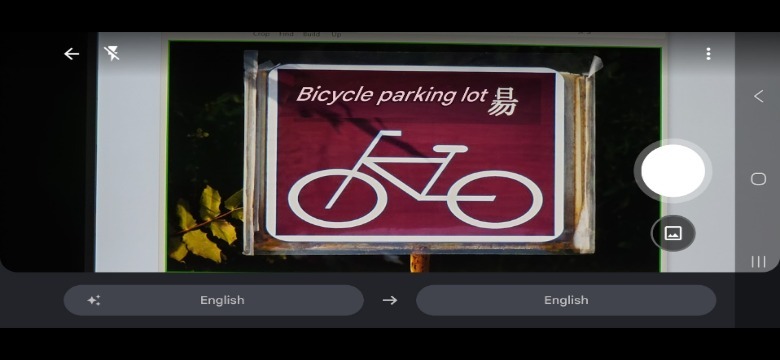
This feature is especially helpful when you're traveling in an area where much of the information comes from visual elements in the environment. This includes street signs, as mentioned above, but it also works for information in store windows, the news ticker on a TV, and even restaurant menus that have no pictures for you to point at. It's handy in instances where you need to understand what sign or document says in the real world. As always, just be aware that some translations might be somewhat literal, which means the exact meaning can be lost.
Conversation mode let's you talk to anyone

To really experience fictional "Star Trek" Universal Translator experience, you need some way to have a translation happen in natural conversation. If you use the conversation mode for Google Translate, you and another person can have a conversation without taking turns, changing settings, or tapping the microphone button. In conversation mode the app listens and automatically figures out who is speaking and in what language. The translation then shows up in both languages so each person can understand what the other is saying. For the moment, this is limited to a conversation between two people at a time.
While you're in conversation mode, you can tap the little speech bubble icon to the left of the settings gear icon to create a "face-to-face" layout. This splits the screen in two segments, and you can put the phone down on a table or hold it flat between the two of you. Using this feature allows each person to see the translation as it happens on their side of the phone.
Offline translation

The Google Translate app is most useful when traveling, but the one thing about visiting places all over the world is that internet connectivity isn't guaranteed. Many travel destinations don't have mobile data coverage, or at least not full coverage. Transport like subways, trains, airplanes, and so on are also often without any sort of internet connection. That's a problem because you most likely still want to converse with people or translate signs in these remote places or while in a vehicle.
The good news is that you can download languages to your phone by just tapping the little download icon next to the language. If you don't see that icon, it means that the language in question isn't yet available to download. Once a language is downloaded you can perform translation offline, and some languages will work with camera mode offline too. You don't have to rely on Wi-Fi to make the download either. Google Translate supports downloading language packs using mobile data, so if you realize at the last minute that you're going somewhere with no coverage, you can download required languages before entering the dead zone.
Hear the correct pronunciatons of words

Google Translate has become more than a tool to translate languages for you; In fact, it might be time for us to add Google Translate to our list of language learning apps you should be using. There are several features built into the app that help you learn a language as you go. When you enter text for the app to translate, you'll see a little speaker icon next to the words in both languages. If you tap on those words, you can hear the pronunciation of that word in its native accent. So, if you're unsure about how a word should be pronounced, you can effectively use Google Translate as a lookup tool for words and phrases.
It also means you can communicate with someone who can't see or read your screen for any reason. The pronunciation of the words is also shown in phonetic script, making it even easier to confidently speak the work properly. Now there's no reason to mispronounce your favorite drink at a bar or your favorite dish at a restaurant.
Practice conversations

Since we're on the topic of learning a language, you might be aware that one of the most important factors in becoming fluent is to practice speaking and listening in your target language. That's easier said than done, however, because most of us don't have access to native speakers with whom to practice. The good news is that Google added a great new feature to its translation app that could help you progress rapidly. As of this writing, the feature is still in beta testing, but you can do personalized conversation in supported languages, which currently includes English, French, German, Portuguese, and Spanish.
You can set specific goals (such as learning to understand TV shows or ordering food) and difficulty levels to customize your experience. After doing so, you can do listening exercises where you need to pick out the words you hear, or you can practice holding the conversation yourself. This is something you can also do with ChatGPT to speed up your language learning, but the advanced voice mode in ChatGPT is limited for free users. Likewise, AI conversations on Duolingo are limited to the highest Max tier. Google Translate conversation practice is free and unlimited, and it has plenty of features to motivate you and keep track of your progress.
Transcribe language in real time

Manual transcription is an awful, tedious job — just ask any graduate student who gets the job of jotting down hours of recorded files Now add transcribing and translating to the list and it's a recipe for frustration. When the transcription feature came to Google Translate in 2020, we called it one of Google's best inventions, but we noted that it wasn't quite perfect as it needed a quiet environment.
Fast-forward to the present day and the transcription function works better than ever. It's amazing what just a few short years of development can achieve. When you start a translation by tapping the mic icon after selecting your language pair, you'll see a "transcribe" button. Tap that, and you can translate any continuous speech, which is useful when you're listening to a speech or watching something on TV. Basically, if you don't need to talk back to the speaker, or you want to make a long continuous translation if your own speech, this is the feature for you.
Even better, as you'd expect from a feature called "transcribe", you can save the transcription as text once you're done. Just tap the little star icon. Later you can find those transcripts under Menu > Saved Transcripts.
Live translation straight from Star Trek
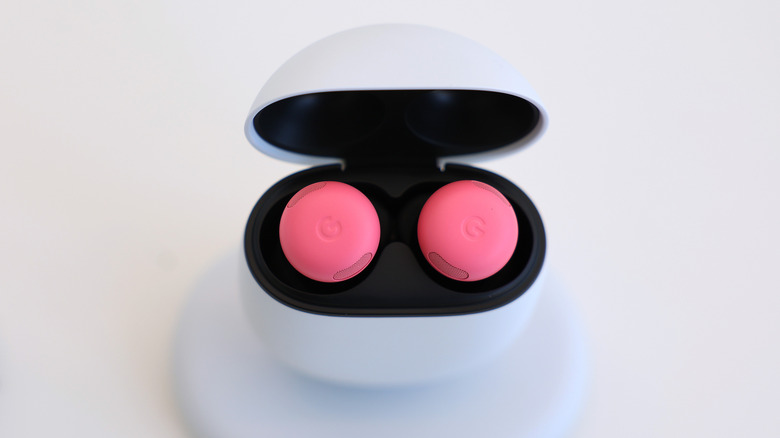
Remember how we wished that we could have that Universal Translator from "Star Trek" earlier? Well, the last cool thing you can do with Google Translate is about as close as anyone's come to that dream, thanks to the Live Translate function. This is one of the first truly impressive ways we've seen that Google Gemini can help travelers, and, while this real-time translator was originally only available to users via any wireless earphones, it no longer has that restriction.
The live translation feature has several modes, allowing you to customize it. In listening mode, you do need headphones, but it's perfect when you just want to sit and listen to someone speak. In conversation mode (without headphones), things play out loud and translation goes both ways. Live translation is currently limited to Bangladesh, France, Germany, India, Italy, Japan, Mexico, Nigeria, Spain, Thailand, the United Kingdom, and the United States. If you are outside of these regions, you won't see the Live Translate button.