

Spotify Now Lets You Disable Video Content — Here's How
Are you sick of pressing play on a Spotify song, only for your senses to be overwhelmed by a music video you didn't ask for? You're not alone — and Spotify is finally doing something to give you control over video content. In fact, this change comes in the wake of a survey that revealed that 93% of Spotify users want features that give them more control. The company took this as its cue to add a series of toggles that you can use to turn off video content entirely.
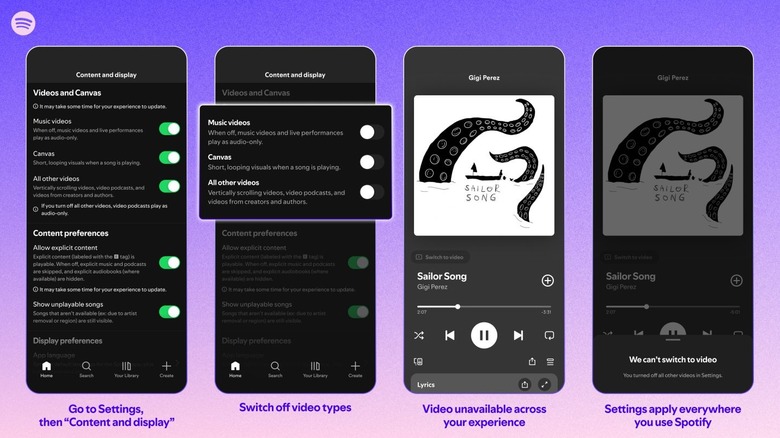
Here's how to disable videos in Spotify: In the mobile app, navigate to Settings and Privacy > Content and Display. This brings you to a screen where you'll see a section labeled "Videos and Canvas." Here, you can toggle off music videos, canvas (the short video loops that accompany certain songs), and "other videos" from podcasts and other content creators. Spotify notes that video advertisements cannot be turned off.
These toggles are located in a slightly different place on the desktop version of Spotify. In the PC app, simply navigate to the Settings menu and scroll down to the "Videos and Canvas" section to find the three different video toggles. These are settings that you might never find unless you specifically know to look for them, so now they fall among those hidden Spotify features that can make your playlists better and more suited to your preferences.
Why did it take so long for Spotify to add video toggles?
When Spotify made its big push into video content, media outlets saw it as an effort to compete against YouTube. As a platform already known for music and podcasts, it made sense to appeal to people who were turning to YouTube to get a visual element alongside those types of content. This would explain why videos weren't optional until now; Spotify really wanted people to see the platform as an alternative to the likes of YouTube and TikTok.
However, Spotify's video efforts faced difficulties from the start. In a blog post for Amplifi Media, CEO Steven Goldstein shared insights from the NYU Business of Podcasting class that he teaches. The students of that class, whom Goldstein considers to represent "Spotify's core Gen Z audience," indicated that they would rather watch a video on YouTube and use Spotify's audio-only content for multitasking. Couple these points with uncomfortable truths about Spotify's payment and AI issues, and it's clear that many people don't feel motivated to use the platform any more than they feel they have to.
Interestingly, Spotify's decision to allow users to turn off videos coincides with the introduction of free fitness videos for Spotify Premium users. This likely means that Spotify has not given up on video content entirely. Rather, the company might be hoping to garner goodwill from its loyal user base by giving them control over their experience, while presenting video content as an added value rather than a mandatory part of the platform.