

Google's AI-Powered 'Magic Pointer' Is Its Latest Feature In A Frustrating Trend
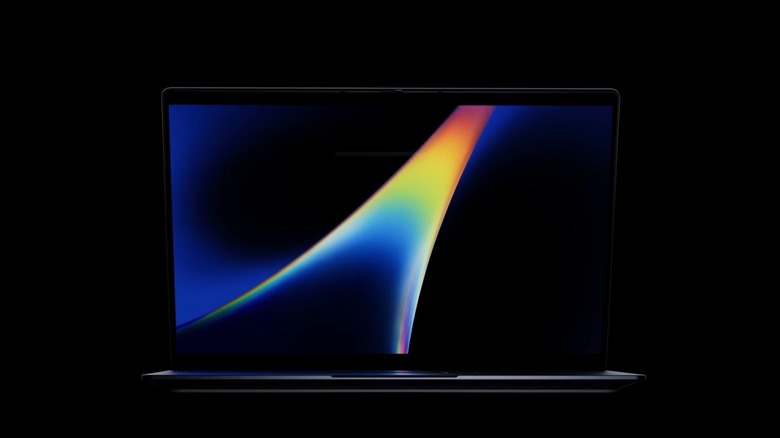
Google is expected to unveil several new Gemini AI features at the Google I/O event in mid-May 2026, but the company already shared AI innovations a week earlier, hosting the I/O 2026 Edition of "The Android Show" on YouTube to announce new Android 17 features and the Android-based Googlebook laptops that will replace Chromebooks. The AluminiumOS laptop makeover was already expected, as was the focus on AI.
Indeed, Google said on stage that Googlebooks have been designed for Gemini Intelligence "from the ground up," sharing a few key features that should set these computers apart from Macs and Windows devices, including Magic Pointer and support for creating custom widgets. Magic Pointer is easily one of the best features coming out of Google's pre-I/O event, a reinvention of the cursor for the AI era that may speed up AI workflows. Unfortunately, the AI-driven reinvention of the regular mouse cursor is the latest development in this somewhat annoying trend: Putting AI everywhere on mobile and PC and hoping some of these features work, while also overlooking user privacy concerns.
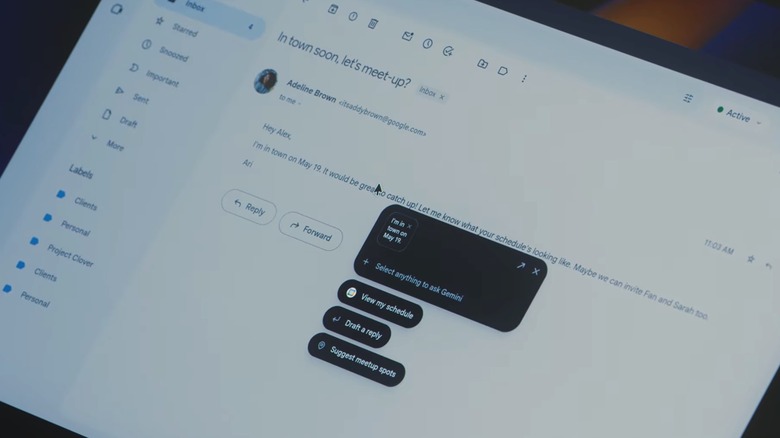
Magic Pointer, based on AI Pointer technology from Google's DeepMind, allows users to interact with AI directly in their workflows, without having to save content and move it to the Gemini app or write a prompt. To invoke the AI where the mouse cursor is, you shake it, at which point Gemini will understand your context, whether you're looking at an image or text, and offer suggestions. The user can still use prompts, and DeepMind's demos show that the AI pointer works with voice inputs. The closest thing to Magic Pointer may be Google's Circle to Search feature on Android smartphones that allows users to perform various AI-powered searches by simply drawing a circle on the display.
Why Magic Pointer is brilliant
Google's announcement of Googlebooks lacked the detail expected for a new product category scheduled to reach stores this year. Google didn't mention any specs for the Googlebook devices coming from various PC makers, and it didn't reveal prices. These are important details considering the competition. The $599 MacBook Neo has been a massive success for Apple this year. At the same time, Microsoft was forced to increase prices for some of its Surface devices. As a reminder, the memory and storage chip shortages, which have been linked to AI demand, are hurting smartphone and laptop vendors.
In this context, Magic Pointer can be a brilliant tool to speed up work on a laptop without requiring hardware resources, like a faster chip and more RAM. That's because a wiggle of the mouse brings up Gemini, which sees what the user sees and understands the context around the cursor. The AI can recognize that you're working with a word processor, that you're looking at images (and what they show), or that you're coding. After that, the AI can offer suggestions and follow your cursor movements to perform actions.
Google's demonstrations included pointing Magic Pointer at an email, which prompted Gemini to suggest actions for Google Calendar, Gmail, and Google Maps. Using the Magic Pointer to select multiple images on the screen informed Gemini that the user may want to visualize the three images together, and when the user clicked on that suggestion, the AI created a text prompt for the task and started generating the image. "In order to do this on today's laptops, you'd have to right-click, save to images, upload to a chatbot, and then prompt," Google said. "Instead, your Googlebook can understand the context and immediately get to work."
Why Magic Pointer is concerning
Google DeepMind's team showed how easy it is to use voice to interact with Gemini while using the AI Pointer feature, without being specific like in text prompts. Vague interactions like "Fix this," or "What does this mean?" would work in human-to-human communication, as people use gestures to point to their surroundings. The technology DeepMind developed for AI Pointer and Magic Pointer works similarly. In one example, the user is pointing to an image containing the name of a train station and a photo showing a place of interest, telling the AI to navigate between the two places. Gemini recognizes both addresses and opens a Google Maps window that shows directions between the two locations. That experience is much faster than performing the steps manually.
But people who worry about their privacy on devices that put AI front and center would be right to question the privacy implications of Magic Pointer. Google has yet to explain what the AI can see when you shake the cursor, and when the data collection starts and stops. Also, Google doesn't say whether any of the Magic Pointer data processing happens on the device, or whether data is sent to the cloud. Finally, Google doesn't explain whether any of this data, which can be sensitive and highly personal, is ever used to train future Gemini models or even improve Magic Pointer.
These are things to keep in mind before using new AI features, no matter how exciting they might be. That said, you won't have to wait for Googlebooks to test Magic Pointer, as a limited version of the functionality works in Gemini in Chrome on Mac and Windows PCs. Users can also test AI Pointer in Google AI Studio.